1 2
5
3
4
SPECIAL FUNCTIONS
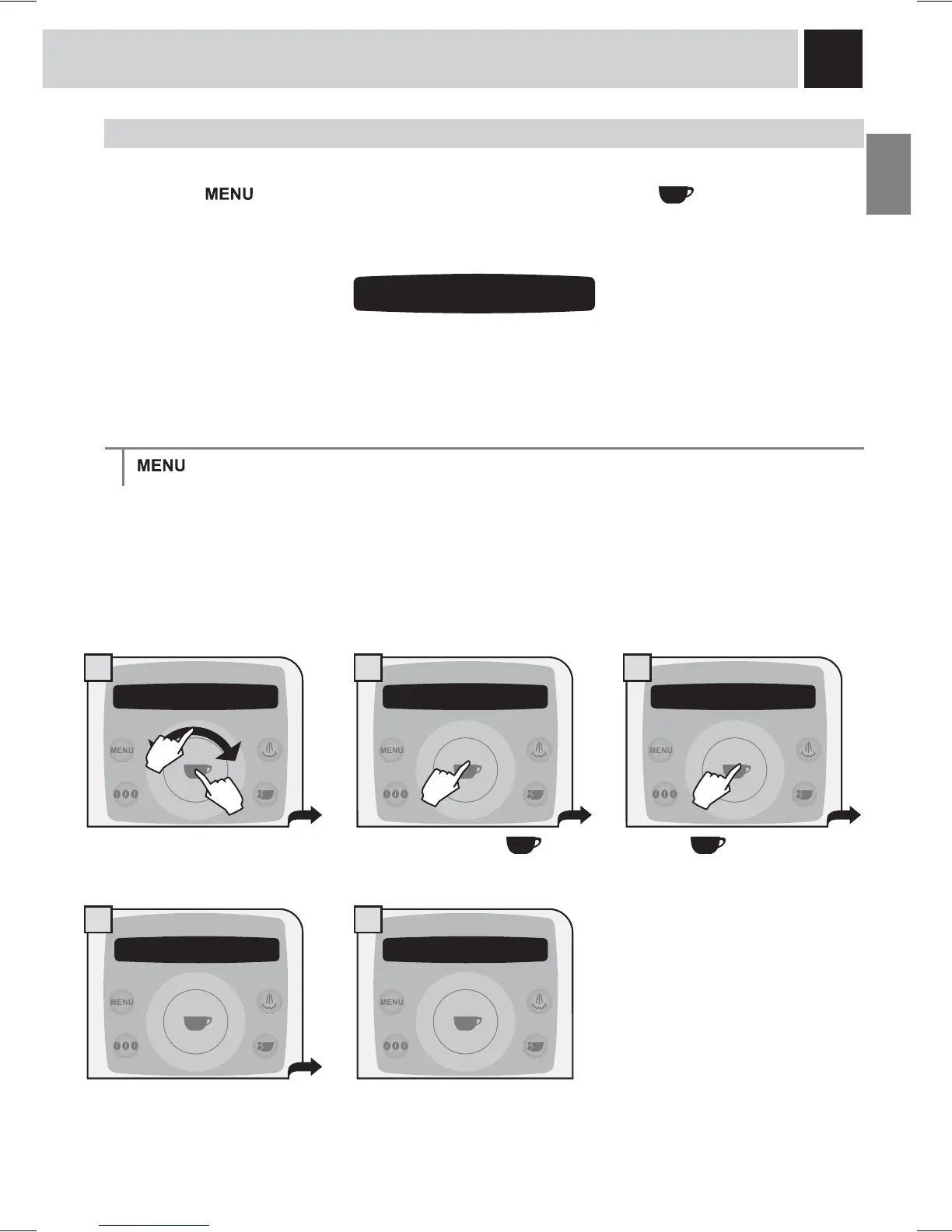
This menu allows you to access special functions present on the machine.
Press the
button to access and select “special function” and press the button. Navigate the
FOLFNZKHHOZLWK\RXU¿QJHUWR
restore the basic machine operating
parameters.
RESTORE SETTINGS
> special function > reset settings
The function for restoring all the factory settings is contained in this menu. This function is particularly
important for restoring the basic parameters.
ALL THE CUSTOM SETTINGS WILL BE LOST AND CANNOT BE RECOVERED. AFTER
RESTORING FACTORY SETTINGS, YOU WILL NEED TO RE-PROGRAM ALL THE MACHINE
FUNCTIONS, IF DESIRED.
Press the button to reset.
The display shows the parameter
UHVHWFRQ¿UPDWLRQ
All parameters have been
restored. Exit programming mode.
Select by pressing the
button.
5 special functions
5.1 reset settings
execute now
reset settings
are you sure?
5 special functionsreset settings
in progress..
5.1 reset settings
execute now
1.
2.







 To Next Page