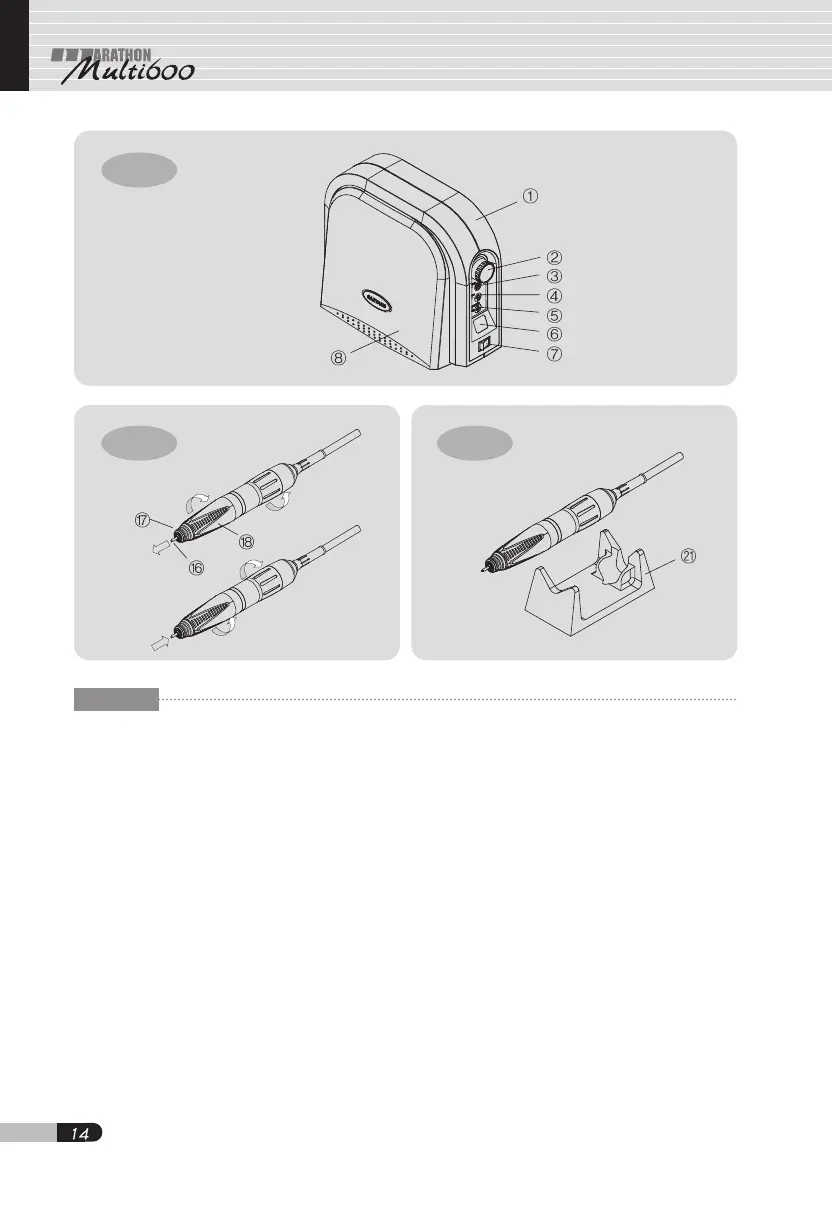
Fig-13
Fig-14 Fig-15
ENG
6. What to do before operation
6.1 Set power switch ⑦ to "0," OFF
position, whenever connecting the
motor handpiece and foot pedal[Fig.
13].
6.2 While the LED of hand/foot selector
switch ③ is off, the motor speed can be
controlled by speed control knob ②
within the limit of
1,000~50,000RPM[Fig. 13].
6.3 When the LED is turned on by pressing
hand/foot selector switch ③, it is
possible to control the speed, using
knee control panel ⑧ and foot pedal ⑮
[Fig. 13].
6.4 The orange-colored LED is turned on
by pressing auto cruise switch ⑤ while
knee control panel ⑧ or foot pedal ⑮ is
in use. When knee control panel ⑧
and foot pedal ⑮ remain at the same
position for 2 seconds, the mode keeps
running at the uniform speed. The auto
cruise mode can be released by
pressing again either knee control panel
⑧ or foot pedal ⑮[Fig. 13].
6.5 The motor speed can be controlled by
knee control panel ⑧ and foot pedal ⑮
within the limit set by speed control
knob ②.
6.6 When the LED of forward/reverse
selector switch ④ is off, the motor is
running counterclockwise[Fig. 13].
6.7 Test bur can be replaced by turning
chuck handle clockwise. After replacing
the test bur or a polishing point, the
chuck handle must be turned
counterclockwise to be securely
held[Fig. 14].


 To Next Page