INTEGRA/-S/-G/-GS User Manual WEB GUI
SAF Tehnika JSC
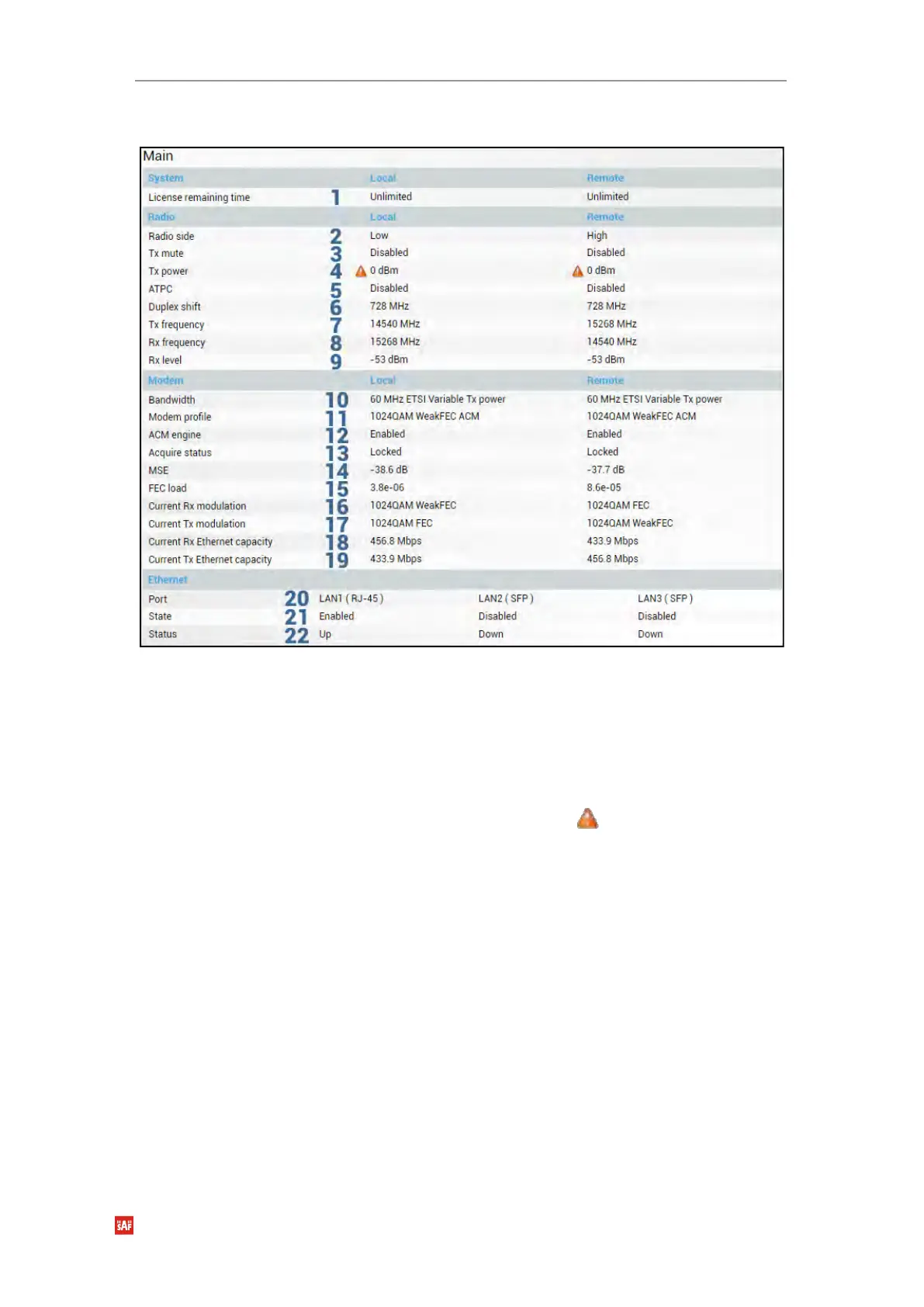
Parameters on Main page
1) License remaining time – shows the amount of time remaining for an active time-
limited license; in case of an unlimited time license, “Unlimited” is being shown.
When the license expires, the modulation will drop to “4QAM FEC Limited”, the link
capacity will drop to 256Kbps and you will see a warning.
2) Radio side – shows the radio side of the local and remote Integra-G.
3) Tx mute – Tx shows if the transmitter is currently muted (“Enabled”) or active
(“Disabled”).
4) Tx power – shows current transmitter power in dBm. will appear if the value is
dynamically changed according to the current ACM modulation. Move the mouse
over for an explanation.
5) ATPC – shows if ATPC is enabled or disabled.
6) Duplex shift – shows the margin between the transmitting and receiving frequencies.
7) Tx frequency – shows the transmitting frequency.
8) Rx frequency – shows the receiving frequency.
9) Rx level – shows the current level of the received signal. It must not differ
significantly from the previously calculated value.
10) Bandwidth – shows the width of currently utilized bandwidth in MHz.
11) Modem profile – Indicates currently configured modulation.
The “FEC” suffix indicates a better sensitivity mode (longer FEC overhead), while
“WeakFEC” indicates a higher capacity mode (shorter FEC overhead).
“WeakFEC” is available only for the highest modulation in the selected channel
bandwidth.
An option with “ACM” (please refer to the chapter Integra-G block diagram
The general internal block diagram of Integra-G is shown below. It has a built-in
Gigabit Ethernet Network Processor that has three LAN ports: LAN1 - 1Gbps PoE-in


 To Next Page
 Loading...
