INTEGRA/-S/-G/-GS User Manual WEB GUI
SAF Tehnika JSC
Modify mode
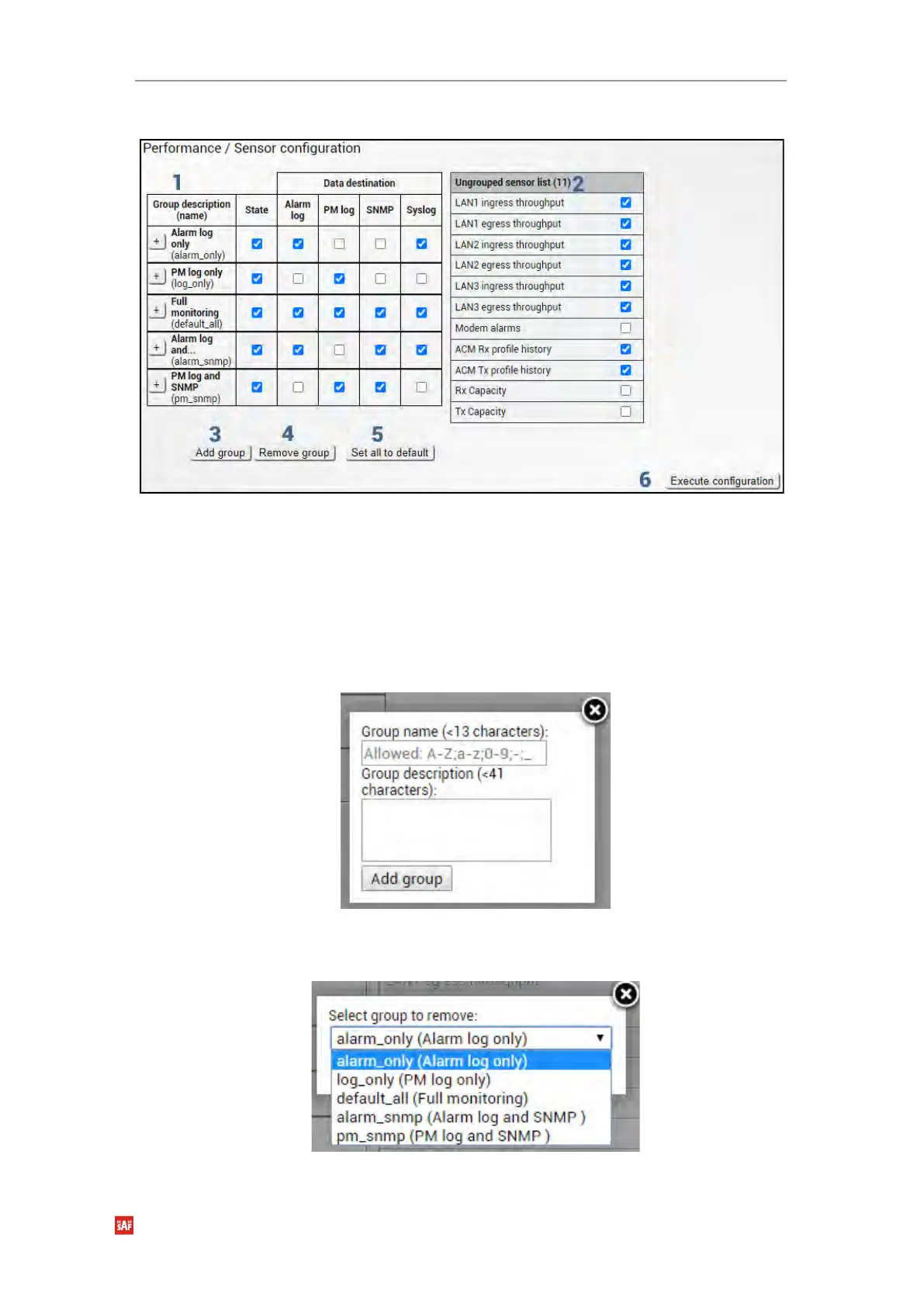
1) Group description (name) – Shows 5 groups of sensors divided by different group
data destinations (event; perf; snmp), as well as indicates whether the group is
enabled (State);
2) Ungrouped sensor list – Shows the list of sensors not added to any of the existing
groups (status mode); allows dragging to any of the existing groups, thus specifying
how the sensor will be treated. Unchecking the checkbox next to the sensor disables
the sensor (modify mode).
3) Add group – Allows creating a new group with a custom name and description.
Afterward, sensors from the ungrouped sensor list or other groups can be added to
the group by dragging them in.
4) Remove group – Allows deleting existing groups via a dialog window.
5) Set all to default – Restores default settings for all groups and sensors.


 To Next Page
 Loading...
