p.12
App Store, iOS
Google play, Android
24
English
ENGLISH
Storing of two different telephone numbers, one to be answered by
P100 code and the other one with voice.
Conguration
example
If at any time you need to start
over, use the factory reset
command *99*1#.
Please refer to the full congu-
ration setup in the “Parameter
list” as these are merely
examples.
1. Startconguration:
0 0
2. P100 ID code:
* 0 1 * 1 2 3 4 5 6 7 8 #
3. 1st phone number:
* 1 1 * 1 2 3 4 5 6 7 8 #
4. 2nd phone number:
* 1 2 * 2 3 4 5 6 7 8 9 #
5. Call type 1st number:
* 2 1 * 0 #
- Example: Answered with P100 code.
6. Call type 2st number:
* 2 2 * 1 # - Example: Answered as voice call.
7. Alarm button delay:
* 8 7 * 0 3 # - Example: 3 seconds delay.
8. Endconguration:
* 0 0 * #
p. 17
CONNECT
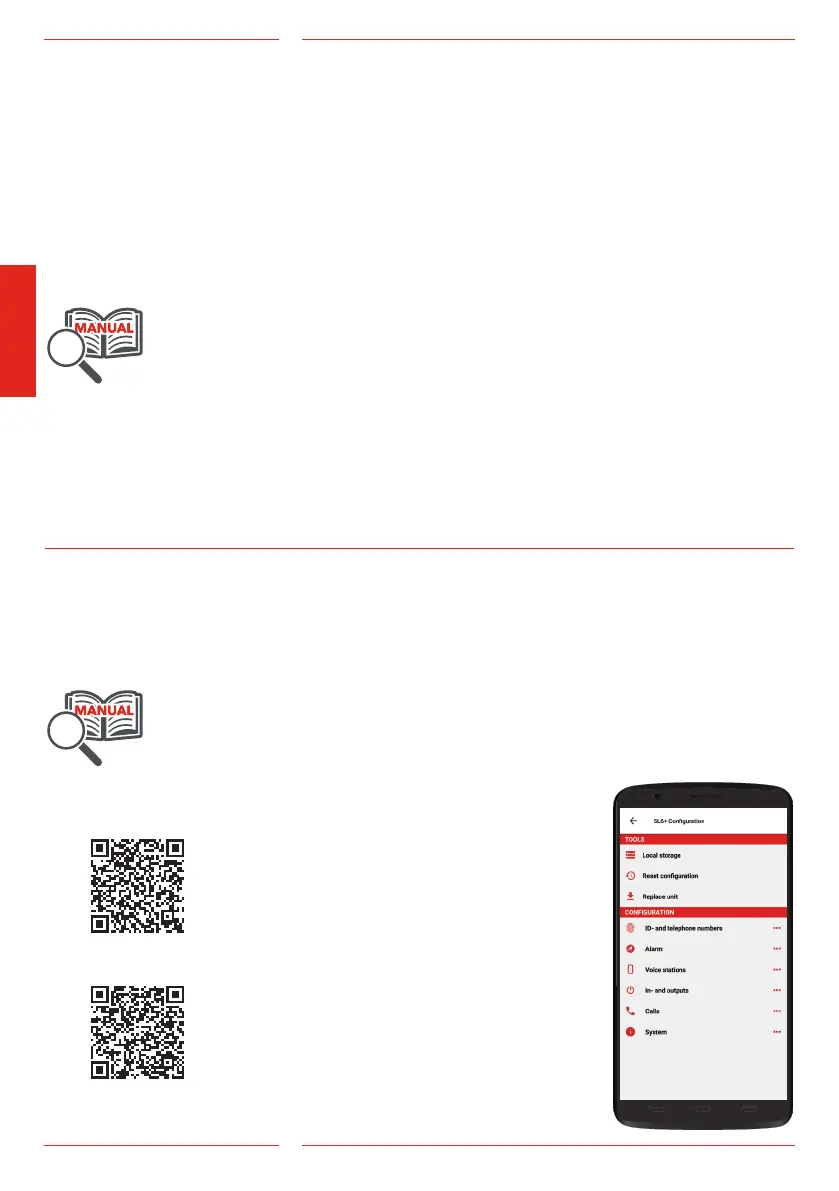
Download SafeLine CONNECT from Google Play or the Apple App
Store. To fully use the app’s features you must register an account.
In the upper corner you can access a menu containing account
information, patch notes and a demo mode. To register an account:
select account and then ”Register new account”. You will then be
redirected to a site where you register your product key.
To access a device it must have a programmed password or have
been restarted within 10 minutes. Every time the device is powered
on, the device’s bluetooth is open for 10 minutes, allowing you to
program a password for the unit. Note:
some devices are quicker than other to
ndthedevicesnearby.Ifthedevice
doesn’t appear on the screen, try waiting
a bit longer.
The SafeLine CONNECT app
is used to congure and
surveil your SafeLine devices.


 To Next Page