8
OPERATING YOUR NEW APPLIANCE
NOTE
Programming a custom grind amount/time
only sets it for that particular brew method.
This will not change the other Shots or
Cups settings.
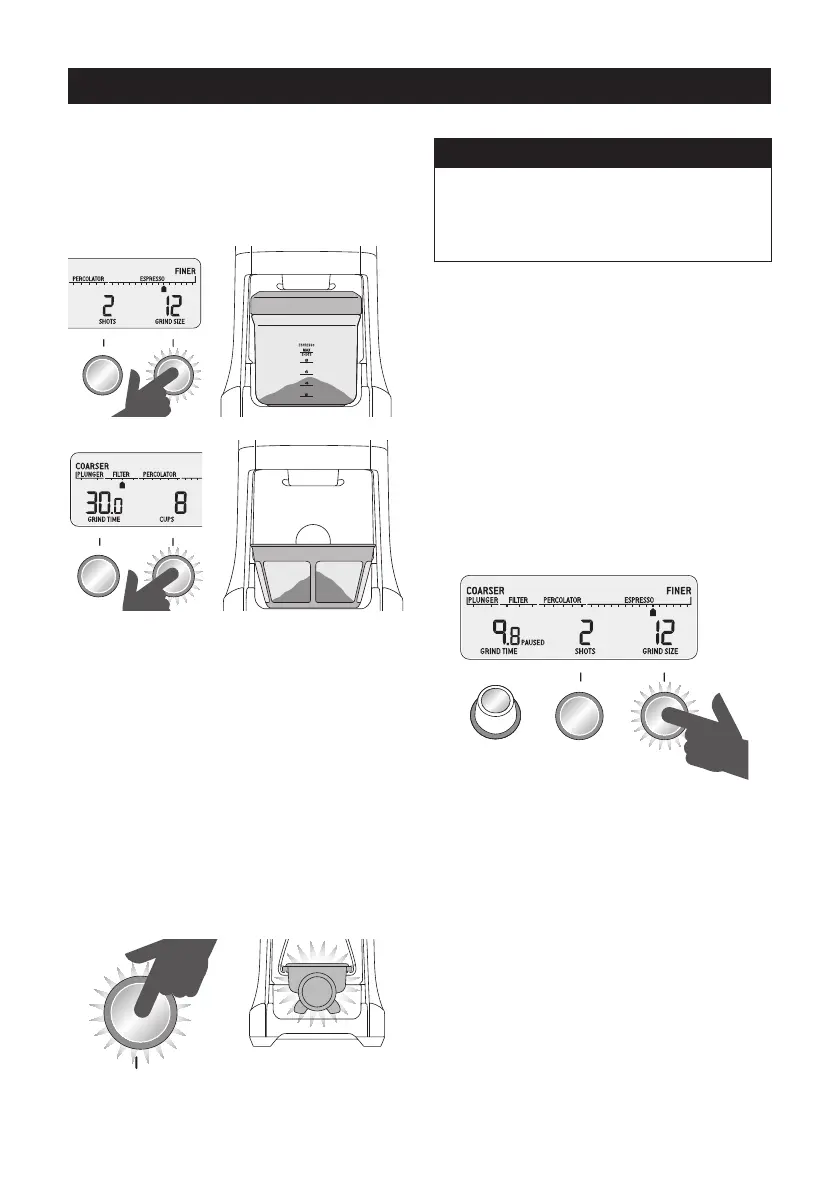
Pause Function
You can pause the grinder during operation
allowing you to collapse or settle the coee
in the portalter.
• Press and release the
START/PAUSE/CANCEL button to start the
grinding operation.
• During grinding, press the
START/PAUSE/CANCEL button again
to pause the operation for 10 seconds.
• Press again within this time to resume grinding
the remaining dose.
START PAUSE
GRIND AMOUNT SHOTS CUPS
CANCELPROGRAM
OPERATING YOUR NEW APPLIANCE
• Select the required amount of ground coee
by pressing the SHOTS/CUPS button.
• Press the START/PAUSE/CANCEL button to
start grinding operation.
START PAUSE
SHOTS CUPS
CANCEL
START PAUSE
SHOTS CUPS
FEATURES OF YOUR SAGE
SMART GRINDER™ PRO
Automatic Grinding
Grinding automatically allows you to grind
hands-free.
• Press and release either the
START/PAUSE/CANCEL button or push
the handle of your portalter once. This will
activate the PORTAFILTER SWITCH.
• Grinding will automatically stop when the
preset amount is dispensed.
START PAUSE PORTAFILTER SWITCH
OR
PUSH



 To Next Page