8
St e p 5:
Se l e c t Y o u r G r i n d Si z e
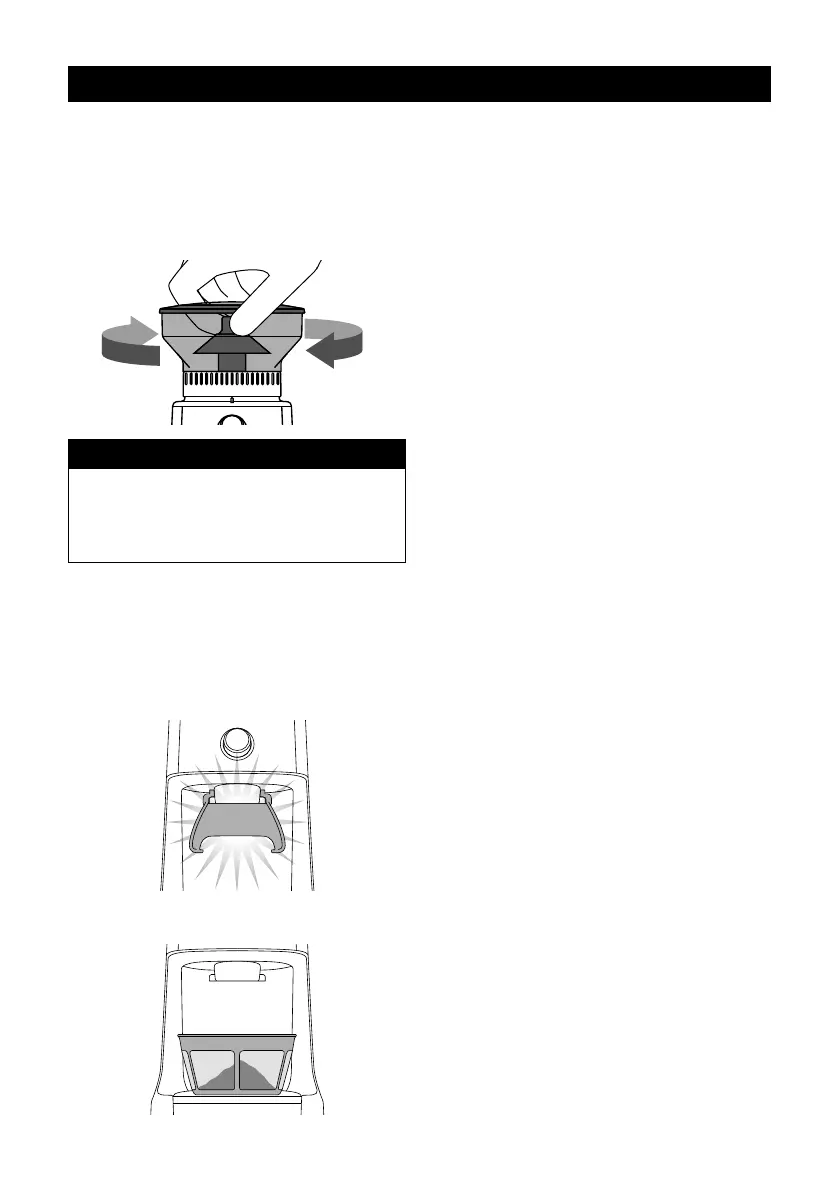
For espresso, we recommend starting with grind
size setting 15 and rotating the Hopper (to adjust
the Grind Size Collar) either coarser or ner.
NOTE
If the Grind Size Collar is tight, run the grinder
by pressing the START / CANCEL button
while turning the Hopper. This will release
co ee grounds caught between the burrs.
G RINDING INT O A G RINDS
CONTAINER OR COFFEE FILTER
St e p 1 :
Remove cradle by sliding out from under the
grind outlet.
PULL
Place your container or co ee lter directly under
grind outlet.
St e p 2 :
Select the required amount of ground co ee
by rotating the GRIND TIME dial.
St e p 3 :
Se l e c t Y o u r G r i n d Si z e
Rotate the Hopper to adjust the Grind Size Collar
until it reaches the required brewing method range.
FEATURES OF Y OUR SA G E
DOSE CONTROL
™
PRO
P a u s e F u n c t i o n
You can pause the grinder during
operation, allowing you to collapse or
settle the co ee in the Porta lter.
• Press the START / CANCEL button to start
the grinding operation.
• During grinding, press the START / CANCEL
button to pause the grinding operation for
up to 10 seconds.
The START / CANCEL button will slowly ash
while paused.
• Press START / CANCEL again within this
time to resume grinding the remaining dose.
Or press and hold the START / CANCEL
button for 1 second to cancel.
Ma n u a l
Grinding manually allows you to have complete
control over how much co ee is dispensed.
• Press and hold the START / CANCEL button
to grind for as long as you require.
• Release START / CANCEL button to
stop grinding.
OPERATING Y OUR NEW APPLIANCE


 To Next Page