4
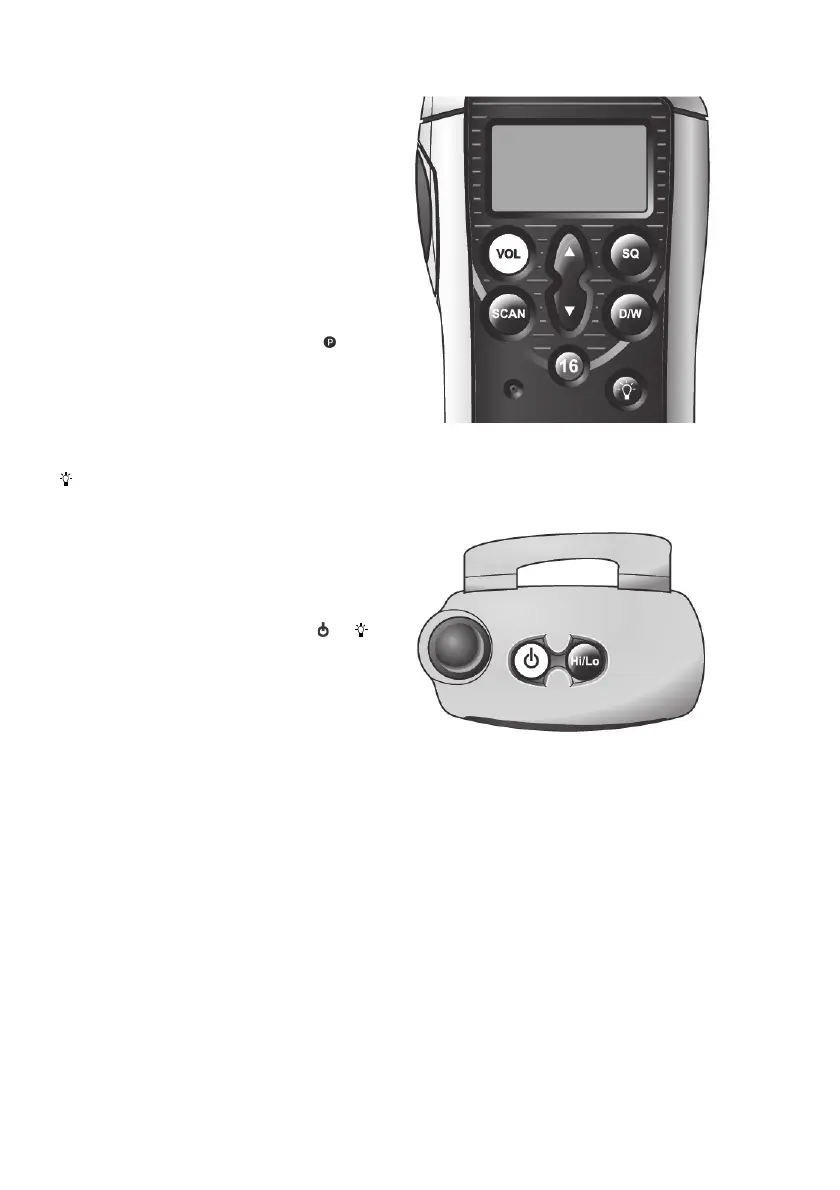
D/W - Dual Watch / Triwatch (9)
Press to select Dual Watch of selected
channel and Ch16. Display shows D/W.
• Press and hold until double beep sounds
for Triwatch - selected channel, personal
channel and Ch16. Display shows T/W.
16 - Channel 16 / Personal Channel (10)
Press to select channel 16.
• Press and hold until double beep to select
personal channel (display shows
)
• Press and hold for three beeps to set
selected channel as the personal
channel.
- Backlight (11)
Press to turn on and off. Use / to adjust
the backlighting level (5 levels available).
The bargraph indicates the backlighting level
selected.
• The battery save function turns off the
backlighting if no key is pressed after 20
seconds. Press any key (except
or )
to turn light on again.
Disable/Enable Key Beep
The radio beeps every time a key is pressed
to confirm operation. To disable key beep,
press and hold SQ while turning the set on.
Repeat this procedure to turn the key beep
on again.
• Second level functions (such as All
Channel Scan, Triwatch etc.) will still be
indicated by a beep, even if the key beep
is disabled.
Keep VOL held down
0438


 To Next Page