9
THE PRODUCT AND KEEP OUT OF REACH OF CHILDREN. IF YOU THINK THE BATTERY HAS
BEEN SWALLOWED OR GOT INTO ANY OF BODY PARTS, CONSULT A DOCTOR IMMEDIATELY!
WARNINGS
• SCREEN CAN BE TOUCHED CAREFULLY, ONLY BY FINGERS! DO NOT PRESS STRONGLY! • Before
starting to use the player, read these instructions carefully, then keep them in an accessible
place for future reference. • Seek professional assistance if necessary to prevent damaging
the unit or motor vehicle! • Depending on the compressed les, the compression program
used, and the quality of the USB/SD storage device, anomalies may occur during playback,
which are not due to the unit malfunctioning. • The playback of copy righted DRM les is not
guaranteed! • It is also possible to connect MP3/MP4 players using a USB cable but avoid
connecting external hard drives this way! • Do not store any additional les on the USB/
SD device other than playable les, because they can slow down or interfere playback. • Do
not connect phones, navigation devices or other equipment to the USB port for purposes of
recharging! • Do not store data storage in the vehicle if it is exposed to freezing or extremely
high temperatures! • While driving, do not do anything that distracts your attention from
driving. Handling the player while driving can result in accidents. • Do not listen to the
player too loud. Set a volume that allows you to hear external sounds while driving. Extreme
volumes can also cause permanent damage to your ears! • Do not disassemble or remake
the player, as that can cause re, accidents, or electric shock. Incorrect use or installation
renders the warranty void. • Only for use in cars with a 12 V battery and a negative ground.
Using the player for any other purpose can result in electric shock, damage, or re. The player
was designed exclusively for use in vehicles! • Always use melting fuses with the proper
values. When replacing a fuse, make sure that the new fuse has the same nominal value as
the one you are replacing. Using a dierent fuse can cause re or damage. • Do not block the
player’s cooling vents, as that can cause its circuits to overheat, resulting in re. Install the
player properly to ensure adequate ventilation. The air vents around the edge must be left
free. • Make sure to connect the player correctly. Incorrect connections can result re or other
defaults. • Prior to wiring/installation, be sure to remove the car battery’s negative terminal
connection! This will prevent any electric shock, short circuit or malfunction. • While
installing the player never cut through cables or damage their insulation. Doing so can
result in short circuit and re! • Before drilling holes or inserting screws into your vehicle’s
body make sure you do not damage tubes or electric wires on the other side of the cover…
• Do not connect to any electric systems of your vehicle that operate steering, brakes, or any
other safety function. Doing so can result in loss of control over the vehicle, and can cause
re. • Do not install the player or its accessories in a location where they can prevent you
from controlling the vehicle safely, e.g., between the steering wheel and the gear shift. •
Make sure that wires do not coil around neighbouring objects. Arrange cables and wires in
a way that does not hinder you in driving. Wires that interfere with your movement or hang
over the gear shift, the brake etc. can be extremely dangerous. (E.g., the connection cable of
a media player connected to the USB port.) • In case of any malfunction, turn of the player
immediately, and consult your distributor. Many malfunctions are very easy to detect (e.g.,
no sound, bad smell, smoke, an external object inside the product etc.). • Make sure that no
external objects get into the USB socket or the memory card slot, as these can cause fatal
damage. • Protect it from dust, damp, liquids, heat, moisture, frost and impact, as well as
direct heat or sunlight! • When leading the connection cables make sure that their insulation
does not get damaged by any sharp metal objects nearby! • Do not connect any cables when
the device is working. Never turn on the system with the volume at the maximum level!
Cracking or other noise impact occurring that time can immediately damage the speakers
irreparably! • The warranty is not applicable to damage caused by irresponsible or improper
installation or use! • Somogyi Elektronic Ltd. certies, that this radio-equipment conforms
to 2014/53/EU directive. Full text of EU Declaration of Conformity is available on the
following link: www.somogyi.hu • Due to continuous improvements, the technical data and
design may change without any prior notice. • We don’t take the responsibility for printing
errors which may occur, and apologize for them.
PRECAUTIONS
CLEANING
Use a soft, dry cloth and a brush for regular cleaning. To remove stronger stains, wet the
cloth slightly with water. Avoid scratching the display’s surface; never wipe the display
when it is dry, and do not use a rough cloth to clean the display. Do not use detergents!
Make sure no liquid gets inside the product or onto the connectors!
TEMPERATURE
Before turning on the player make sure that the temperature inside the car is between 0°C
and +40°C, as the product is only guaranteed to operate properly within this temperature
range. Extreme weather conditions can damage the product.
LOCATION AND INSTALLATION
When installing the product, make sure it will not be exposed to any of the followings:
- direct sunlight or heat (e.g. from the heating system), - moisture, high humidity, - a
signicant amount of dust, - strong vibration
Warning! Manufacturer doesn’t take responsibility for lost or damaged data, even if these data,
etc. have been lost during the use of this product. It is recommended to make a safety copy
about the data, tracks –located on the data storage- to your computer.
INSTALLATION (Only a specialist can install the device!)
• Depending on the vehicle’s design, additional metal straps or other means of
fastening may be required. The manner of installation may dier from the instructions
depending on the vehicle model!
• Connect the unit’s wiring according to the instructions. Inspect the connectors in the
vehicle for suitability according to the wiring instructions in this manual. Make sure
that the connections are properly made and free of short circuits. The speaker wiring
should be conducted properly!
• It is prohibited to connect any of the speaker wires to the vehicle’s or battery’s negative
terminal/grounding point! (e.g. black power cable or metal point on the vehicle)
• In order to protect audio system from external noises:
- Locate the device and lead the cables at least 10 cm far from the car dashboard-
cables.
- Keep the battery power cables as far from any others as you can.
- Grounding cable should be connected securely to a clean surface of the car chassis,
free from paint, dirt and grease.
- Make it as far as possible from the unit, in case of noise reduction connection.
SPEAKER CONNECTIONS
In some cases, increasing the volume will not proportionally increase the bass level. This is
dependent on the number of speakers used and their positioning, moreover, a speaker in
the vehicle may wired not according to the correct polarity.
1. When two front speakers are used:
• Reverse the +/- polarity of either the right or left front speaker (the wires leading to
either speaker should be reversed anywhere between the head unit and the speaker).
2. When four speakers are used:
• A., If both the front and rear speakers are built into the doors (or otherwise isolated
from each other, such as in a sound box), then the polarity of either speaker in both
the front and rear should be reversed.
• B., If the front speakers are built into the doors but the rear speakers are built into the
hat rack panel, then only the polarity of either front speaker should be reversed. The
rear speakers’ wires should remain unaltered.
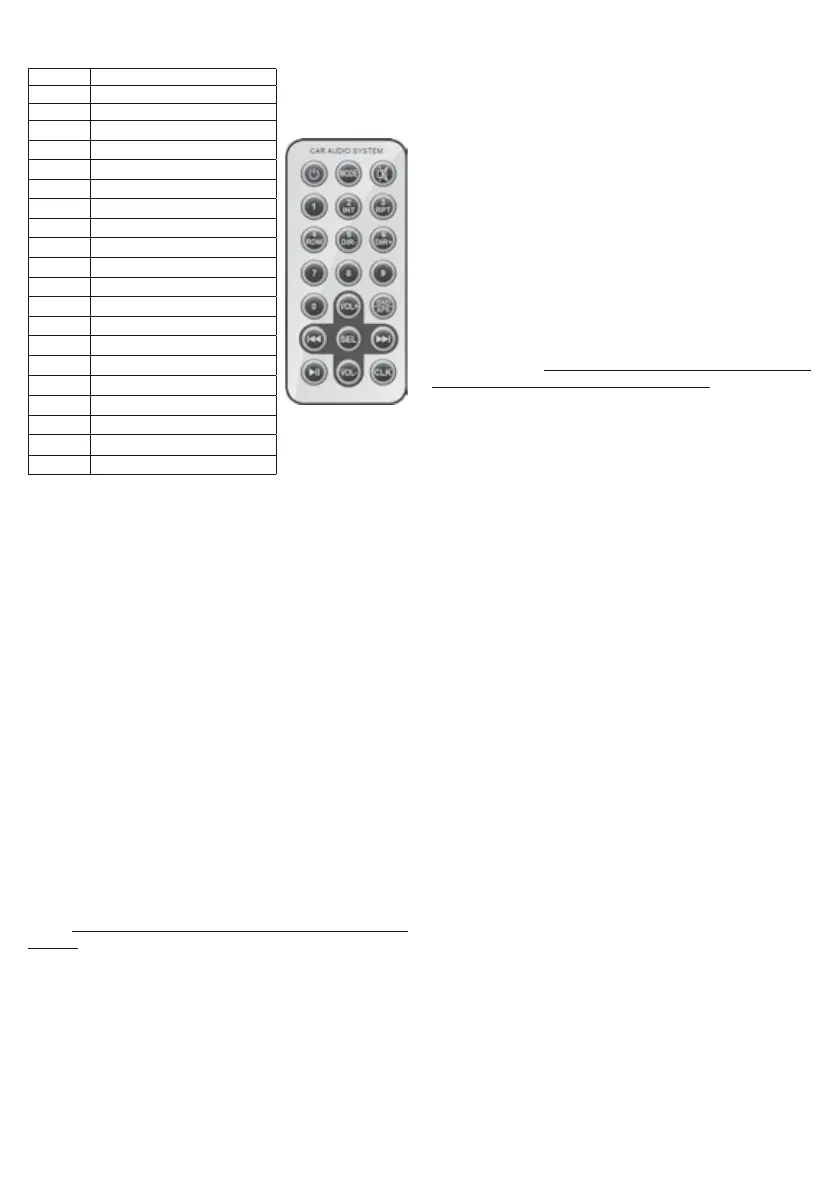
POWER switching on and o
MODE change mode
MUTE mute
1
radio / selecting MP3 mode
2 / INT
radio / MP3 / introducing tracks
3 / RPT
radio / MP3 / repeating tracks
4 / RDM
radio / MP3 / random playback
5 / DIR-
radio / MP3 / stepping folder
6 / DIR+
radio / MP3 / stepping folder
7
selecting MP3
8
selecting MP3
9
selecting MP3
0
selecting MP3
VOL+
volume / settings
VOL-
volume / settings
stepping back
stepping forward
SEL
sound setting functions
BND / APS
band / station seeking
playing / pause
CLK
clock / time setting


 To Next Page
 Loading...