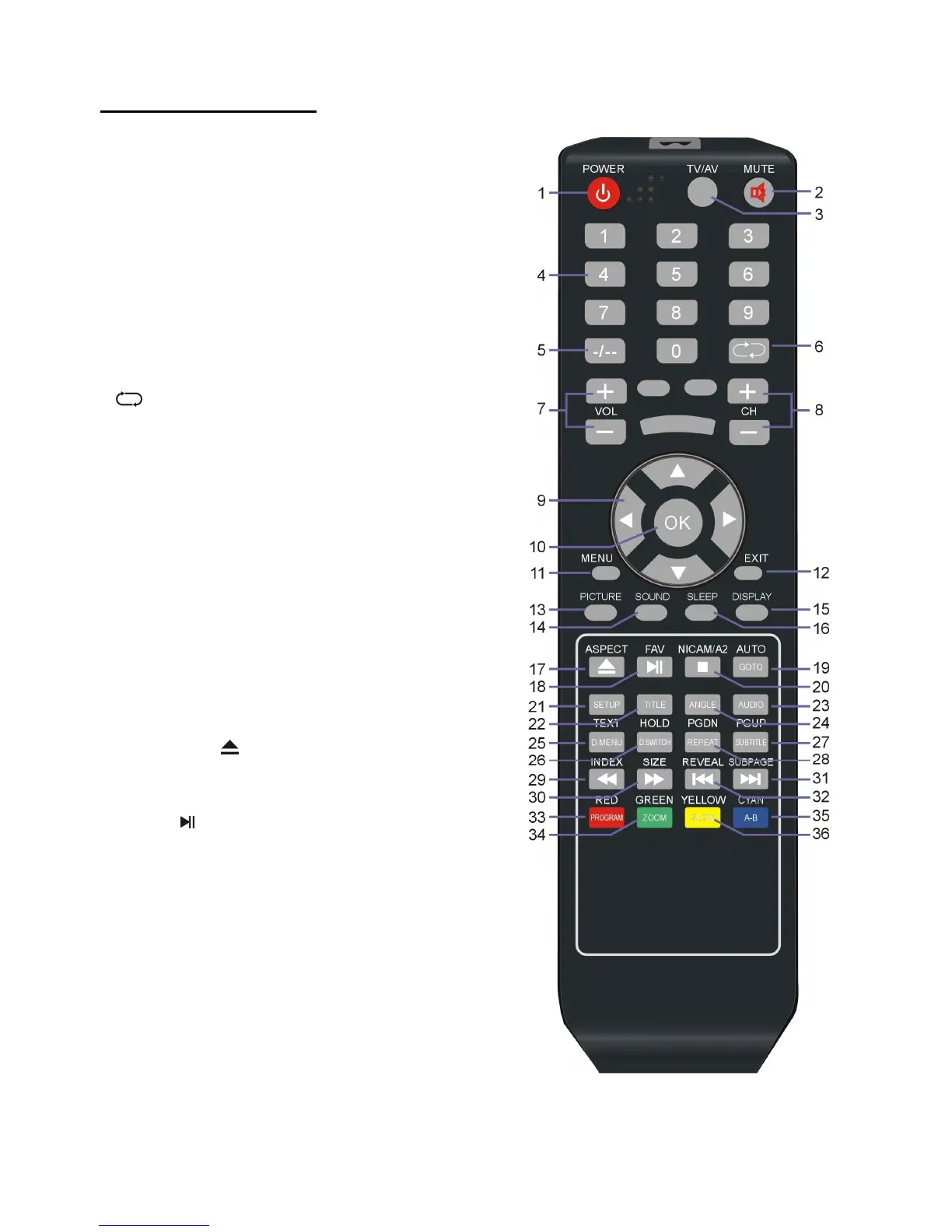
REMOTE CONTROL
1. POWER: To set the unit in standby mode;
press it again to switch it on.
2. MUTE: To mute the sound; press it again to exit
MUTE mode.
3. TV/AV: To display the input source list.
4. NUMBER BUTTONS (0-9): To input the
number information, such as channel number and
so on.
5. -/--: To switch the digit when selecting multiple
digit channels.
6.
: To return to the previous channel.
7. VOL+/-: To turn up/down the volume.
8. CH+/-: To play next/previous channel.
9. ▲/▼/◄/►: UP/DOWN/LEFT/RIGHT
navigation buttons.
10. OK: To confirm selection.
11. MENU: To display the main menu; press it
again to return to previous menu page.
12. EXIT: To exit the menu page.
13. PICTURE: To switch the picture mode.
14. SOUND: To switch the sound mode.
15. DISPLAY: To display information of current
program.
16. SLEEP: To set desired sleep time.
17. ASPECT/
: Press this button repeatedly to
select desired aspect ratio of screen in TV mode;
to enter/eject a disc in DVD mode.
18. FAV/
: To display favorite channel list in TV
mode; to play/pause playing.
19. AUTO/GOTO: To adjust the screen
automatically in PC/VGA mode; to play from a
certain point.
20. NICAM/A2/ █: To select desired sound track
in TV mode; to stop playing.
21. SETUP: To enter setup menu page in DVD
mode.
22. TITLE: To display the title when playing a
disc.



 To Next Page