GB | 5
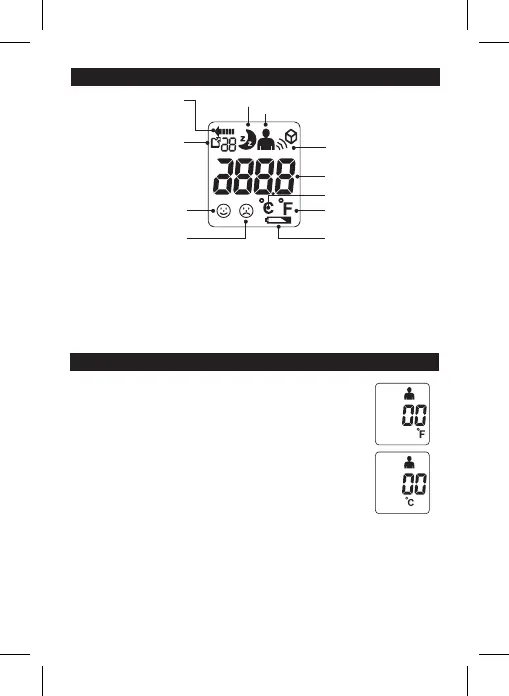
DESCRIPTION OF LCD DISPLAY
SWITCHING BETWEEN CELCIUS OR FAHRENHEIT
Your thermometer can display results in either degrees Celsius (°C) or
degrees Fahrenheit (°F).
To switch between Celsius and Fahrenheit, while the unit is on press
and hold both the Human/Object button and the Memory button for
approximately 3 seconds. This will change the mode to either °C or °F.
Once the thermometer beeps, at which time the mode
has been changed and you may release the buttons.
Switching between 4 Kinds of Scan Mode
1. Under power on status, you can press the Human/Object button
to switch dierent scan mode. There are 4 kinds of mode which including Human,
Object, Human/Night, and Object/Night mode (in order).
2. The beep sounds will be closed when your choice in Human/Night mode, and
Object/Night mode, and the Moon symbol will appears on the LCD in both Night
mode.
Temperature in degrees
Celcius scale
Fahrenheit scale
Scan in progress
Frowning face
Measurement
≥38.0°C(≥ 100.4°F)
Fever
Smiling face
Measurement
<38.0°C(< 100.4°F)
No Fever
Low battery warning
Memory symbol
and sets of
records
Night mode
Human scan mode
Object scan mode


 To Next Page