All contents current at time of publication.
SALTO Systems S.L. reserves the right to change availability of any
item in this catalog, its design, construction, and/or materials.
©
2022 SALTO Systems S.L.
224901-ED.4- 26/06/2023
Installation guide
CU4000 Door Controller
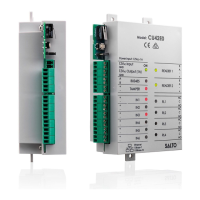
The LEDs in the top layer of the CU show the state of the system:
LED name Description
ON
GREEN ON: the unit is powered correctly
BLINKING RED: the unit is not powered properly (check power supply)
BLINKING ORANGE: addressing mode
OFF: not powered
BUS485
ON CU4200:The unit is communicating with the CU42E0
ON CU42E0: To be defined
OFF CU4200:The unit is not communicating with the CU42E0 (press the CLR to start detection process)
OFF CU42E0: To be defined
TAMPER
ON: tamper alarm active
OFF: tamper alarm not active
IN1-IN6
ON: active input (depends on the input type configured in the software)
OFF: inactive input (depends on the input type configured in the software)
READER
ON: the reader is communicating with the CU
OFF: the reader is not communicating with the CU (press the CLR to start detection process)
RL1-RL4
ON: the relay is activated (NO is connected with C).
OFF: the relay is inactive (NC is connected with C).
Signaling:
Los LEDs en la parte superior de la CU muestran el estado del sistema:
Nombre del LED Descripcióon
ON
VERDE ON: el dispositivo está correctamente alimentado
ROJO INTERMITENTE: el dispositivo no está correctamente alimentado (comprobar la fuente de alimentación)
NARANJA INTERMITENTE: modo direccionamiento
OFF: sin alimentación
BUS485
ON CU4200: El dispositivo se comunica con la CU42E0
ON CU42E0: Por definir.
OFF CU4200: el dispositivo no se comunica con la CU42E0 (presione el botón CLR para iniciar la detección)
OFF CU42E0: Por definir.
TAMPER
ON: alarma tamper activada
OFF: alarma tamper desactivada
IN1-IN6
ON: input activado (depende del tipo de input configurado a través del software)
OFF: input desactivado (depende del tipo de input configurado a través del software)
READER
ON: el lector comunica con la CU
OFF: el lector no comunica con la CU (presione el botón CLR para iniciar la detección)
RL1-RL4
ON: relé activado (NO está conectado con C).
OFF: relé desactivado (NC está conectado con C).
Señalética:
E
Eng
F
Les LEDS en façade avant de la CU indique l'état du système
Nom LED Description
ON
VERT : l'appareil est correctement alimenté
Rouge clignotant : l'appareil est mal alimenté (vérifier la tension d'alimentation)
Orange clignotant : en mode adressage
OFF: non alimenté
BUS485
ON CU4200 :L’unité communique correctement avec la CU42E0
ON CU42E0 : À définir.
OFF CU4200 : L'unité ne communique pas avec la CU42E0 (appuyez sur le CLR pour lancer le processus de détection)
OFF CU42E0 : À définir.
TAMPER
ON : alarme active
OFF : alarme désactivé
IN1-IN6
ON : entrée active (dépend du type d'entrée configuré dans le logiciel)
OFF : entrée inactive (dépend du type d'entrée configuré dans le logiciel)
READER
ON : le lecteur est en communication avec la CU
OFF : le lecteur ne communique pas avec la CU (appuyez sur le CLR pour lancer le processus de détection)
RL1-RL4
ON : le relais est actif (NO est connecté avec C)
OFF : le relais est inactif (NC est relié à C)
Signalisation:
10/20



 To Next Page