EasyManua.ls Logo

Salus RT510BC - User Manual

Salus RT510BC
2 pages
Print Icon
To Next Page IconTo Next Page
Loading...
TEST / PAIRING
SELECT
+Hr
SET
i
Once paired please close the
boiler control panel.
The LED will start flashing red.
TEST / PAIRING
+Hr
SELECT SET
RXBC605 Installation
RXBC605 Wiring Terminals
RXBC605
1
3
6
2
5
4
Remove the front panel from the boiler.
Do not remove boiler loop.
Replace the front panel ensuring a good seal is made.
Connect the electrical plug.
Pull out the mechanical timer.
Push fit boiler control into housing.
7 Power up the boiler and check the correct operation.
Quick Guide
RT510BC
Always isolate the AC Mains supply before installing or working on any components
that require 230 VAC 50Hz supply.
RT510TX Button Functions
Introduction
The RT510TX thermostat will switch your heating system on or o, as needed, in accordance
with the time and temperature set by you. It can be used with the RXBC605 integral plug-in RF
boiler control. The RF boiler control is a direct replacement for the basic time clock or blanking
plate usually supplied with the boiler. Installing the RF boiler control takes minutes. Once
installed, you will benefit from all the control features of the RT510TX thermostat.
868.0-868.6MHz; <13dBm
Safety Information
Use in accordance with the regulations. Indoor use only. Keep your device completely dry. Disconnect
your device before cleaning it with a dry cloth. This accessory must be tted by a competent person, and
installation must comply with the guidance, standards and regulations applicable to the city, country or
state where the product is installed. Failure to comply with the relevant standards could lead to prosecution.
Product Compliance
This product complies with the essential requirements and other relevant provisions of the following EU Directives: EMC
2014/30/EU, LVD 2014/35/EU, RED 2014/53/EU and RoHS 2011/65/EU. Full text of the EU Declaration of Conformity is
available on www.saluslegal.com
+Hr
SELECT
SELECT
SET
SET
+
+
+
Key Function
1. Press once to activate Frost Mode
2. Press for 3 seconds in order to activate Holiday Mode
Press once to activate/deactivate Boost function
Press once to enter/exit Permanent Override function
Increase button
Decrease button
Select the clock or programme settings
Press to conrm your settings
1. Press once to enter/exit in Test Mode
2. Press for 3 seconds to enter/exit Pairing Mode
Press the buttons for 3 seconds to enter Installer Mode
Press the buttons for 3 seconds to enter Clock Settings
Box content
Quick Guide
2 x AA Alkaline
Batteries
2 x Fixing Screws
RT510TX
Desk Stand
RT510TX Dip Switch Settings
The DIP Switches can be found on the rear of your thermostat.
Control feature TPI Span
Operation When TPI is selected on DIP
switch № 2, the DIP switch
№ 1 is functional. You can
choose the Cycles Per Hour
between a lower comfort
level (6CPH) and a higher
comfort level (9CPH).
When Span is selected
on DIP switch № 2,
the DIP switch № 1 is
not functional. The
temperature accuracy of
your thermostat is set to
± 0.25 °C.
TEST / PAIRING
SELECT
+Hr
SET
TEST / PAIRING
SELECT
+Hr
SET
3 Sec
TEST / PAIRING
+Hr
SELECT SET
3
4
Test the Pairing Process
Pairing Process
Once the LED stops flashing, press the
TEST / PAIRING button for 3 sec.
1
2
Begin the pairing process
End the pairing process
i
i
i
During test pairing, boiler control should ash conrming pair. If not, please follow
Pairing Process.
When enter test pairing
mode, after a 10 minute
countdown the thermostat
will time out.
Terminal Identier Description
1 N Neutral
2 L Live input (230V AC)
3 COM Common terminal (volt free)
4 N.O. Normally Open
RXBC605 User Controls
RXBC605 Switch Position
LED - It will be on when the thermostat is demanding
heat.
Mode Switch
The AUTO / MANUAL switch allows you to turn on the
Boiler Control manually if required.
SYNC Button - This is used only for pairing the RF
communications.
Press the SYNC button for 3
seconds until LED starts ashing.
The LG+5V is ready to be paired
with your thermostat.
3 Sec
2. MANUAL mode. The user
can also move the switch to the
MANUAL position; when in this
mode, the boiler will be always turned
on and the LED indicator will also
be lit constantly. The manual mode
is only to be used as a temporary
control if problems develop with the
communication from the thermostat.
1. AUTO mode. When the switch
on the Boiler Control is in the AUTO
(normal) position, the Boiler Control
will automatically receive the RF signal
from the transmitter and control the
boiler based on the programming of
the transmitter.
1 2
When the thermostat is operating in
NORMAL mode, if the Boiler Control has
not received a signal from the transmitter
after 1 hour, the Boiler Control will turn
off the boiler, and the LED indicator will
flash constantly (two times every second).
Once the Boiler Control receives a valid
ON or OFF signal, the Boiler Control will
control the heating system accordingly.
SALUS Controls plc
SALUS House
Dodworth Business Park South,
Whinby Road, Dodworth,
Barnsley S75 3SP, UK.
T: +44 (0) 1226 323961
E: sales@salus-tech.com
E: techsupport@salus-tech.com
SALUS Controls is a member of the Computime Group.
Maintaining a policy of continuous product development SALUS Controls plc reserve the right to
change specification, design and materials of products listed in this brochure without prior notice.
www.salus-tech.com
Issue Date: February 2018
V005
For PDF Installation guide please go to www.salus-manuals.com
TEST / PAIRING
SELECT
+Hr
SET
3 Sec

Question and Answer IconNeed help?

Do you have a question about the Salus RT510BC and is the answer not in the manual?

Summary

Introduction to RT510 TX Thermostat

RXBC605 Boiler Control Features

RXBC605 User Controls Overview

Describes the LED, SYNC button, and Mode Switch for boiler control.

RXBC605 Installation Steps

Guidance on installing the boiler control unit.

RXBC605 Wiring Terminals

Details on the terminal identifiers and descriptions for wiring.

RT510 TX Dip Switch Settings

Configuration options for the thermostat via DIP switches.

Testing and Pairing the Thermostat

Test the Pairing Process

Steps to verify and establish RF communication between devices.

Pairing Process Steps

Detailed sequence for initiating and completing the pairing.

RT510 TX Thermostat Operation

Setting Time and Date

Instructions for configuring the thermostat's time and date.

Programming Schedules

Creating personalized heating schedules (5-2 days or 24h).

Reviewing Setpoint Temperature

How to view the current desired temperature setting.

Permanent Override Function

Activating a manual override for continuous heating.

Holiday Mode

Setting a specific temperature for extended periods away.

Boost Function

Temporarily increasing the heating output.

Frost Protection

Enabling a low-temperature setting to prevent freezing.

Installer Mode

Accessing advanced configuration settings.

Reset Function

Restoring the thermostat to its default settings.

Overview

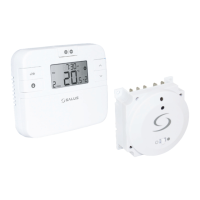
The SALUS RT510BC is a programmable thermostat system designed to control your heating system, offering both time and temperature regulation. It consists of two main components: the RT510TX thermostat (transmitter) and the RXBC605 boiler control (receiver).

Function Description

The RT510TX thermostat acts as the central control unit, allowing you to set desired heating schedules and temperatures. It communicates wirelessly with the RXBC605 boiler control, which then switches your heating system on or off as needed. The RXBC605 is designed as a direct plug-in replacement for a standard boiler time clock or blanking plate, simplifying installation.

The system offers flexible programming options, including a 5-2 day program (weekdays/weekends) or a 24-hour program, with up to 6 time/temperature settings per day. This allows for personalized heating schedules tailored to your lifestyle.

Key functions include:

  • Time and Date Setting: Allows precise configuration of the current time and day.
  • Temperature Control: Users can set specific desired temperatures for different times of the day.
  • Permanent Override: This feature enables a continuous override of the programmed schedule, maintaining a set temperature until manually deactivated.
  • Boost Function: Provides a temporary period of heating at a higher temperature, useful for quick warmth. Users can set the duration and temperature for the boost.
  • Holiday Mode: Designed for periods when you are away, this mode maintains a lower, energy-saving temperature (frost protection) for a specified number of days, automatically resuming the normal schedule afterward.
  • Frost Protection: An essential safety feature that prevents pipes from freezing by maintaining a minimum temperature (default 5.0°C, adjustable in Installer Mode) when the system is not actively heating.
  • Installer Mode: This advanced mode allows for configuration of system parameters such as temperature display increments, temperature offset, frost protection setpoint, and programmer selection (5-2 day or 24-hour).

Usage Features

The RT510TX thermostat features an intuitive interface with dedicated buttons for various functions:

  • SELECT/SET: Used to confirm settings and navigate menus.
  • UP/DOWN Arrows: Adjust values (time, temperature, days) and navigate options.
  • +Hr (Boost): Activates and configures the boost function.
  • OVERRIDE: Engages or disengages the permanent override function.
  • HOLIDAY: Activates and sets the holiday mode.
  • FROST: Toggles frost protection on or off.
  • SYNC: Used for pairing the thermostat with the boiler control.
  • TEST/PAIRING: Initiates the pairing process and allows for testing communication.

The RXBC605 boiler control has a simple LED indicator that shows its operational status:

  • LED On: Indicates the thermostat is demanding heat.
  • LED Flashing (two times per second): Signals that the boiler control has not received a signal from the thermostat for an hour in AUTO mode, leading to the boiler turning off.
  • Mode Switch (AUTO/MANUAL): Allows the user to switch between automatic control by the thermostat (AUTO) and continuous manual operation of the boiler (MANUAL). MANUAL mode is useful for temporary control if communication issues arise.

The system incorporates DIP switches on the rear of the RT510TX thermostat for advanced control features:

  • TPI (Time Proportional and Integral) Control: When TPI is selected, DIP switch № 1 allows selection of Cycles Per Hour (CPH) between 6CPH (lower comfort) and 9CPH (higher comfort), influencing how frequently the boiler cycles to maintain temperature.
  • Span: When Span is selected, the temperature accuracy of the thermostat is fixed at ±0.25°C.

Maintenance Features

  • Battery Replacement: The RT510TX thermostat is powered by 2 x AA alkaline batteries. When replacing batteries, the device uses internal memory to back up settings for 30 seconds, allowing for a seamless transition without losing your programmed schedule.
  • Reset Function: If needed, the RT510TX can be reset by removing the batteries, waiting 2 minutes, and then reinserting them. This restarts the device.
  • Installation: The RXBC605 boiler control is designed for easy installation, plugging directly into the boiler as a replacement for existing components. It requires connection to live, neutral, and common/normally open terminals.
  • Product Compliance: The device complies with relevant EU Directives (EMC, LVD, RED, RoHS), ensuring safety and environmental standards.
  • Safety Information: Emphasizes indoor use only, keeping the device dry, disconnecting power before cleaning, and professional installation to comply with local regulations and standards. Always isolate the AC Mains supply before working on components requiring 230 VAC 50Hz.

Salus RT510BC Specifications

General IconGeneral
BrandSalus
ModelRT510BC
CategoryThermostat
LanguageEnglish

Related product manuals