EasyManua.ls Logo

Salus RT510TX - User Manual

Salus RT510TX
2 pages
Print Icon
To Next Page IconTo Next Page
Loading...
Quick Guide Installation
Model: RT510 / RT510RF / RT510TX / RT510BC / RXRT510
Always isolate the AC Mains supply before installing or working
on any components that require 230 VAC 50Hz supply.
Introduction
The RT510 thermostat will switch your heating system on or o, as needed, in accordance with the temperature set
by you. The RT510 series includes the following products:
RT510 for wired applications
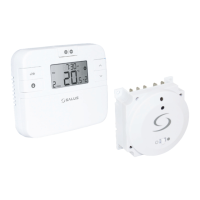
RT510RF (RT510TX + RXRT510) for wireless applications
RT510TX for wireless application, using 5 x 5 receiver
RXRT510 for wireless application using 5 x 5 transmitter
RT510BC for wireless application
Go to www.salus-manuals.com for the full PDF version of the manual.
Product Compliance
EU Directives: 2014/53/EU and 2011/65/EU. Please check www.saluslegal.com for the full information.
Safety Information
Use in accordance with the EU and national regulations. For indoor use only.
Keep your device completely dry. This product must be installed by a competent person and in accordance with all
the EU and national regulations.
Button Functions RT510 and RT510TX Pairing the RT510TX with the Receiver/Boiler Controller
Installer Mode
Dip Switch Settings
RT510 & RT510RF Quick Guide
RESET
+Hr
SELECT SET
RESET
+Hr
SELECT SET
TEST / PAIRING
SELECT
+Hr
SET
TEST / PAIRING
SELECT
+Hr
SET
RT510 RT510TX
COMNO L N
Terminal Description Receiver Terminals
NO
COM
L
N
Switch Terminal
Common Switch Terminal
Mains Live (230VAC)
Mains Neutral
RT510BC (RT510TX+Boiler Controller)
Wire up the boiler controller and switch it ON. After that please insert the
batteries into the thermostat.
Leave the link wire in the boiler
Remove the link wire in the boiler
NL1234
NL123456
NL1234 NL123456
NL1234 NL123456
NL1234 NL123456
NL1234 NL123456
NL1234 NL123456
NL1234 NL123456
NL1234 NL123456
NL1234 NL123456
NL1234 NL123456
NL1234 NL123456
NL1234 NL123456
NL1234 NL123456
NL1234 NL123456
NL1234 NL123456
NL1234 NL123456
NL1234 NL123456
NL1234 NL123456
NL1234 NL123456
NL1234 NL123456
NL1234 NL123456
NL1234 NL123456
NL1234 NL123456
NL1234 NL123456
NL1234 NL123456
NL1234 NL123456
NL1234 NL123456
NL1234 NL123456
NL1234 NL123456
NL1234 NL123456
1234
Terminal Description Plug in BC terminals
4 (NO)
3 (COM)
2 (L)
1 (N)
Switch Terminal
Common Switch Terminal
Mains Live
Mains Neutral
The DIP switches are found on the rear of
your thermostat and can be used to change
the span (temperature accuracy) of your
thermostat from the default +/-0.5°C to
+/-0.25°C and the programmes 5-2 or 24h.
Changing DIP Switch 2 may cause your boiler
to operate more frequently. The DIP switches
are located on the back of the thermostat.
24H
5-2
+/-0.25
+/-0.5
ON
1
2
Key Function
+Hr
SELECT
SELECT
SET
SET
+
+
+
1. Press once to activate Frost Mode
2. Press for 3 seconds in order to activate Holiday Mode.
Press once to activate/deactivate Boost function
Press once to enter/exit Permanent Override function.
Increase button
Decrease button
Select the clock or programme settings
Press to conrm your settings
Press the buttons for 3 seconds to enter Installer Mode
Press the buttons for 3 seconds to enter Clock Settings
1. Press once to enter in Test Mode for RT510RF
2. Press for 3 seconds to enter/exit Pairing Mode for RT510RF
3. Press once to return to Factory Settings for the RT510
RESET
+Hr
SELECT SET
3 Sec 3 Sec
3 Sec
Press the three buttons
together for 3 seconds.
dxx Function Parameter Description Default
value
d01
Temperature display
increments
0.1 or 0.5°C
Select temperature display
increments
0.5°C
d02 Temperature oset +/-3.0°C
Calibrate your thermostat
temperature
0.0°C
d03 Frost setpoint 5.0-17.0°C Set the Frost Point temperature 5.0°C
If you are using the RT510RF or RT510BC pack, the pairing between
the thermostat and the receiver/boiler controller is already done.
If you bought an RT510TX and RXRT510 separately then pair as follows.
Please make sure that the Receiver/Boiler Controller is set on Auto.
Begin the pairing process
TEST / PAIRING
SELECT
+Hr
SET
TEST / PAIRING
SELECT
+Hr
SET
TEST / PAIRING
SELECT
+Hr
SET
3 Sec
ON
AUTO
OFF
MANUAL
TEST / PAIRING
SELECT
+Hr
SET
Wait 9 minutes for the timeout
process to be complete.
End the pairing process
3 Sec
ON
AUTO
OFF
MANUAL
TEST / PAIRING
+Hr
SELECT SET
TEST / PAIRING
+Hr
SELECT SET
Test the pairing process
If you bought an RXRT510 or RT510TX and intend pairing with other
devices in the 5x5 range, please refer to the Receiver Units manual, or the
relevant manuals available at www.salus-manuals.com
Button Description for RXRT510 Receiver
Button Function
ON The receiver is enabled, ready for use.
OFF The receiver is disabled, will not function.
AUTO The receiver will switch on and o automatically,
as operated by the thermostat.
MANUAL Providing ON is selected,the receiver will switch
on continuously, overriding the thermostat.
Button Description for RXBC605 Boiler Controller
Button Function
SYNC The boiler controller will be syncronised with the
thermostat.
AUTO The receiver will switch on and o automatically,
as operated by the thermostat.
MANUAL Select in the event of thermostat failure to switch
boiler on continuously, overriding the thermostat.
ON
AUTO
OFF
MANUAL
Installation
RT510 Thermostat
Insert the batteries and
wire up the device.
Terminal Description Backplate
Common Terminal
1 (COM)
2 (NC)
Switched Live OFF
3 (NO)
Switched Live ON
Technical Support
T: 44 (0) 1226 323961
E: tech@salus-tech.com
Installation
RT510RF (RT510TX+RXRT510)Thermostat and Receiver
1. Wire up the receiver and switch the power on
2. Once the receiver is switched on then insert the batteries into the
thermostat. If using RT510RF pack the devices are already paired.
Now follow Test pairing process to confirm connection between both the
thermostat and receiver. If purchased the devices separately please follow
pairing process.
TEST / PAIRING
SELECT
+Hr
SET
AUTO
ON OFF
MANUAL
868.0-868.6MHz; <13dBm
06/2017
+Hr
RESET
SELECT SET
1
1
1
1
1
1
1
1
1
After power up, the
receiver will be in
pairing mode and
the LED will flash red.

Question and Answer IconNeed help?

Do you have a question about the Salus RT510TX and is the answer not in the manual?

Summary

Installation and Wiring Guide

RT510 RF Thermostat and Receiver Installation

Guides the user through wiring the receiver, inserting thermostat batteries, and confirming the connection.

RT510 BC Boiler Controller Installation

Details on wiring the boiler controller and inserting thermostat batteries for this model.

Receiver and Backplate Terminal Connections

Explains the specific terminals and connections for receivers and backplates.

Thermostat Operation and Setup

Button Functions Overview

Details the functions of buttons on the RT510 and RT510TX thermostats.

Wireless Pairing Procedure

Steps to pair the RT510TX thermostat with the receiver or boiler controller.

Dip Switch Configuration

Describes how to adjust DIP switches for temperature accuracy and program settings.

Setting Time and Date

Time and Date Adjustment

Instructions for setting the time, date, and hour format on the thermostat.

Programming Thermostat Functions

Programming Options

Explains how to choose between 5-2 day or 24-hour programming schedules.

Permanent Override Function

Details on how to activate or deactivate the permanent override mode.

Holiday Mode Activation

Steps to set and exit the holiday mode for temperature control.

Boost Functionality

Instructions for activating and setting the boost function for immediate heating.

Temporary Override

How to temporarily override the setpoint temperature.

Frost Protection Mode

Instructions for activating and viewing the frost protection feature.

Resetting the Thermostat

Factory Reset Procedure

Guides on how to reset the RT510 and RT510TX to factory settings.

Summary

Installation and Wiring Guide

RT510 RF Thermostat and Receiver Installation

Guides the user through wiring the receiver, inserting thermostat batteries, and confirming the connection.

RT510 BC Boiler Controller Installation

Details on wiring the boiler controller and inserting thermostat batteries for this model.

Receiver and Backplate Terminal Connections

Explains the specific terminals and connections for receivers and backplates.

Thermostat Operation and Setup

Button Functions Overview

Details the functions of buttons on the RT510 and RT510TX thermostats.

Wireless Pairing Procedure

Steps to pair the RT510TX thermostat with the receiver or boiler controller.

Dip Switch Configuration

Describes how to adjust DIP switches for temperature accuracy and program settings.

Setting Time and Date

Time and Date Adjustment

Instructions for setting the time, date, and hour format on the thermostat.

Programming Thermostat Functions

Programming Options

Explains how to choose between 5-2 day or 24-hour programming schedules.

Permanent Override Function

Details on how to activate or deactivate the permanent override mode.

Holiday Mode Activation

Steps to set and exit the holiday mode for temperature control.

Boost Functionality

Instructions for activating and setting the boost function for immediate heating.

Temporary Override

How to temporarily override the setpoint temperature.

Frost Protection Mode

Instructions for activating and viewing the frost protection feature.

Resetting the Thermostat

Factory Reset Procedure

Guides on how to reset the RT510 and RT510TX to factory settings.

Overview

This document describes the Salus RT510 series of thermostats, including the RT510 (wired), RT510RF (wireless, consisting of RT510TX and RXRT510), RT510TX (wireless thermostat), RXRT510 (wireless receiver), and RT510BC (wireless boiler controller). These devices are designed to manage heating systems by switching them on or off according to user-defined temperature settings.

Function Description

The RT510 series thermostats regulate heating systems based on a set temperature. The RT510 is a wired thermostat, while the RT510RF, RT510TX, RXRT510, and RT510BC are designed for wireless applications. The RT510TX acts as a wireless thermostat, and the RXRT510 and RT510BC are receiver/boiler controller units that receive signals from the thermostat to control the heating system.

RT510/RT510TX Thermostat:

  • Frost Mode: Activates a low-temperature protection setting to prevent pipes from freezing.
  • Holiday Mode: Allows users to set a specific temperature for a defined holiday period, overriding the regular schedule.
  • Boost Function: Provides a temporary override to increase heating for a short duration.
  • Permanent Override: Maintains a set temperature indefinitely, overriding any programmed schedule until manually cancelled.
  • Programming: Supports 5-2 day programming (weekdays and weekends with different schedules) or 24-hour programming (same schedule every day). Each program allows for multiple time/temperature settings.
  • Temperature Offset: Allows calibration of the displayed temperature to match the actual room temperature.
  • Span (Temperature Accuracy): Adjustable to +/-0.5°C or +/-0.25°C, affecting how frequently the boiler operates.

RXRT510 Receiver / RT510BC Boiler Controller: These units receive wireless signals from the RT510TX thermostat to control the boiler.

  • Enabled/Disabled: The receiver can be enabled for use or disabled to prevent operation.
  • Auto Mode: The receiver switches the heating system on and off automatically as directed by the thermostat.
  • Manual Mode: Overrides the thermostat control, continuously switching the boiler on, useful in case of thermostat failure or for continuous heating.
  • Sync (RT510BC): Synchronizes the boiler controller with the thermostat.

Usage Features

Installation and Pairing:

  • Wired Installation (RT510): Connects directly to the heating system.
  • Wireless Installation (RT510RF/RT510TX/RXRT510/RT510BC): The receiver/boiler controller is wired to the heating system, and the thermostat communicates wirelessly.
  • Pre-paired Devices: RT510RF and RT510BC packs come pre-paired, simplifying setup.
  • Manual Pairing: If devices are purchased separately, a pairing process is initiated by pressing buttons on both the thermostat and receiver/boiler controller. The receiver's LED flashes red during pairing mode.
  • Boiler Controller (RT510BC): Wires directly to the boiler, and the thermostat batteries are inserted. A link wire in the boiler should be left in place.

Thermostat Operation (RT510/RT510TX):

  • Button Interface: Features dedicated buttons for increasing/decreasing temperature, selecting settings, activating modes (Frost, Holiday, Boost), and confirming choices.
  • Time and Date Setting: Allows users to set the current time and date, including the hour format (12h/24h).
  • Programming: Users can create custom heating schedules with multiple time and temperature settings for weekdays and weekends (5-2 day program) or for all days (24h program). DIP switches on the back of the thermostat determine the program type.
  • Review Setpoint: Users can review the desired temperature setting.
  • Temporary Override: Allows for a temporary adjustment of the setpoint temperature without altering the programmed schedule.
  • Installer Mode: Accessible by pressing specific buttons for 3 seconds, allowing advanced settings like temperature display increments, temperature offset calibration, and frost setpoint adjustment.
  • Clock Settings: Accessible by pressing specific buttons for 3 seconds, allowing adjustment of the clock.

Receiver/Boiler Controller Operation (RXRT510/RT510BC):

  • Mode Selection: Buttons on the receiver/boiler controller allow users to switch between enabled/disabled, auto, and manual modes.
  • LED Indicators: Provide visual feedback on the device's status, such as pairing mode (flashing red LED).

Maintenance Features

Battery Replacement:

  • The thermostat uses batteries. When replacing them, users have a 30-second window to swap batteries before settings are lost, as the device uses internal memory to back up settings.
  • To restart the device, remove batteries, wait 2 minutes, and then reinsert them.

Reset Function:

  • Soft Reset (RT510): Pressing the reset button (often with a paper clip) restores the device to factory settings.
  • Hard Reset (RT510TX): Removing batteries, waiting 2 minutes, and reinserting them restarts the device.

DIP Switch Settings:

  • Located on the back of the thermostat, these switches allow users to adjust the temperature accuracy (span) and select between 5-2 day or 24-hour programming. Changing the span may affect boiler operation frequency.

Technical Support:

  • Contact information (phone and email) is provided for technical assistance.
  • A website is provided for accessing the full PDF version of the manual and product compliance information.

Safety Information:

  • The device must be installed by a competent person in accordance with EU and national regulations.
  • It is for indoor use only and must be kept dry.
  • The AC Mains supply must always be isolated before installing or working on components requiring 230 VAC 50Hz supply.

Salus RT510TX Specifications

General IconGeneral
Frequency868 MHz
Power Supply2 x AA batteries
Temperature Range5°C to 35°C
DisplayLCD
ProgrammableYes
Battery TypeAA
Temperature Accuracy±0.5°C
Switching Voltage230 V AC
OutputRelay
Frost ProtectionYes
Switching Current3A
Communication Range30m (indoors)

Related product manuals