EasyManua.ls Logo

Salus RT510 - User Manual

Salus RT510
22 pages
Print Icon
To Next Page IconTo Next Page
Loading...
RT510 THERMOSTAT - FULL USER MANUAL

Other manuals for Salus RT510

Question and Answer IconNeed help?

Do you have a question about the Salus RT510 and is the answer not in the manual?

Summary

Introduction

Product Compliance

Details compliance with EU directives and provides a link to the Declaration of Conformity.

Safety Informations

Provides essential safety precautions for installation and operation, including warnings for qualified personnel and avoiding hazardous environments.

Product Overview

Product advantages

Lists key features like TPI algorithm, schedule operation, temporary override, frost protection, and holiday/sleep modes.

Package content

Lists the items included in the thermostat package: thermostat, batteries, manual, and mounting screws.

Proper thermostat location

Advises on ideal mounting height and placement, away from heat/cooling sources, sunlight, and drafts for accurate sensing.

Wall mounting

Details the process of mounting the thermostat to the wall using the backplate and front housing.

Connection description

Before you start (first power up)

LCD icon description

Explains the meaning of various icons displayed on the thermostat's LCD screen.

Button description

Identifies and describes the function of each button on the thermostat interface.

First power up sequence and configuration

Guides users through the initial power-up process, including battery insertion and system initialization.

User settings

Time settings

Step-by-step instructions for setting the time, date (day of week), and hour format on the thermostat.

Operating modes

Manual mode - changing temperature setpoint

Explains how to manually set and adjust the desired temperature, indicated by a hand icon.

Schedule mode

Details how to program temperature setpoints for specific time periods based on daily or weekly schedules.

Temporary override mode

Describes how to temporarily change the temperature setpoint during active schedule mode until the next programmed interval.

Boost mode (hourly temperature override mode)

Explains how to set a temporary temperature override for a specified number of hours, returning to the previous mode afterward.

Frost protection mode

Guides on activating frost protection to prevent pipes from freezing by maintaining a minimum temperature.

Holiday mode

Instructions for setting a period where frost protection temperature is maintained for a specified number of days.

Sleep mode

Details how to activate and deactivate sleep mode, where the thermostat is off but can be woken by any button press.

Temperatures outside operating range

Explains how the thermostat displays 'HI' for temperatures above the limit and 'LO' for temperatures below the limit.

Low battery detection

Describes the warning indicator for low battery voltage and advises on timely battery replacement.

Battery change

Provides instructions on how to replace the thermostat's batteries, noting the 30-second window to retain settings.

Installer mode

DIP switches parameters

Describes the function of DIP switches located on the thermostat's back cover for control algorithm settings.

Factory Reset

Cleaning and Maintenance

Technical Informations

Warranty

Overview

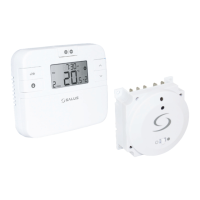
The RT510 thermostat is a room temperature control device designed to manage heating systems efficiently. It operates by sensing the ambient air temperature and activating or deactivating the heating system to maintain a user-defined setpoint. This intelligent control helps in preventing overheating and ensures energy savings. The thermostat is suitable for various heating setups, including those with boilers and radiators, and can work in conjunction with thermostatic radiator valves (TRVs) for individualized room temperature control.

Function Description

The core function of the RT510 is to regulate room temperature. When the ambient temperature falls below the setpoint, the thermostat switches on the heating. Once the set temperature is reached, it switches off the heating. The device incorporates a TPI (Time Proportional and Integral) control algorithm, which optimizes heating cycles for improved efficiency and comfort.

The RT510 offers several operating modes to cater to different user needs and scenarios:

  • Manual Mode: In this mode, the user manually sets a constant temperature setpoint, which the thermostat maintains until changed or switched to another mode. This provides direct control over the heating.
  • Schedule Mode: This mode allows users to program temperature setpoints for specific periods throughout the day and week. The thermostat supports two types of schedules: 5/2 (working days and weekends separately) or 7d (individual schedules for each day). Users can define up to six time programs, allowing for multiple temperature changes within a day. This mode is ideal for automating heating based on daily routines.
  • Temporary Override Mode: Available only in schedule mode, this feature allows for a temporary change to the programmed schedule. If a new setpoint temperature is set, it will be maintained until the next scheduled time interval begins.
  • Boost Mode (Hourly Temperature Override): This function enables users to temporarily change the setpoint temperature for a specified number of hours (up to 9 hours). After the set time elapses, the thermostat reverts to its previous operating mode (manual or schedule). This is useful for short-term heating adjustments without altering the main schedule.
  • Frost Protection Mode: In this mode, the thermostat maintains a constant, low frost protection temperature (adjustable between 5°C and 17°C) to prevent pipes from freezing. It operates at the lowest possible level to conserve energy. This mode is particularly useful when the premises are unoccupied for extended periods.
  • Sleep Mode: This mode effectively switches off the thermostat, putting it into a state where it consumes minimal energy. While in sleep mode, the thermostat maintains the frost protection temperature. It can be reactivated by pressing any button.
  • Holiday Mode: Similar to frost protection, this mode maintains a user-defined frost protection temperature for a specified number of days (up to 31 days). It's designed for longer periods of absence, such as holidays, to ensure minimal energy consumption while protecting the heating system.

Usage Features

The RT510 thermostat is designed for user-friendly operation with a clear LCD display and intuitive button controls.

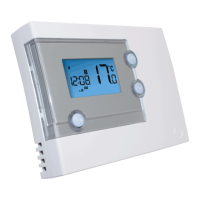
  • Display: The LCD screen provides comprehensive information, including the current time, day of the week, program number, program indicator, measured/set temperature, temperature unit, and status icons for various modes (heating on, manual mode, holiday mode, frost protection mode, boost function, low battery, wireless connection). Temperatures outside the normal operating range are indicated by 'HI' for high temperatures and 'LO' for low temperatures.
  • Button Controls: The thermostat features dedicated buttons for common functions:
    • +Hr button: Activates the boost function and adjusts the duration of hourly temperature override.
    • Manual Mode button: Switches the thermostat to manual mode.
    • Frost protection / Holiday Mode button: Toggles frost protection and activates holiday mode.
    • Increase and Decrease buttons (^ and v): Used to adjust temperature setpoints, navigate through settings, and change values.
    • Select button: Confirms selections and navigates through menus.
    • Set button: Initiates programming sequences and saves settings.
    • Reset button: Resets the thermostat to factory default settings.
  • Time Settings: Users can easily set the current time and day of the week. The thermostat does not have date settings.
  • Installer Mode: An installer mode allows for advanced configuration of parameters such as temperature display accuracy, temperature offset, frost protection setpoint temperature, and schedule type (5/2 or 24hr/7d). Accessing this mode requires a specific button combination.
  • DIP Switches: Located under the back cover, DIP switches allow installers to select the control algorithm, choosing between TPI (Time Proportional and Integral) with adjustable cycles per hour (6CPH or 9CPH) or Hysteresis with a fixed span of ±0.25°C.

Maintenance Features

The RT510 thermostat requires minimal maintenance, focusing primarily on battery replacement and general cleaning.

  • Battery Operation: The device is powered by two AA batteries. A low battery warning indicator appears on the LCD when the battery voltage drops to a certain level. The thermostat continues to function normally during low battery, but it is recommended to change the batteries as soon as possible to ensure continuous operation.
  • Battery Change: When replacing batteries, the thermostat's internal memory retains settings for approximately 30 seconds, allowing for battery replacement without losing configurations. Users should remove the old batteries and insert new ones according to polarity without pressing any buttons during the process.
  • Cleaning: The outer casing of the RT510 can be wiped clean periodically with a dry cloth. It is crucial to avoid using solvents, polishes, detergents, or abrasive cleaners, as these can damage the thermostat's finish.
  • Servicing: The RT510 contains no user-serviceable parts. Any servicing or repairs should only be carried out by Salus Controls or their authorized agents to ensure proper functioning and safety.
  • Safety Information: Before installation or use, it is essential to read the entire manual. Installation should be performed by a qualified person in accordance with local and EU standards. The device should not be exposed to extreme temperatures, strong vibrations, mechanical shock, or unfavorable environmental conditions (e.g., flammable gases, fumes, dust, or condensation). Packaging and loose parts should be kept out of reach of children.
  • Product Compliance: The RT510 complies with essential requirements of Directives 2014/53/EU and 2011/65/EU, with the full EU Declaration of Conformity available online.
  • Environmental Responsibility: The product features a crossed-out trash can symbol, indicating that it should not be disposed of with ordinary waste. Users are responsible for surrendering used electronic equipment to designated collection points for recycling, contributing to environmental protection.

Salus RT510 Specifications

General IconGeneral
Temperature Accuracy±0.5°C
Frequency868 MHz
DisplayLCD
MountingWall Mounted
Switching Voltage230 V AC
Frost ProtectionYes
Battery BackupYes
TypeDigital Thermostat
Power Supply2 x AA Batteries
Switching Current3A
Programming5/2 day or 7 day programming
CompatibilityCompatible with most heating systems

Related product manuals