Need help?
Do you have a question about the Salus RT510RF and is the answer not in the manual?
Crucial safety precautions for installation, operation, and handling of the thermostat.
Explanation of the function of the manual/auto switches on the receiver unit.
Wiring diagrams and essential connections for the RXRT510 receiver.
Guides through the first power-up and initial configuration of the thermostat.
How to set and maintain a constant temperature setpoint manually.
Instructions for setting up daily or weekly heating schedules.
Enabling frost protection to prevent pipes from freezing.
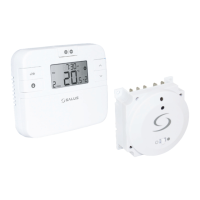
The RT510RF wireless room thermostat is designed to simplify the control of your heating system. It operates by continuously monitoring the ambient air temperature and activating the heating when the temperature drops below your setpoint, then deactivating it once the desired temperature is achieved. This intelligent system ensures efficient heating without unnecessary energy consumption.
It's important to understand that turning the thermostat to a higher setting will not accelerate the heating process. The speed at which your room heats up depends on your heating system's design, including the boiler size and radiator capacity. Similarly, the setting does not influence how quickly the room cools down. To save energy, setting the thermostat to a lower temperature will result in the room being maintained at that reduced temperature. The heating system will only operate if a time switch or programmer has enabled it.
The recommended approach for using this room thermostat is to identify the lowest temperature at which you feel comfortable and then leave the setting untouched. A practical method for this is to begin with a low temperature, such as 18°C, and gradually increase it by one degree each day until you reach your preferred comfort level. Once this optimal setting is found, further adjustments should be unnecessary, as any increase beyond this point would lead to wasted energy and higher costs.
For homes with a boiler and radiators, a single room thermostat typically controls the entire house. However, individual room temperatures can be customized by installing thermostatic radiator valves (TRVs) on each radiator. If TRVs are not present, select a temperature suitable for the entire house. If you do have TRVs, you can set a slightly higher temperature to ensure comfort in the coldest room, then use the TRVs to prevent overheating in other areas.
For accurate temperature sensing, the room thermostat requires an unobstructed airflow. It should not be covered by curtains or blocked by furniture. Avoid placing it near electric fires, televisions, or wall/table lamps, as these can interfere with its proper functioning.
The RT510RF thermostat comes factory-paired and ready for immediate use, offering a hassle-free setup. It incorporates a TPI (Time Proportional and Integral) control algorithm, which intelligently learns your home's heating characteristics to optimize energy usage and maintain a stable temperature. The device automatically repeats its signal, ensuring reliable communication with the receiver. It operates according to user-defined time schedules, allowing for personalized heating patterns throughout the day.
A crucial feature is the frost protection mode, which maintains a minimum temperature (within a range of 5 to 17 degrees Celsius) to prevent pipes from freezing, especially during colder periods or when the house is unoccupied. The thermostat also allows for correction of the displayed temperature by ±3°C, enabling fine-tuning for accuracy.
For extended periods away from home, the holiday mode can be activated, which maintains the frost protection temperature for a specified duration, minimizing energy consumption while ensuring basic protection. Additionally, a sleep mode is available, which suspends the thermostat's functions, effectively turning it off to conserve energy, particularly outside the heating season. The device utilizes unique transmission codes and operates at 868 MHz, providing a stable and noise-resistant signal for reliable performance.
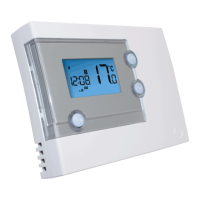
The RT510TX thermostat offers several operating modes to suit various needs. In manual mode, the user manually sets a desired temperature, which the thermostat then maintains until a new setpoint is entered or another mode is selected. This provides direct control over the heating.
The schedule mode allows the thermostat to operate according to a predefined schedule, with temperature setpoints for specific periods. Users can choose between a 5+2 mode (weekdays and weekends separately) or a 7-day mode (individual schedules for each day). The schedule is divided into up to six time programs, allowing for multiple temperature changes throughout the day. All six programs must be filled in to complete the schedule programming.
Temporary override mode is available only in schedule mode (AUTO). If a new setpoint temperature is set during an active schedule, this temperature will be maintained until the next programmed time interval begins. This is useful for short-term adjustments without altering the entire schedule.
Boost mode, also known as hourly temperature override mode, is available in both manual and schedule modes. This feature allows users to temporarily change the setpoint temperature for a specified number of hours (up to 9 hours). Once the set time elapses, the thermostat automatically reverts to its previous operating mode.
Frost protection mode automatically sets the temperature to a frost setpoint to prevent pipes from freezing. If the room temperature falls below this setpoint, frost protection is enabled. This mode ensures minimal energy consumption while providing essential protection.
Sleep mode places the thermostat in a state where it maintains the frost protection temperature but consumes no energy, essentially switching it off. No actions can be performed until the thermostat is reactivated.
Holiday mode maintains the "frost protection" temperature for a specific number of days. This is ideal for extended absences, such as vacations, to conserve energy while still protecting the property.
The thermostat also provides indications for temperatures outside the operating range. Temperatures below 10°C are displayed without a leading '0'. If temperatures exceed the measurable upper limit, 'HI' is displayed, and if they fall below the lower limit, 'LO' is shown.
Low battery detection is performed every minute. When the battery voltage drops to a certain level, a low-battery warning indicator appears. The thermostat continues to function normally during low battery, but it is recommended to change the batteries as soon as possible to ensure continuous normal operation. When changing batteries, the internal memory backs up your settings for approximately 30 seconds, allowing for battery replacement without losing configurations.
For cleaning and maintenance, the RT510TX thermostat requires minimal effort. The outer casing can be periodically wiped clean with a dry cloth. It is crucial to avoid using solvents, polishes, detergents, or abrasive cleaners, as these can damage the thermostat. The unit contains no user-serviceable parts; any servicing or repairs should only be carried out by Salus Controls or their authorized agents.
 General
| Power Supply | 2 x AA batteries |
|---|---|
| Frequency | 868 MHz |
| Temperature Range | 5°C to 35°C |
| Display | LCD |
| Programming | 7-day programmable |
| Temperature Control Accuracy | ±0.5°C |
| Hysteresis | ±0.5°C |
| Control Algorithm | TPI |
| Operating Modes | Manual, Holiday |
| Compatibility | Combi Boilers |
| Programmable Periods | 6 periods per day |


 To Next Page