13
TEST / PAIRING
SELECT
SET
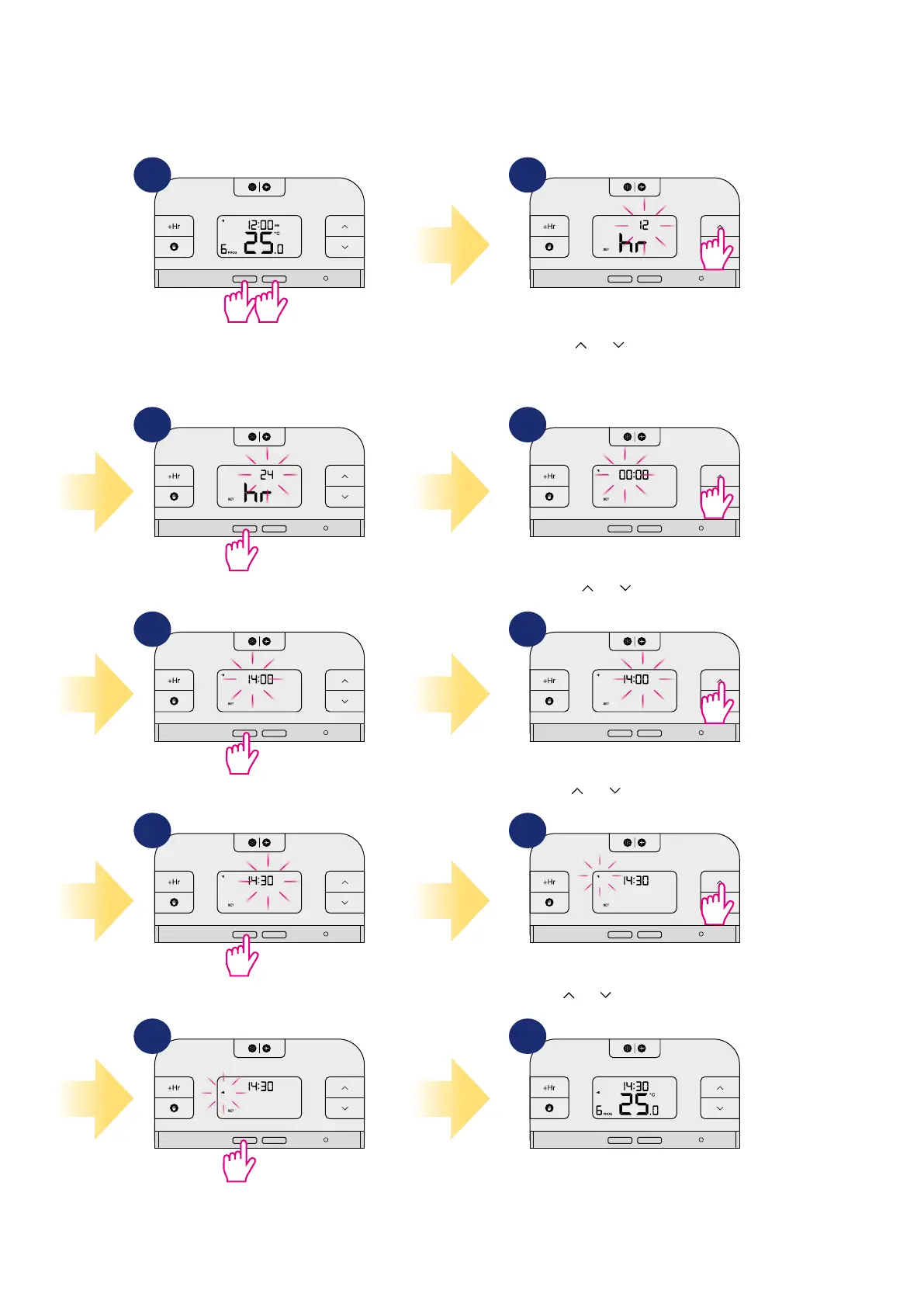
In this chapter you can set time and day of the week. RT510TX thermostat has no date settings. You can choose the day of the week (from monday to
sunday). Please follow the steps below:
5. User settings
5.1 Time settings
TEST / PAIRING
SELECT
SET
TEST / PAIRING
SELECT
SET
TEST / PAIRING
SELECT
SET
TEST / PAIRING
SELECT
SET
TEST / PAIRING
SELECT
SET
Press
or
to select the hour
format.
Press the buttons SELECT and SET
together for 3 sec to enter the time
settings.
Press SELECT to conrm.
Press SELECT to conrm.
Press SELECT to conrm.
Press SELECT to conrm.
Press
or
to set the hour.
Press
or
to set the minutes.
3 sec 3 sec
TEST / PAIRING
SELECT
SET
TEST / PAIRING
SELECT
SET
TEST / PAIRING
SELECT
SET
TEST / PAIRING
SELECT
SET
Press
or
to set day of the week.
Time settings has been saved. Thermostat
will return to the main screen.
1
3
5
7
9
2
4
6
8
10



 To Next Page