70 VS20WRF and VS20BRF Installer Manual
Installation - Replacing product
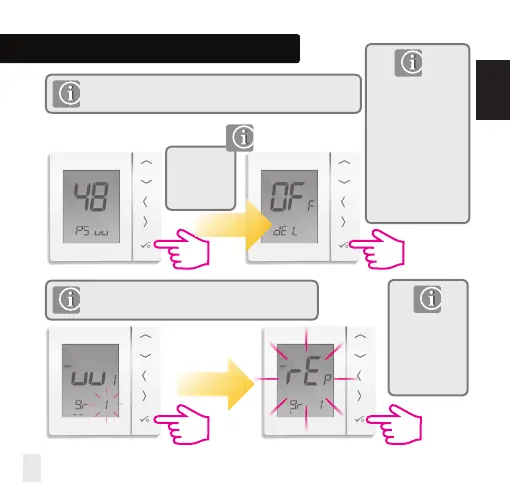
Before replacing any device it must be removed from the Zigbee network.
Please ensure the Zigbee coordinator is also in pairing mode.
Note: If replacing a thermostat connected to the wiring
centre, you can use the replacement method.
Deleting thermostat from the network.
Your thermostat will
now be deleted from
the network. You are
now ready to install
your new thermostat.
Please note password
48 can also be used to
delete other devices
that are offline.
Please follow
step 1 on page
71. Select
password 48.
The unit
previously
connected to the
wiring centre
will be replaced.
INSTALLATION


 To Next Page