Need help?
Do you have a question about the Salus 091FLRF and is the answer not in the manual?
Instructions for installing and wiring the receiver unit, including safety precautions and location advice.
Procedure to set unique RF address codes for multiple receivers to avoid interference.
Procedure to verify RF signal transmission between the control centre and receiver units for proper operation.
Guidelines for selecting the optimal location and securely mounting the control centre unit on the wall.
Instructions for powering up the control centre, installing batteries, and verifying initial LCD display.
Explanation of the various indicators and symbols displayed on the control centre's LCD screen.
Details on comfort, economy, and defrost temperature modes and their indicators on the thermostat.
Introduction to the programmable thermostat's function for automatic temperature adjustment based on schedules.
How to temporarily change the temperature setting without altering the programmed schedule.
Step-by-step guide to correctly set the current day and time on the thermostat.
Procedure to view or adjust comfort and economy temperatures, including mode indicators.
Detailed steps and examples for temporarily overriding the current program schedule by selecting comfort or economy temperature.
How to view, select, and customize program schedules for different days, including user-defined programs.
Configuring the thermostat for heating or cooling systems, including delay on/off and span settings.
Explanation of span settings (0.5°C and 1°C) and their effect on turn-on and turn-off temperatures.
Specific considerations and differences when using the thermostat to control a cooling system.
List of items included in the product packaging, such as receiver, control centre, and accessories.
Detailed technical specifications of the thermostat, including ratings, operating conditions, and approvals.
This document describes the Salus Controls Model 091FLRF Programmable Room Thermostat with RF (Volt Free). This thermostat is designed to replace most common residential thermostats and is compatible with electric, gas, or oil heating control systems.
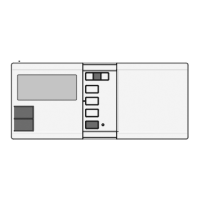
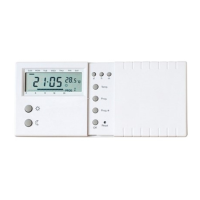
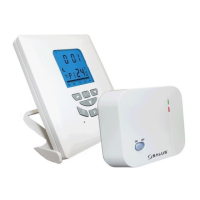
The device operates as a two-unit system: a Receiver and a Control Centre. The Receiver handles wiring connections and the heat on/off control, while the Control Centre serves as the user interface and performs temperature sensing and control. These two units communicate wirelessly via Radio Frequency (RF).
The primary function of the thermostat is to automatically adjust the room temperature to a comfortable level when you are at home and lower it to save energy when you are out or asleep. This is achieved through programmable settings.
The Control Centre senses the room temperature and, based on its programmed settings and the current temperature, sends RF signals to the Receiver to turn the heating system on or off. The Receiver then actuates the heating system accordingly.
The thermostat offers different temperature modes:
The device includes nine programs, six of which are factory preset, and three are user-changeable. These programs allow you to define schedules for comfort or economy temperatures throughout the day. Program 0 is a special defrost program (7°C), and Program 5 sets the entire day to economy temperature. Programs 1, 2, 3, and 4 are typical daily schedules. Programs 6, 7, and 8 are user-defined and can be modified to suit specific needs.
The thermostat can also control a cooling system. In this mode, the operation is reversed: the thermostat switches on the system when the room temperature is higher than the set temperature. The comfort temperature for a cooling system is generally lower than the economy temperature. When cooling mode is selected, the defrost temperature and snowflake icon are not displayed. Program 0 will switch off the cooling system.
The Receiver is installed using an Industry Standard back plate. It requires a 230V AC mains supply, fused at 13 amps max. It should be mounted in a location accessible for wiring and good RF signal reception, free from water, moisture, or condensation. The Control Centre does not require wiring and can be mounted directly to a wall surface in a suitable indoor location with freely circulating air, away from direct sunlight, heat-generating appliances, or areas prone to vibration.
To prevent interference from other nearby RF transmitters, the Receiver and Control Centre can be set to a specific RF address code. This is done by adjusting five DIP switch levers on the rear of the Receiver and ensuring the Control Centre has the same setting.
Before final installation, it's advisable to test the RF transmission between the Control Centre and Receiver. This involves setting the Control Centre's temperature higher than the room temperature to trigger a heat call (indicated by an animated flame on the LCD and a green LED on the Receiver) and then lowering it to stop the heat call. If the green LED doesn't illuminate, the Control Centre should be moved closer to the Receiver, or the address code should be altered.
The Control Centre is powered by two AA alkaline batteries. Upon battery installation or reset, the LCD becomes active, displaying the time, day, and current temperature.
Dedicated buttons are used to set the day, hour, and minute. Holding these buttons down allows for rapid changes.
Pressing the "Temp" button enters the View/Change temperature mode. The current temperature mode (comfort, economy, or defrost) will flash. Users can then press the comfort or economy buttons to review or change the temperature. Pressing "OK" returns to normal operation. The temperature setting range is 5°C to 30°C, adjustable in 0.5°C steps.
To temporarily change the temperature without altering the programmed schedule, users can press the comfort or economy buttons. This override remains active until the next set point in the program. Pressing "OK" clears the override.
As an alternative to manual override, the "Time Hold" feature allows users to set a specific duration (up to 24 hours) for a desired temperature mode. During this period, the program will not affect the temperature. Pressing the corresponding temperature mode key while time hold is active will display the remaining hold time, which can also be adjusted. Pressing a different temperature mode key will clear the time hold.
Pressing the "Prog" button allows users to view and modify the program for the current day. Subsequent presses advance to the next day. The "Prog#" button changes the program number. For user-defined programs (6, 7, 8), users can use the comfort or economy buttons to change the distribution of these temperatures and the hour button to review settings. "OK" returns to normal operation.
By pressing the "OK" button for approximately 5 seconds, users can access selections for Heat/Cool mode, Delay Off/On, and Span. In Heat Mode, the heat icon flashes, and pressing "OK" confirms Heat mode, or pressing comfort/economy changes to Cool mode.
This feature, accessible through the "OK" button (approx. 5 seconds), ensures that the external system (heating or cooling) only switches on if it has been off for more than 5 minutes. This function is automatically activated when a cooling system is selected.
The span defines the temperature difference between the turn-on and turn-off temperatures. Users can select between 0.5°C and 1°C span. For example, with a 1°C span and a set temperature of 20°C, the heater will turn on at 19.6°C and turn off at 20.4°C.
The Control Centre is powered by two AA alkaline batteries. A "Low Battery Indicator" will be displayed on the LCD when the battery voltage drops, prompting the user to change the batteries as soon as possible. The battery compartment is accessible by opening a sliding door on the right half of the thermostat.
A small reset button is located to the right of the "OK" key on the Control Centre. Pressing this button restores the thermostat to its initial factory status:
Important Note on Reset: Do not use a pencil to push the reset button, as graphite residue can cause a short circuit and damage the thermostat. In environments with high electrostatic discharge (+/- 8KV), the product may not operate normally, and a reset might be required.
 General
| Type | Wireless Thermostat |
|---|---|
| Power Source | Battery |
| Frequency | 868 MHz |
| Display | LCD |
| Power Supply | 2 x AA batteries |
| Temperature Control | ±0.5°C |
| Range | 30m (open space) |
| Temperature Range | 5°C to 35°C |


 To Next Page