EasyManua.ls Logo

Salus THERMO 091FL - User Manual

Salus THERMO 091FL
2 pages
Print Icon
To Next Page IconTo Next Page
Loading...
Program
Your thermostat is a programmable. It can automatically adjust the room tempe-
rature to a comfortable level when you are at home, and lower it to save energy
when you go out or sleep. What you have to do is to program the thermostat so
that it knows when to raise the temperature. There are altogether nine programs
contained in the memory of the thermostat. Six of them are preset in the factory
and the remaining three are user changeable.
Manual override
If you want to change the temperature temporarily and do not want to alter the
programs you have set, you can simply touch a button to override the current
program.
INSTALLATION INSTRUCTIONS
Caution: Switch off the electric source before installing the thermostat. We re-
commend that the installation be performed by trained personnel.
Select a suitable location for the thermostat. The location of the thermostat can
greatly affect its performance. If it is located where air circulation cannot reach,
or exposed to direct sun light, it will not adjust the room temperature properly.
To ensure proper operation, your thermostat should be installed at an inside wall
with freely circulating air. Find a place where your family is usually occupied.
Avoid close proximity to heat generating appliances (e.g. TV, heater, refrigerator)
or exposed to direct sunlight. Do not install near a door where the thermostat
will suffer from vibration.
Wiring
Wiring terminals are at the back of the thermostat.
You can nd two terminals labeled COM and NO. It is a
typical single-pole, single throw (SPST) contact. In most
situations COM and NO are used.
Mounting the thermostat
Using the template provided, drill two ø6mm holes in the wall. Insert the wall
anchors and tighten the left screw with 3mm clearance. Fix the thermostat by
putting it over the screwhead and slide it rightward (note the keyhole-like opening
at the back of the thermostat). Tighten the remain screw to lock it in place.
Note: If the wall is made of wood, there is no need to use the wall anchors. Drill
two ø2.7mm holes instead of ø6mm.
USING YOUR NEW THERMOSTAT
The following procedures show how to operate the thermostat. It is recommended
that you follow the instructions and try to operate once before connecting it to
the heating or cooling system.
1, Start
The thermostat is operated by two AA alkaline batteries. Please remove the front
cover and install two new batteries.
When the batteries are installed, your thermostat should be operating and you can
see the LCD active. If your thermostat does not work properly, please check the
batteries if wrong polarities, press the reset button by using a ball-point pen.
The LCD after start or reset:
0 6 12 18 24
SUN MON TUE WED THU FRI SAT
PROG
During stand by mode, the rst press any key is to turn on the backlight.
Note:
i, Temperature may not be 20°C as the diagram shown and the Output-On in-
dicator may activate after a few seconds, depending on different situations.
ii, Do not use a pencil to push the reset button. The graphite residue of a pencil
can cause a short circuit and damage the thermostat.
2, Set day/time
To set day, press d. Similarly, press h to set hour and m to set minute.
Buttons used:
THERMOSTAT THERMO 091FL USER’S MANUAL
Your new thermostat will serve your family for years and signicantly save the
energy cost. The large multi-data liquid crystal display allows you to operate the
feature-rich design with a touch of a button. Before operating the thermostat, we
hope you can read this manual thoroughly.
BE FAMILIAR WITH YOUR THERMOSTAT
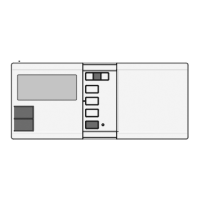
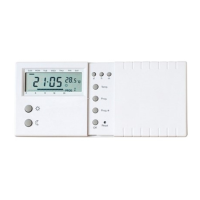
Appearance
There is a sliding door on the right half of the thermostat. If you open the door,
you can see some buttons. This door is removable for the replacement of
batteries.
Specication
Temperature measurement range: 0---34.5°C (0.5°C step)
Temperature control range: 5---30°C (0.2°C step)
Temperature accuracy: +/-1°C
Clock accuracy: +/-70 seconds/month
Program: 6 preset, 3 user-dene
Switching span: 0.5°C or 1°C
Control mode: Heating or Cooling system
Minimum air-con. cycle time: 5 minutes
Switching: 230VAC 50Hz 5 (3) A
Battery: 2 x AA alkaline battery
Dimensions: 154 x 80 x 30 mm (W x H x D)
Operation temperature: 0 --- 40°C
Storage temperature: -20 --- 60°C
Operating humidity: 5 --- 90% non-condensing
LCD
1
2
9
45
7
8
6
3
10
11
1. Day of the week Indicator
2. Time
3. Temperature
4. Program Number
5. Program Prole Indicator
6. Frost Protection
7. Manual Override Indicator
8. Output-On Indicator will be displayed and rotates if the ouput is on. It will
disappear if the output is off
9. Low Battery Indicator – will be displayed if the voltage of the batteries drop to
a certain level. Please change the batteries as soon as possible.
10. Cool mode
11. Heat mode
Temperature mode
You can see
and
on both the buttons and the LCD.
means comfort tem-
perature and
means economy temperature. These two
temperatures are user changeable. Furthermore, there is
a xed defrost temperature (7°C) indicated by
on the
LCD. Throughout the operation of the thermostat we will
refer to them as comfort, economy or defrost temperature
instead of numeric values.
Example:
When start or after reset, the time is 00:00,
Sunday. To set the clock to current time (e.g.,
11:23, Tuesday), press d 1 times, h 11 times
and m 23 times.
Note: When you press and hold the keys for 2 seconds, the day/time will change
rapidly. Release when the desired setting comes.
3, View/Change temperature
Press Temp, and the thermostat enter View/Change temperature mode. The
LCD will show the setting of the current temperature mode (
,
or
) which
will be ashing. Press
or
to review or change the temperature. Press OK
to directly return to normal operation mode. Buttons used:
Example:
i, In normal mode…
ii, Press Temp. The setting of comfort tempera-
ture is ashing:
iii, To change, press
. For example, to change
to 20.0°C, press
5 times :
iv, To review economy temperature, press
,
them Temp:
v, You can press
key again to set the economy
temperature, or press OK to return to normal
operation mode.
Note:
i, The temperature setting range is 5° to 30°C.
ii, To lower the setting, enter View/Change temperature mode and press
or
until it reaches 30°C and then the setting will return to 5°C. Continue to
pressing until the desired setting comes.
iii, The setting will change rapidly by pressing and holding the keys.
iv, Please note the temperature mode indicator. A
means the comfort tempe-
rature is being viewed or changed. A
indicates economy temperature. If is
shown, it is defrost temperature. Defrost temperature is always at 7°C and is
not changeable.
v, It is not always necessary to use the OK key to return to normal operation
mode. After 15 seconds of no key pressed it will automatically return to normal
mode.
4, Manual Override
Press
to select comfort temperature. Press
to select economy temperature.
The current temperature mode will be overrode until the next set point of the
program comes. Press OK to clear override. Buttons used :
Example:
i, In normal operation mode, press
to change
the current comfort setting to economy set-
ting:
The temperature is now set to economy mode.
This mode will be held until 23:00. (It is because
the program for the day is PROG 1. At 23:00 the
temperature will change from comfort to econo-
my, which matches the override setting.)
Time hold
Timer hold is an alternative to manual override. Press and hold
(or
) key for
2 seconds, the hold time will appear. Press the key again to set the hold time.
Press OK to return to normal operation mode. The maximum can be set is 24
hours. In the hold period the temperature will not be affected by the program.
When timer hold is active, pressing the corresponding temperature mode key
(e.g.,
if comfort mode is being held) will show the remaining hold time. The
remaining hold time can also be changed by using the same key. If another
temperature mode key is pressed (e.g., if comfort mode is being held), the timer
hold will be cleared.
Example:
i, To change the current setting from comfort to
economy for 5 hours, press and hold
for
approxmiate 2 seconds. The hold time will
appear.
ii, The hold time is 1 hour. Press
4 times to
change the hold time to 5:
iii, Press OK or just leave no key pressed for 15
seconds, the thermostat will return to normal
mode
Note:
i, A ‘hand’ appears when the current temperature mode is being overrode.
ii, The setting will change rapidly by pressing and holding the keys.
5, View/Change Programs
Press Prog, the program of the current day is ready to be changed.
Press Prog again to advance to the next day and the program of that day will
be shown.
Press Prog# to change the program.
Program 6, 7 and 8 are user-dene programs. You can use
or
to change
the distribution of comfort or economy temperature and h to review the setting.
Press OK to return to normal operation mode.
Buttons used:
There are altogether nine programs available, as
the diagram shown:
Program 0 is a special program. It will set the whole
day to defrost temperature (7°C). (If cooling mode
is selected, it will turn off the system. See Part 8,
Controlling a cooling system.)
Program 1,2, and 3 are some typical schedules of a
day. You can select them if you nd them suitable.
Program 4 sets the whole day to comfort temperature
while program 5 sets it to economy.
Program 6, 7 and 8 are user-dene programs. They
can be modied to suit your need.
GB
0 6 12 18 24
PROG 0
0 6 12 18 24
PROG 1
0 6 12 18 24
PROG 2
0 6 12 18 24
PROG 3
0 6 12 18 24
PROG 4
0 6 12 18 24
PROG 5
0 6 12 18 24
PROG 6
0 6 12 18 24
PROG 7
0 6 12 18 24
PROG 8
COM
NO
Question and Answer IconNeed help?

Do you have a question about the Salus THERMO 091FL and is the answer not in the manual?

Summary

Getting Familiar with Your Thermostat

Thermostat Appearance

Describes the physical appearance, sliding door, and battery replacement access.

Thermostat Specifications

Lists technical parameters like temperature range, accuracy, power, dimensions, and operating conditions.

LCD Display Indicators

Details the indicators and symbols shown on the liquid crystal display.

Temperature Modes Explained

Explains comfort, economy, and defrost temperatures indicated on the LCD.

Program Functionality Overview

Explains the programmable nature of the thermostat for automatic temperature adjustment.

Manual Override Function

Describes how to temporarily change temperature without altering programs.

Installation Instructions

Selecting an Optimal Location

Guides on choosing an optimal location for proper thermostat operation.

Wiring Terminals Guide

Details the COM and NO terminals used for connecting the thermostat.

Thermostat Mounting Procedure

Explains the steps for physically installing the thermostat onto a wall.

Operating Your Thermostat

Initial Start-Up Procedure

Covers battery installation and initial system activation.

Setting Day and Time

Instructions on how to set the current day and time on the thermostat.

Viewing and Changing Temperatures

How to check and adjust comfort and economy temperature settings.

Temporary Manual Temperature Override

How to override current program settings temporarily.

Managing Program Schedules

Explains how to view and change the thermostat's programmed schedules.

Resetting the Thermostat

Details how to perform a factory reset to restore default settings.

System Selections and Cooling Control

Heat;Cool Mode Selection

How to select between heating and cooling system control.

Delay On;Off Function Configuration

Configuration of a minimum cycle time to protect the system.

Span Adjustment Settings

Setting the temperature differential for system switching (0.5°C or 1°C).

Controlling a Cooling System

Differences in operation and settings when controlling a cooling system.

Summary

Getting Familiar with Your Thermostat

Thermostat Appearance

Describes the physical appearance, sliding door, and battery replacement access.

Thermostat Specifications

Lists technical parameters like temperature range, accuracy, power, dimensions, and operating conditions.

LCD Display Indicators

Details the indicators and symbols shown on the liquid crystal display.

Temperature Modes Explained

Explains comfort, economy, and defrost temperatures indicated on the LCD.

Program Functionality Overview

Explains the programmable nature of the thermostat for automatic temperature adjustment.

Manual Override Function

Describes how to temporarily change temperature without altering programs.

Installation Instructions

Selecting an Optimal Location

Guides on choosing an optimal location for proper thermostat operation.

Wiring Terminals Guide

Details the COM and NO terminals used for connecting the thermostat.

Thermostat Mounting Procedure

Explains the steps for physically installing the thermostat onto a wall.

Operating Your Thermostat

Initial Start-Up Procedure

Covers battery installation and initial system activation.

Setting Day and Time

Instructions on how to set the current day and time on the thermostat.

Viewing and Changing Temperatures

How to check and adjust comfort and economy temperature settings.

Temporary Manual Temperature Override

How to override current program settings temporarily.

Managing Program Schedules

Explains how to view and change the thermostat's programmed schedules.

Resetting the Thermostat

Details how to perform a factory reset to restore default settings.

System Selections and Cooling Control

Heat;Cool Mode Selection

How to select between heating and cooling system control.

Delay On;Off Function Configuration

Configuration of a minimum cycle time to protect the system.

Span Adjustment Settings

Setting the temperature differential for system switching (0.5°C or 1°C).

Controlling a Cooling System

Differences in operation and settings when controlling a cooling system.

Overview

The Salus Controls Thermostat is a programmable device designed to regulate room temperature, offering both heating and cooling functionalities. It aims to provide comfort and energy savings through its various operational modes and programmable settings.

Function Description

The primary function of this thermostat is to maintain a desired room temperature. It can operate in two main modes: heating and cooling. In heating mode, the thermostat activates the heating system when the room temperature falls below the set point and deactivates it when the temperature rises above the set point. Conversely, in cooling mode, it activates the cooling system when the room temperature rises above the set point and deactivates it when it falls below.

The thermostat features a large LCD display that provides essential information at a glance, including the current time, day of the week, room temperature, set temperature, and operational mode. The display also shows various icons to indicate the status of the device, such as the flame icon for heating, the snowflake icon for cooling, and battery low indicators.

One of the key features is its programmability. Users can set up to nine distinct programs, including three user-defined programs, for each day of the week. These programs allow for different temperature settings (comfort or economy) at various times throughout the day. This flexibility enables users to optimize energy consumption by lowering temperatures when the building is unoccupied or during sleep hours and raising them during active periods. The thermostat supports a 7-day programming cycle, meaning programs can be tailored for each day of the week.

The device offers a "Manual Override" function, which allows users to temporarily adjust the temperature without altering the programmed schedule. This is useful for short-term changes in comfort needs. The manual override can be set for a specific duration, after which the thermostat reverts to its programmed operation. There is also a "Permanent Manual Override" option, which maintains the manually set temperature indefinitely until it is manually canceled.

An "Economy Temperature" feature allows for a predefined lower temperature setting, typically used during periods when less heating or cooling is required, such as overnight or when the building is empty. The "Comfort Temperature" is a higher setting, suitable for periods of occupancy.

The thermostat includes a "5-minute minimum cycle time" feature, particularly relevant for cooling systems. This function prevents the external system from switching on too frequently, which can extend the lifespan of the HVAC equipment. If the cooling system has been off for less than 5 minutes, it will not switch on again until the 5-minute period has elapsed.

The "Span" setting allows users to define the temperature difference between the turn-on and turn-off temperatures. This hysteresis prevents rapid cycling of the heating or cooling system, contributing to energy efficiency and system longevity. Users can select between 0.5°C or 1°C span settings.

The thermostat also incorporates a "Holiday" function, enabling users to set a specific temperature for an extended period, such as during a vacation. This feature helps save energy by maintaining a reduced temperature while the premises are unoccupied, automatically reverting to the programmed schedule upon the user's return.

Usage Features

The thermostat is designed for user-friendly operation with a simple interface consisting of several buttons: "Prog" for programming, "OK" for confirmation, "h" for hour adjustment, and up/down arrows for temperature and time adjustments.

To set the time and day, users press the "Prog" button repeatedly until the time or day indicator flashes, then use the "h" or up/down arrows to make adjustments. The "OK" button confirms the settings.

Programming the thermostat involves selecting a program number (0-8), then setting the desired comfort or economy temperatures for specific time slots throughout the day. The "Prog" button cycles through the days and program slots, while the up/down arrows adjust temperatures, and the "h" button adjusts time.

The "Manual Override" is activated by simply pressing the up or down arrow buttons to adjust the temperature. The display will show "MAN" to indicate manual mode. To set a temporary override, users can adjust the temperature and then press "OK" to set a duration. For a permanent override, the temperature is adjusted, and the "OK" button is held for a few seconds.

The "Holiday" function is accessed by pressing "Prog" until the holiday icon appears. Users can then set the desired holiday temperature and the number of days for the holiday period.

The thermostat includes a "View/Change Temperature" feature, allowing users to quickly check or modify the current set temperature without entering full programming mode.

The device also supports a "Keypad Lock" function to prevent unauthorized changes to settings. This is particularly useful in public or shared environments.

Maintenance Features

The thermostat is designed for low maintenance. The primary maintenance task involves replacing the batteries when the low battery indicator appears on the LCD display. The manual recommends using two AA alkaline batteries.

For installation, the thermostat comes with a drilling template, screws, and wall anchors, facilitating easy and secure mounting on the wall. It is important to mount the thermostat in an area with good air circulation, away from direct sunlight, drafts, or heat sources, to ensure accurate temperature readings. The recommended mounting height is approximately 1.5 meters from the floor.

The device includes a "Reset" button, typically a small hole requiring a pointed object to press. This button allows users to restore the thermostat to its initial factory settings, which can be useful for troubleshooting or if settings become corrupted. The manual advises against using a pencil to press the reset button due to potential graphite residue causing short circuits.

The thermostat is designed to be robust against electrostatic discharge, but in extreme cases, a reset might be required if the device malfunctions due to high electrostatic interference.

The manual provides clear instructions for wiring the thermostat to the heating or cooling system, emphasizing safety precautions and recommending professional installation if the user is unsure. It also highlights the importance of checking the wiring diagram specific to the heating/cooling system.

Overall, the Salus Controls Thermostat is a versatile and user-friendly device aimed at providing efficient temperature control and energy savings through its comprehensive programming and operational features.

Salus THERMO 091FL Specifications

General IconGeneral
DisplayLCD
Switching voltage230V AC
ProgrammableYes
MountingWall Mounted
Temperature accuracy0.5°C
OutputRelay
Switching current3A
CompatibilityHeating systems

Related product manuals