Indice de révision : G 7 6102
3.2. Menus
After having recognized the high voltage unit, the
GNM
gives access to the menus.
3.2.1. User menu
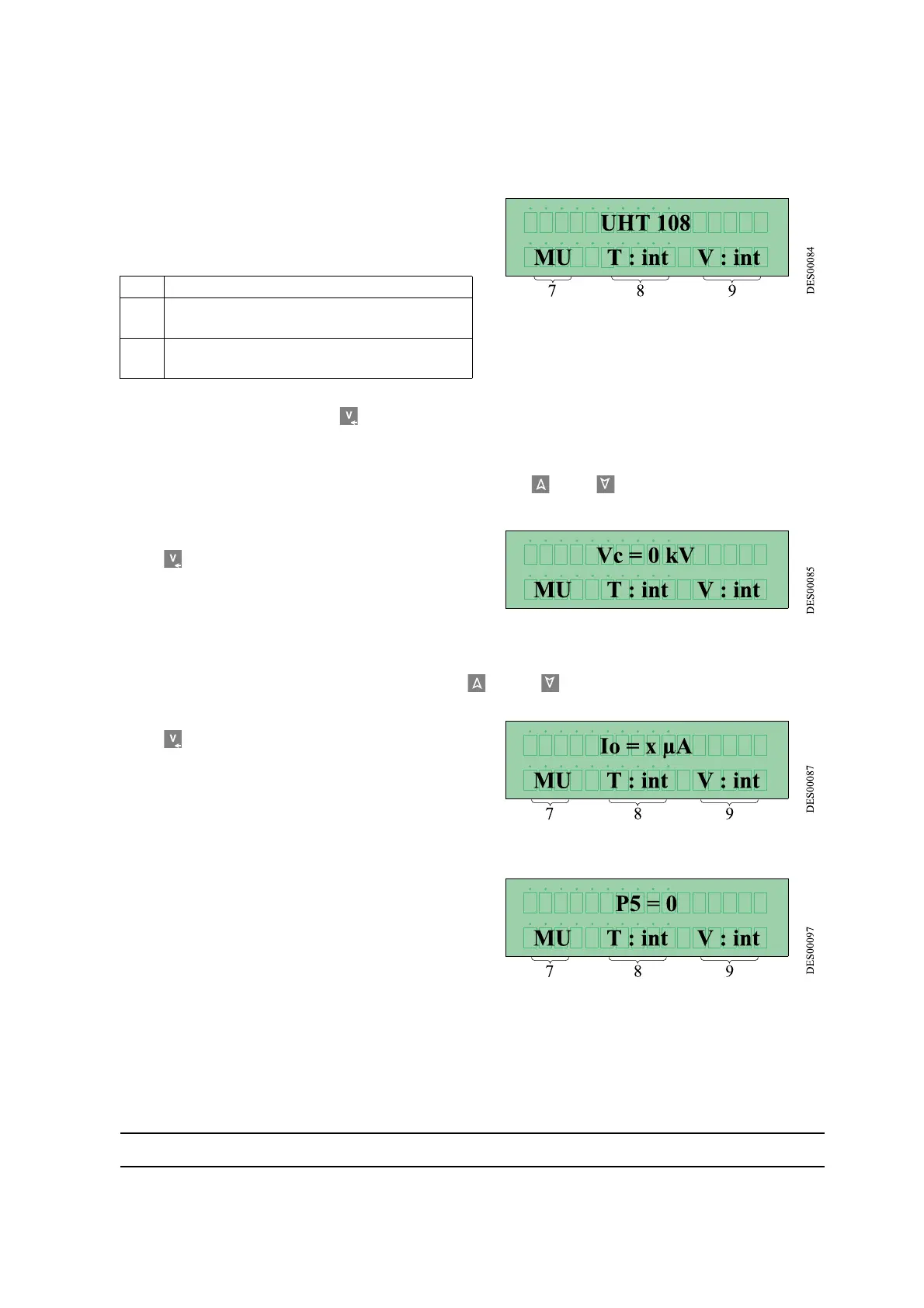
This is displayed as follows:
The last line of the screen displays the
GNM
's oper-
ating mode.
To scroll the menu, press key 4 .
3.2.1.1. Adjusting Voltage Set Point
Voltage adjustment set point is adjusted by pressing keys 2 and 3
Key 4 permits one to go to the next screen.
3.2.1.2. Adjusting Current Set Point
Current adjustment set point is adjusted by keys 2 and 3 .
Key 4 permits one to go to the next screen.
3.2.1.3. Parameter -
P5
: type of trigger
This selection defines the way the HV is triggered:
•
P5
= 0 triggering called «internal». High volt-
age is triggered only if the set point value is
above 20Kv and will be released when the set
point value is below 15 Kv.
7 Means the module is in User Menu
8 T = Type of trigger: int = internal - ext. =
external
9 V = voltage set point: int = local - ext. = at
a distance


 To Next Page