5
6
7
8
9
10
11
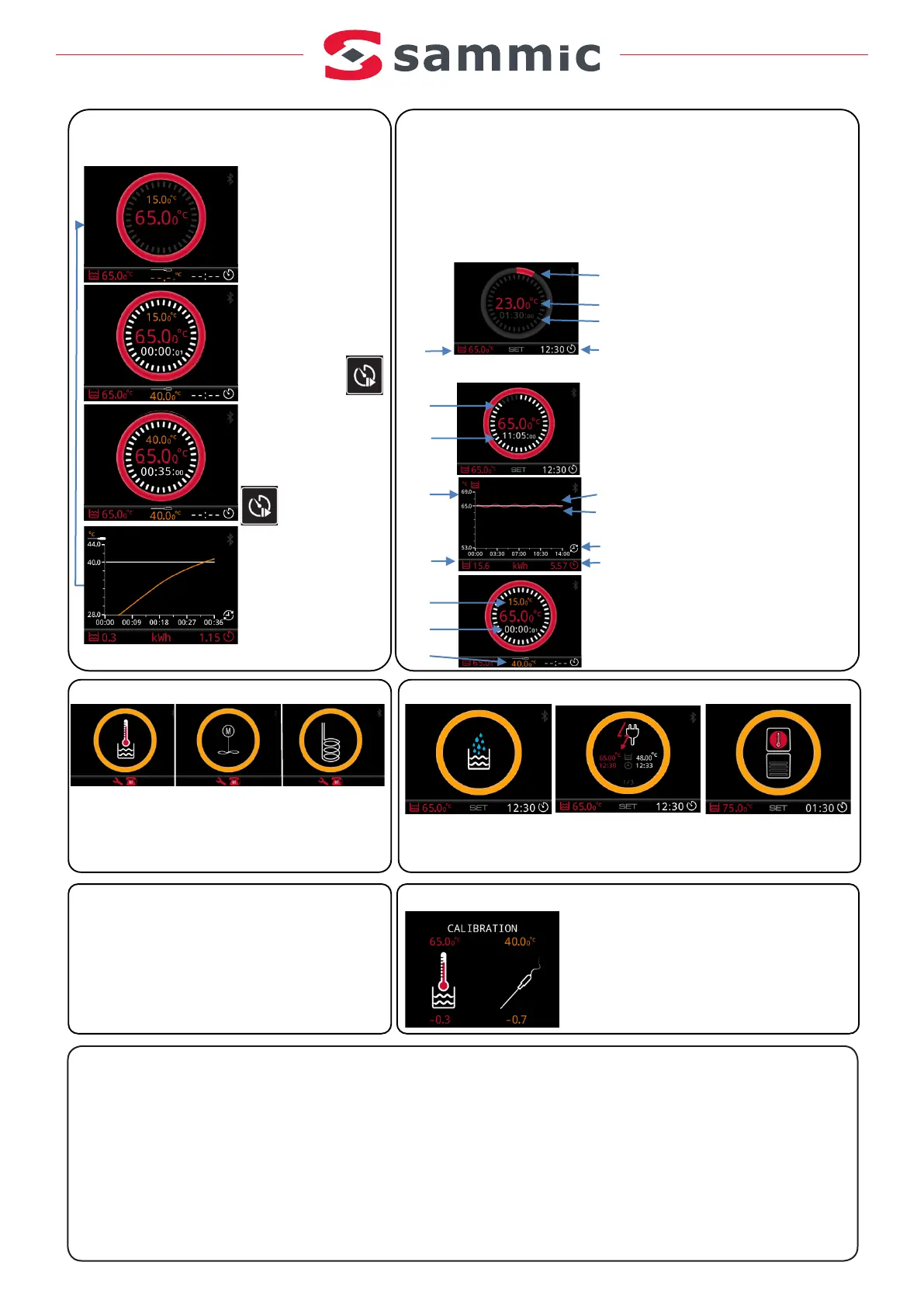
5.- Heating status
6.- Actual water temperature
7.- Estimated heating time
8.- SETtimer (target)
9.- SETtemperature (target)
10.- Timer status
11.- Timer countdown
12.- Temperature during the cycle
13.- Water heating kWh
14.- SETtemperature symbol
15.- Actual temperature symbol
16.- Cycle time
17.- kWh during the cycle
18.- Actual needle probe
temperature
19.- Time passed
20.- SETneedle probe temperature
12
13
14
15
16
17
18
19
20
CharacteristicsWorking with the nee dle probe
(Only with SmartVide 8)
Change ºC/ºF
Calibration
Connect the needle probe
tothe machine.
SETset temperature
of the needle probe
atwhich we want it
towarn us.
Press PLAYtosave
the data.
.
Peep, Peep...!!!
It hasreached the
temperature.
Indicates the timepassed.
Press any button to
view stopthe beeper sound.
Press ENDtofinish
the cy cle.
End!
SUMMARY of the cycle.
Press any button
for anewcy cle.
1.- Machine off.
2.- Holding dow n the
SETbutton, switch on
the machine.
3.- Change the unit.
1.- Machine off
2.- Holding down the – and + buttons, switch
on the machine.
3.- CALIBRATION screen
4.- Adjust the value with SET and the – and +
buttons
5.- Turn off and on again.
Temperature
sensor
water
Stirrer motor
Heating
element
Overheating
cab
Lack of water.Fill.
P o wer cut during th e cycle.
In d i cates tem p erature b efo re and
after th e po wer cut
Note: Call aTechnical Service
Fault warning
Warnings
1.- Machine off.
2.- Push and hold “SET”, “-” and “+”, switch the machine on.
3.- Hold for 10 seconds until the machine makes a distinct sound.
4.- Turn off and on again.


 To Next Page