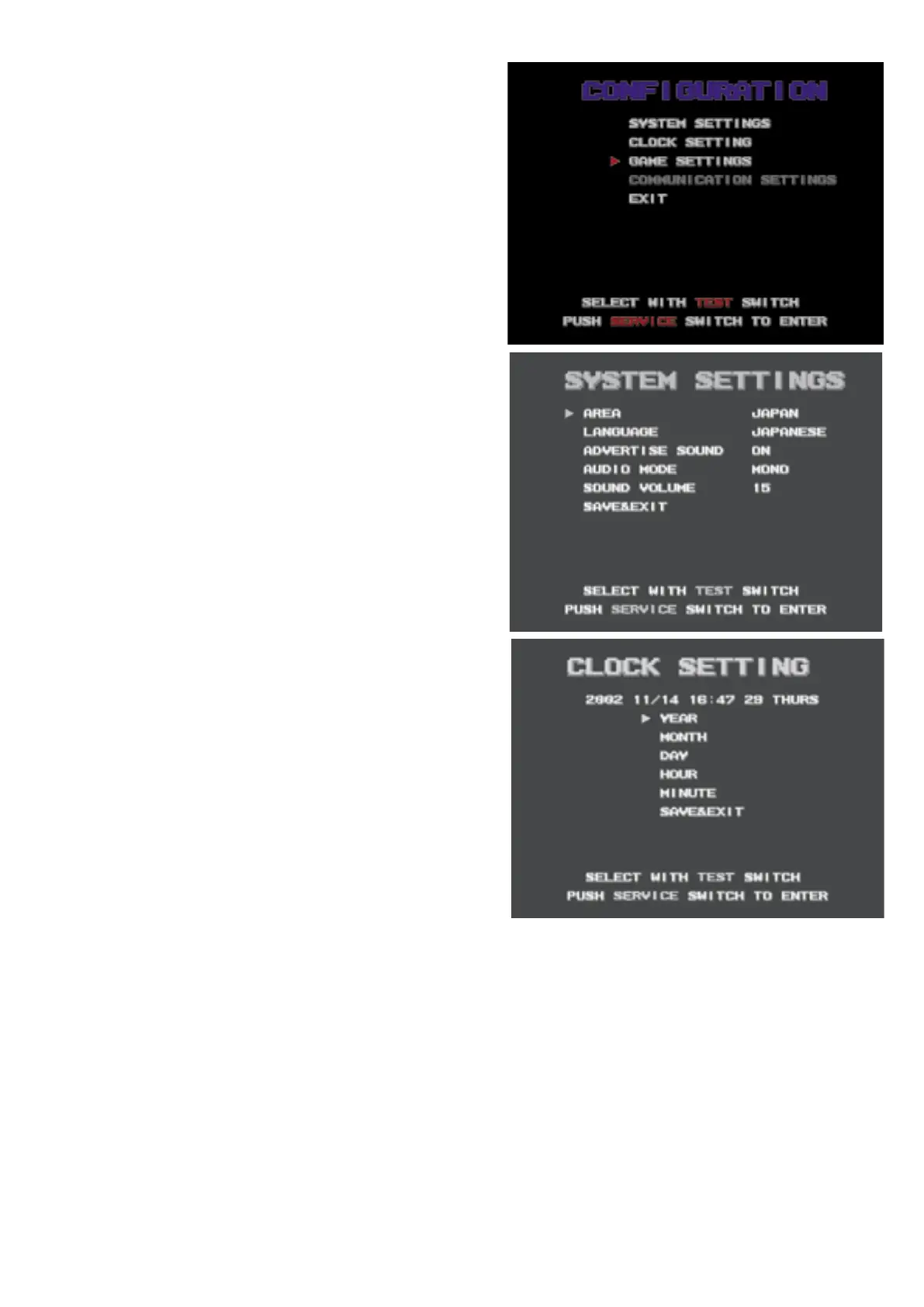
CONFIGURATION
4 kinds of contents.
Contents of COMMUNICATION is
unavailable when game has no
COMMUNICATION feature.
SYSTEM SETTINGS
AREA: Select country of operation.
(JAPAN, NORTH AMERICA, EUROPE or OTHER)
This setting effects factory defaults.
LANGUAGE: Select from following:
(English or Japanese)
ADVERTISE SOUND:
Select to output sound in attract mode.
AUDIO MODE:
Select sound STEREO (OPTION) or MONO.
SOUND VOLUME:
Volume level of sound. Default is "15"
21
CLOCK SETTING
Adjust clock system on Main PCB.
Move cursor then press SERVICE switch
to advance each digit. Press & hold
SERVICE switch more than 1 sec. to
speed it up.
Move cursor to SAVE & EXIT then press
SERVICE switch to go back to SYSTEM
MENU screen.
GAME SETTING
Adjust game setting at this mode.
Move cursor to SAVE & EXIT then press SERVICE switch to go back to
CONFIGURATION.
Select RETURN TO FACTORY SETTINGS to change all settings to
Factory default settings.



 To Next Page