EasyManua.ls Logo

Sammy Mighty Driver - GAME MODES AND SETTINGS; Gameplay and Setting Mode Navigation; DIP Switch Configuration

Default Icon
14 pages
Print Icon
To Next Page IconTo Next Page
To Previous Page IconTo Previous Page
Loading...
GAME
PLAY
t
Insert
coin(s)
or token(s)
.
.
Control
the
Car using
steering wheel
to hit
the
FLAGS.
.
More
FLAGS,
more
tickets.
GAME
SETTING
MODE
HOW
TO
ENTER
THE
GAME
SETTING
MODE
Re-power
on while
pressing
and holding
the RESET
Switch
which
is located
inside
of front
door.
Digits
of 88
are shown
first.
Then
release
the RESET
switch
OFF
to show the
-1
on
2 digits
LED
display
on
Marquee
box"
EE)TH
HOW
TO
SELECT
AND
DEGIDE
EAGH
CONTENTS
After
entering
GAME
SETTING
mode,
press
SERVICE
switch
to
move
the number
of
FUNGTIqTS.
(2
digits
will
be changed
by
pressing
the SERVICE
switch.)
Press
RESET
switch
to
select
it. After
selecting,
display
shows each
setting
numbers.
Press
SERVIGE switch
to move
the number
of SETTINGS. (2
digits
will
be changed
by
pressing
the SERVICE
switch) Press
RESET
switch
to select
it.
RETURN
TO PREVIOUS
MENU
Change
FUNCTIONS
and SETTINGS
to selection
"oo".
Select
these Digits
then
press
RESET
switch
to return
to
previous
menu.
RETURN
TO
GAME MODE
After
selecting
any
SETTINGS,
re-power
on
the
game.
For
the FUNCTIONS
and
SETTINGS,
please
refer
to the
setting
table on next
page.
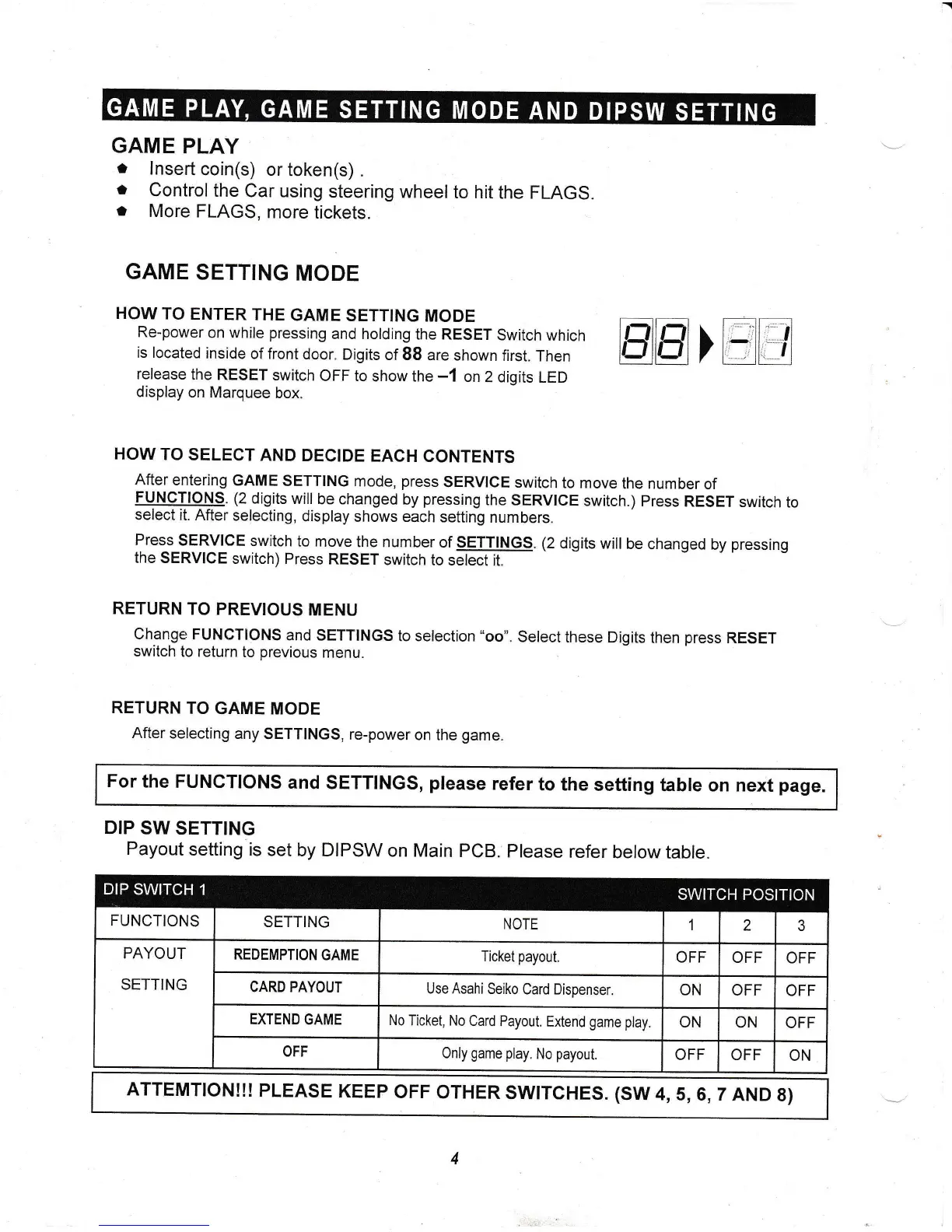
DIP
SW SETTING
Payout
setting
is
set by DIPSW
on Main
PCB.
Please
refer
below
table.
PAYOUT
SETTING
Use Asahi
Seiko
Card Dispenser.
No
Ticket, No
Card
Payout.
Extend
game play
Only
game
play.
No
payout.
ATTEMTION!!!
PLEASE
KEEP
OFF
OTHER
SWITCHES. (SW
4,
5,6,7
AND
8}