EasyManua.ls Logo

Sammy Mighty Driver - Sound Test

Default Icon
14 pages
Print Icon
To Next Page IconTo Next Page
To Previous Page IconTo Previous Page
Loading...
raj-
BELT
MECH.
TEST
(Press
SERVICE
switch
to select
22,lhen
press
RESET switch.)
Spin the Steering
Wheel clockwise
to move
the
BELT forward. Spin
the Steering
Wheelcounter
clockwise
to move
the BELT backward.
Spin
more
to make the
BELT
move faster.
Each
Lamp on
Marquee shows
the function
of each Sensor
on BELT MECH.
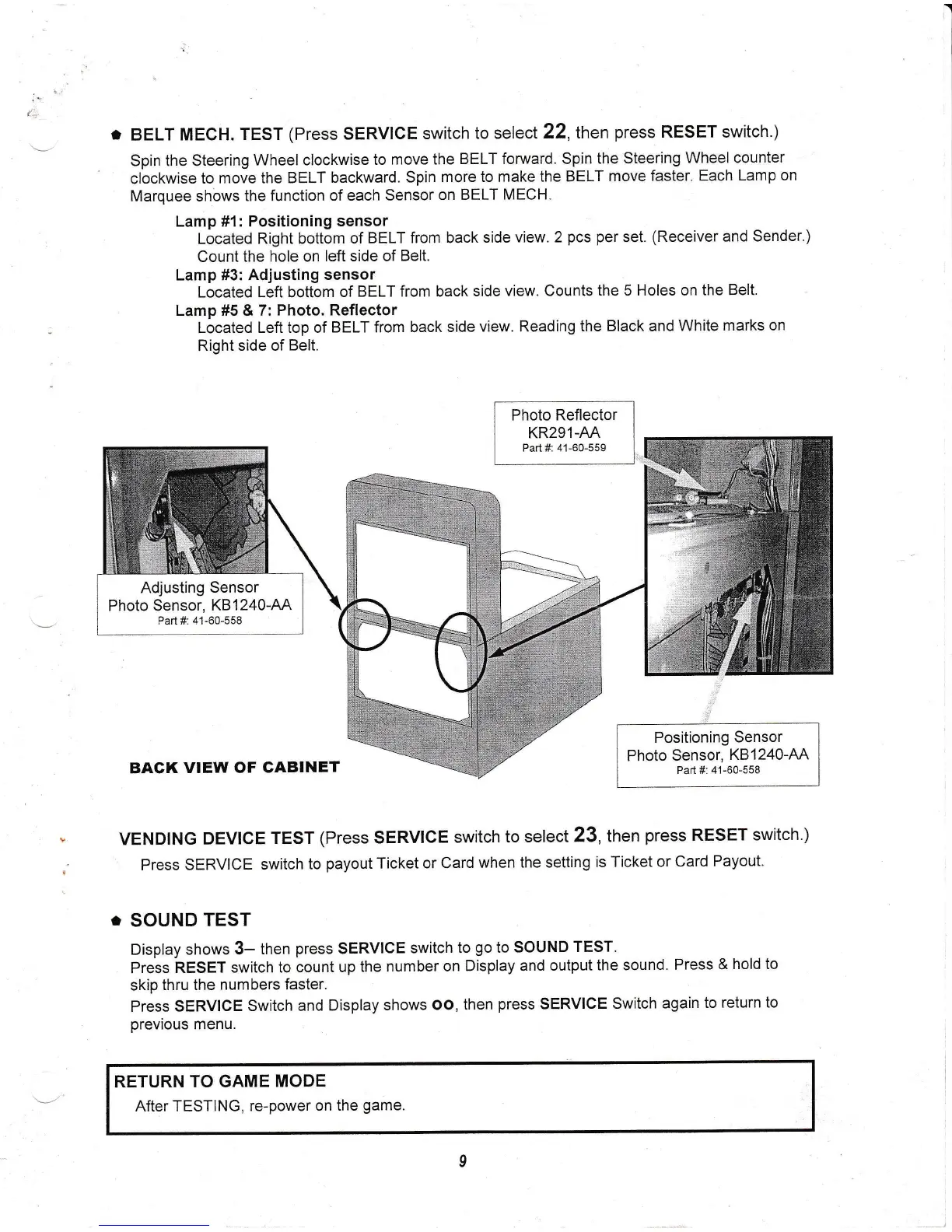
Lamp
#1: Positioning
sensor
Located
Right
bottom
of BELT
from back
side
view. 2
pcs per
set.
(Receiver
and
Sender.)
Count the
hole on
left side of
Belt.
Lamp #3: Adjusting
sensor
Located Left bottom
of
BELT from back
side
view. Counts the 5
Holes on the
Belt.
Lamp #5 & 7: Photo.
Reflector
Located
Left top of
BELT from back
side
view. Reading
the Black and
White
marks on
Right
side of
Belt.
Photo
Reflector
KR291-AA
Part #: 41-60-559
BACK
VIEW OF
CABINET
Positioning
Sensor
Photo
Sensor,
K81240-AA
Part
#:
41-60-558
VENDTNG
DEVICE
TEST
(Press
SERVICE
switch to
select
23, then
press
RESET
switch.)
Press
SERVICE
switch
to
payout
Ticket
or Card
when the
setting
is Ticket
or
Card
Payout.
.
SOUND
TEST
Display
shows 3-
tnen
press
SERVICE
switch to
go
to
SOUND
TEST.
Press
RESET
switch to
count up
the number
on
Display and
output
the sound.
Press
&
hold to
skip
thru
the
numbers faster.
Press SERVIGE
Switch and
Display
shows
oo, then
press
SERVIGE
Switch
again
to
return to
previous
menu.
RETURN
TO GAME
MODE
After TESTING,
re-power
on the
game.
Adjusting
Sensor
Photo Sensor,
KB1240-AA
Part #: 41-60-558