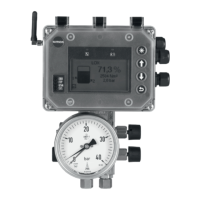
MEMRD = Media 6 reads data from the
memory pen.
MEMRD write protection: turn switch 4
OFF.
Press key to activate selection.
RUN appears in the display,
when DONE appears, the data is saved
and the memory pen can be removed.
MEMRD write protection: turn switch 4 ON.
Data transfer from memory pen to Media 6
Status "read only"
Write protection: turn switch 4 OFF.
Insert memory pen into the SERIAL INTER-
FACE connector.
MEMRD appears at the top of the display.
Press key to start the reading process.
RUN appears in the display,
when DONE appears,
the data is saved in Media 6, the
memory pen can be removed.
Write protection: turn switch 4 ON.
Data transfer from Media 6 to memory pen
Status "write only"
Insert memory pen into SERIAL INTER-
FACE connector.
MEMWR appears at the top of the display.
Press key to start the writing process.
RUN appears in the display,
when DONE appears, the data is saved
in the memory pen, the memory pen
can be removed.
Media 6 with LED
Data transfer from Media 6 to memory pen
(write) and from memory pen to Media 6
(read).
Status "write and read"
Insert memory pen into the SERIAL INTER-
FACE connector.
Short flashing of the LED indicates that
Media 6 reads data from the memory pen
and long flashing means that Media 6
writes data to the memory pen.
or has to be pressed to switch
between the functions Media 6 writes
data to memory pen and Media 6 reads
data from memory pen.
When selecting the function
Media 6 reads data from memory pen:
turn switch 4 OFF.
Press key to activate selection,
the LED is on.
When the LED goes off, remove the
memory pen.
Write protection: turn switch 4 ON.
Data transfer from memory pen to Media 6
Status "read only"
Write protection: turn switch 4 OFF.
Insert memory pen into SERIAL INTER-
FACE connector.
The LED signals short flashes.
Press key to start the reading process,
the LED is on.
When the LED is off, remove the
memory pen.
Write protection: turn switch 4 ON.
EB 9527-1 EN
25
Memory pen – communication



 To Next Page