XP310w • Portable PA System 17
ENGLISH
FRANÇAISDEUTSCHEESPAÑOLITALIANO
The XP310w comes with one CR88a
receiver installed. You can add an additional
CR88a receiver to the system. Follow these
steps to install the receiver.
1. Turn the XP310w POWER off and leave
the AC power cable disconnected until
the installation process is completed.
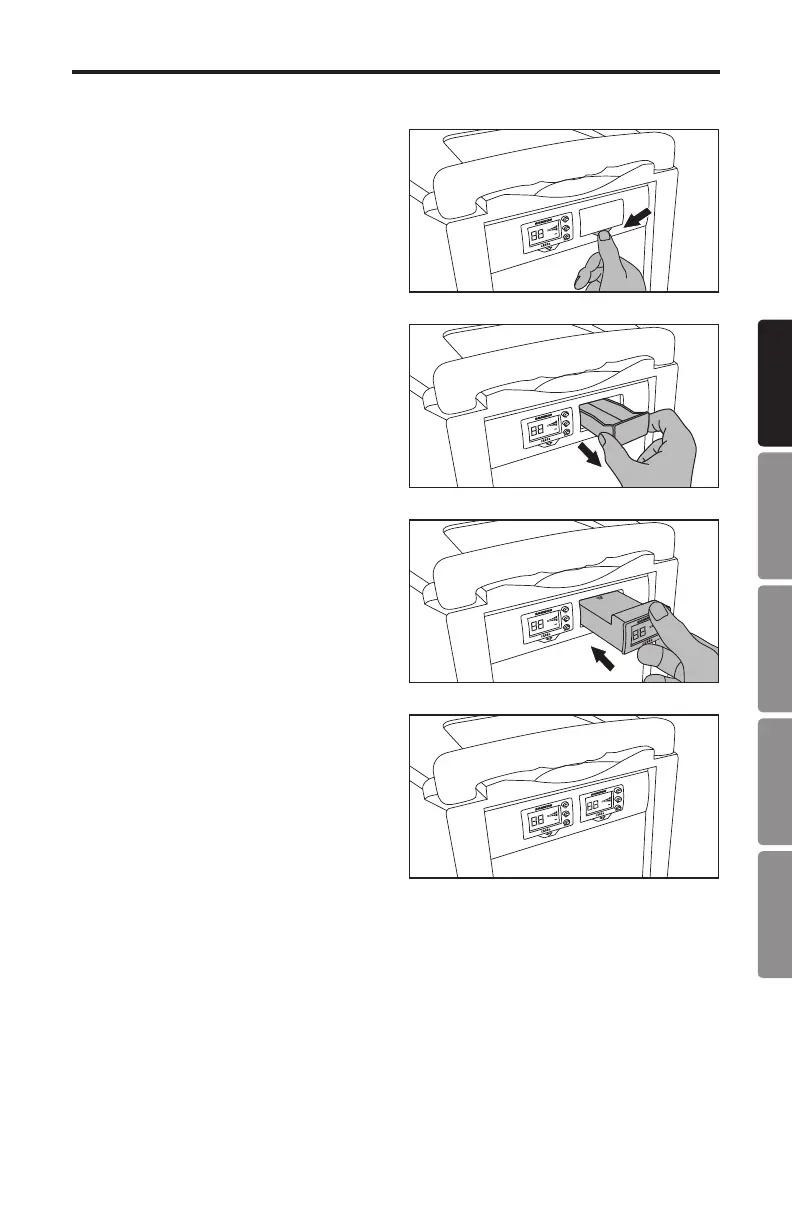
2. Press the button with the arrow under
the blank receiver panel until the panel
pops out (you may need to use a non-
marking tool).
3. Remove the blank panel by sliding it
out of the XP310w.
4. Align the CR88a module with the open
slot and slide the module in until it is
fully seated in the XP310w.
Note: When using multiple systems, each
system must be set to a different operating
channel.
Installing the CR88a Receiver










 To Next Page