7
G Track Quick Start
G Track Quick Start
You will find a detailed description of the G
Track’s controls and functions in the follow-
ing sections of this manual. However, if you
can’t wait to get started, you can follow this
quick start guide. Before you get going it’s
recommended that you follow the instructions
on installing the G Track with either Mac or
Windows OS in the previous sections of this
manual. Once you confirm the G Track is con-
nected to your computer properly, it will be easy
to start recording. The more you learn about G
Track, the more you’ll discover its versatility and
powerful features. There are many ways to use
the microphone, and our quick start example is
for a typical set-up for recording electric guitar
and vocals. Just follow the simple steps below
to start recording.
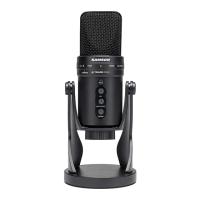
1. Set the G Track up on the included desk stand
or any standard mic stand and ensure it is
secure and stable. Since the microphone is
unidirectional, be sure to face the front side,
with the G Track logo, towards the vocalist.
2. Use the included 1/8-inch to 1/4-inch instru
-
ment cable and connect your guitar to the G
Track’s INST input which is located on the bot-
tom of the microphone.
3. Connect your headphones to the PHONES
output located on the bottom of the G Track,
Note: If your headphones are terminated in
a 1/4-inch plug, use the included 1/8-inch to
1/4-inch extension cable to make the transi-
tion.
4. Plug the B size (small) end of the included
USB cable into USB socket on the bottom of
the G Track, but don’t plug into the computer
USB port just yet.
5. Set all the level controls off by turning them
to their fully counter-clockwise position.
6. Set the Input select switch to INST/MIC, which
will enable you to use the microphone along
with the instrument input.



 To Next Page