Connecting the Resolv A Series
• Lower your mixer’s master outputs to all the way off.
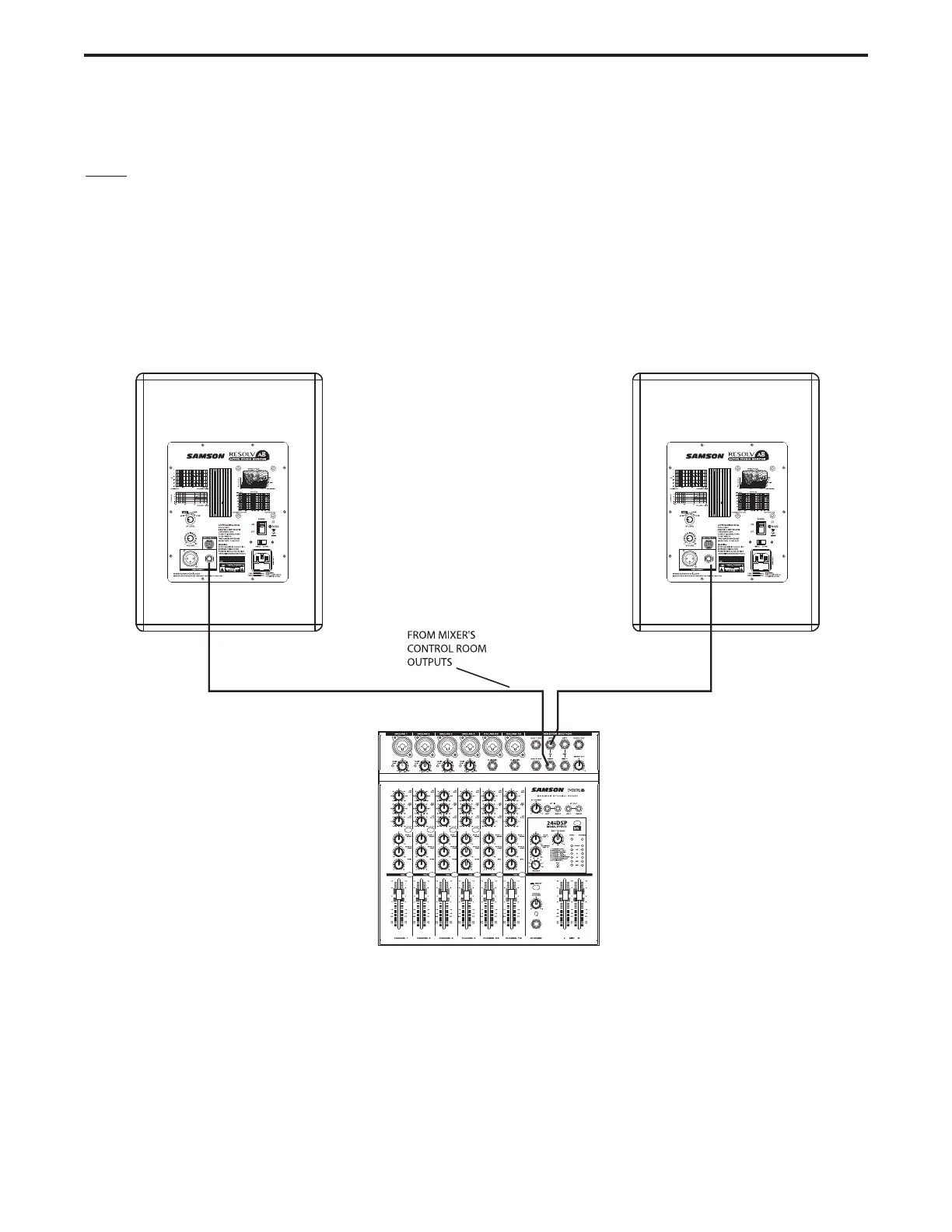
• Connect the mixer’s Left Control Room output to the left-side Resolv A Series LINE INPUT and the
mixer’s Right Control Room output to the right-side Resolv A Series LINE INPUT.
• Set the Resolv A Series input Volume control to the 2 o’clock position.
•
Run an audio signal (like some music from a CD) through your mixer and raise the Control Room level
to a comfortable listening level.
Resolv A Series Quick Connections
Note: Before plugging in and turning on, remember the “last on, first off” rule of power amplifiers (and pow-
ered monitors). When powering up your system, be sure that all the wires are connected, turn your mixer
and any other outboard gear on, and then last turn your Resolv A Series on. When powering down, turn your
Resolv A Series off first and then your mixer and outboard gear.
The Resolv A Series connections can be made via one of the three rear panel Audio Inputs. You can use RCA
inputs for unbalanced -10dBV level signals, or either the 1/4-inch or XLR inputs for balanced, +4dBu level sig-
nals. Follow the simple steps and diagram below for a quick connection using a standard recording console’s
control room outputs.
8




 To Next Page