11
English
03 Basic Features
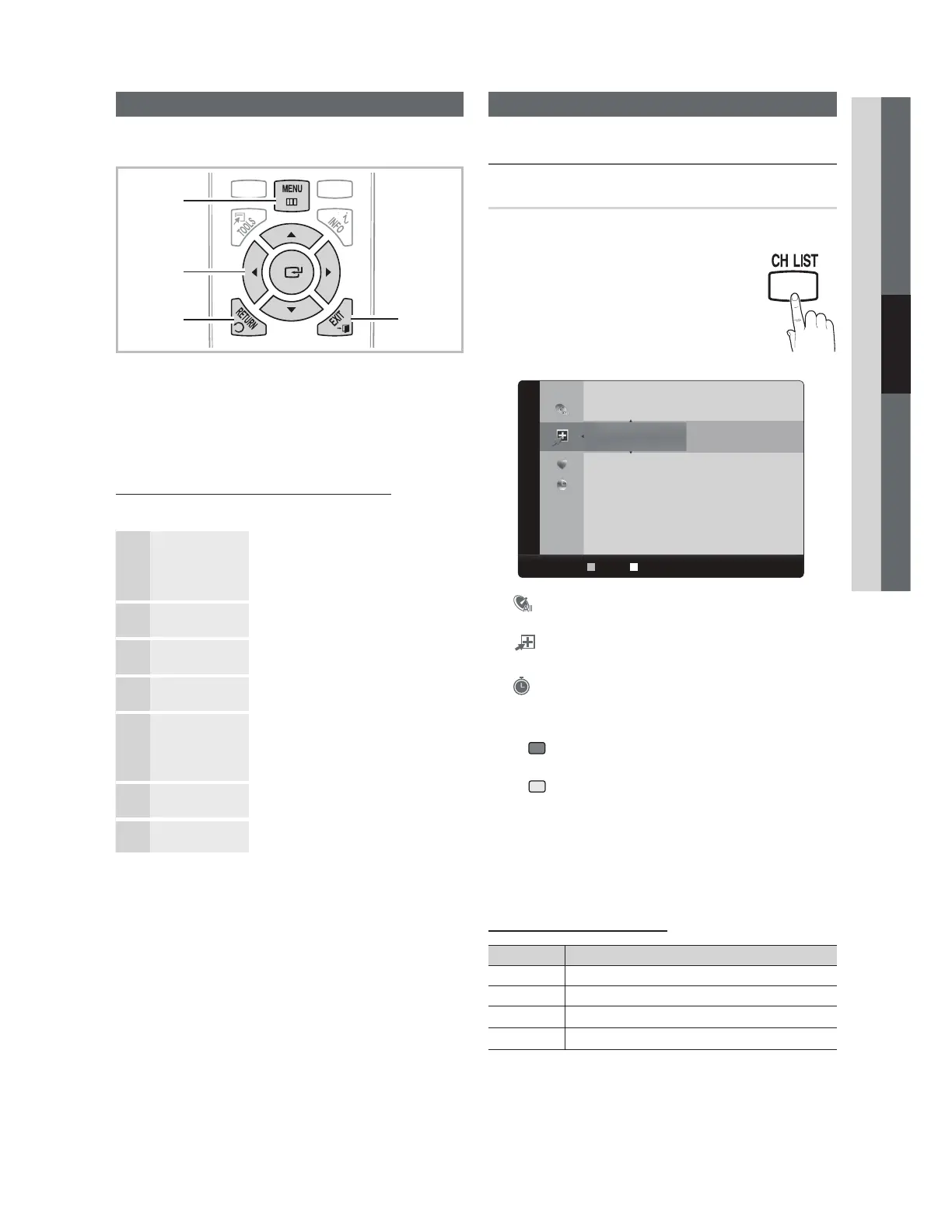
How to Navigate Menus
Before using the TV, follow the steps below to learn how to
navigate the menu and select and adjust different functions.
1 MENU button: Displays the main on-screen menu.
2
ENTER
E
/ Direction button: Move the cursor and
select an item. Confi rm the setting.
3
RETURN button: Returns to the previous menu.
4
EXIT button: Exits the on-screen menu.
How to Operate the OSD (On Screen Display)
The access step may differ depending on the selected menu.
1
MENU
m
The main menu options appear on
the screen:
Picture, Sound, Channel, Setup,
Input, Application, Support.
2
Ÿź Select an icon with the Ÿ or ź
button.
3
ENTER
E
Press ENTER
E
to access the
sub-menu.
4
Ÿź
Select the desired submenu with
the Ÿ or ź button.
5
ŻŹ
Adjust the value of an item with the
Ż or Ź button. The adjustment in
the OSD may differ depending on
the selected menu.
6
ENTER
E
Press ENTER
E
to confi rm the
selection.
7
EXIT
e
Press EXIT.
Channel Menu
¦ Seeing Channels
Channel List
O
MENU
m
ĺ Channel ĺ Channel List ĺ ENTER
E
Add, delete or set Favorite channels and use
the program guide for digital broadcasts.
Select a channel in the All Channels, Added
Channels, Favorite or Programmed
screen by pressing the Ÿ / ź buttons, and
pressing the
ENTER
E
button. Then you
can watch the selected channel.
Added Channels
6 Air
Ɔ79
Ɔ79
8 Air
9 Air
Ɔ79
10 Air
Ɔ79
Ɔ79
Air
B
Zoom
C
Select T Tools
■ All Channels: Shows all currently available
channels.
■
Added Channels: Shows all added channels.
■
*
Favorite: Shows all favorite channels.
■
Programmed: Shows all currently reserved
programs.
✎
Using the color buttons with the Channel List
x
Green (Zoom): Enlarges or shrinks a channel
number.
x
Yellow (Select): Selects multiple channel lists.
Select desired channels and press the Yellow button
to set all the selected channels at the same time. The
c
mark appears to the left of the selected channels.
x
T
(Tools): Displays the Channel List option menu.
(The Options menus may differ depending on the
situation.)
Channel Status Display Icons
Icons Operations
c
A channel selected.
*
A channel set as a Favorite.
)
A reserved program.
(
A program currently being broadcast.
.
FAV.
H
1
3
4
2
Basic Features



 To Next Page