4
Getting Started
English
List of Features
Excellent Digital Interface & Networking: With a built-in HD digital tuner, nonsubscription HD broadcasts can be viewed y
without a cable box / STB (Set-Top-Box) satellite receiver.
Media Play y : Allows you to play music files, pictures, and movies saved on a USB or your PC. (P. 31)
AllShar
e y : AllShare connects your TV and compatible Samsung mobile phones/devices through a network. (P. 41)
Self Diagnosis y : You can check picture and sound operation. (P. 22)
Accessories
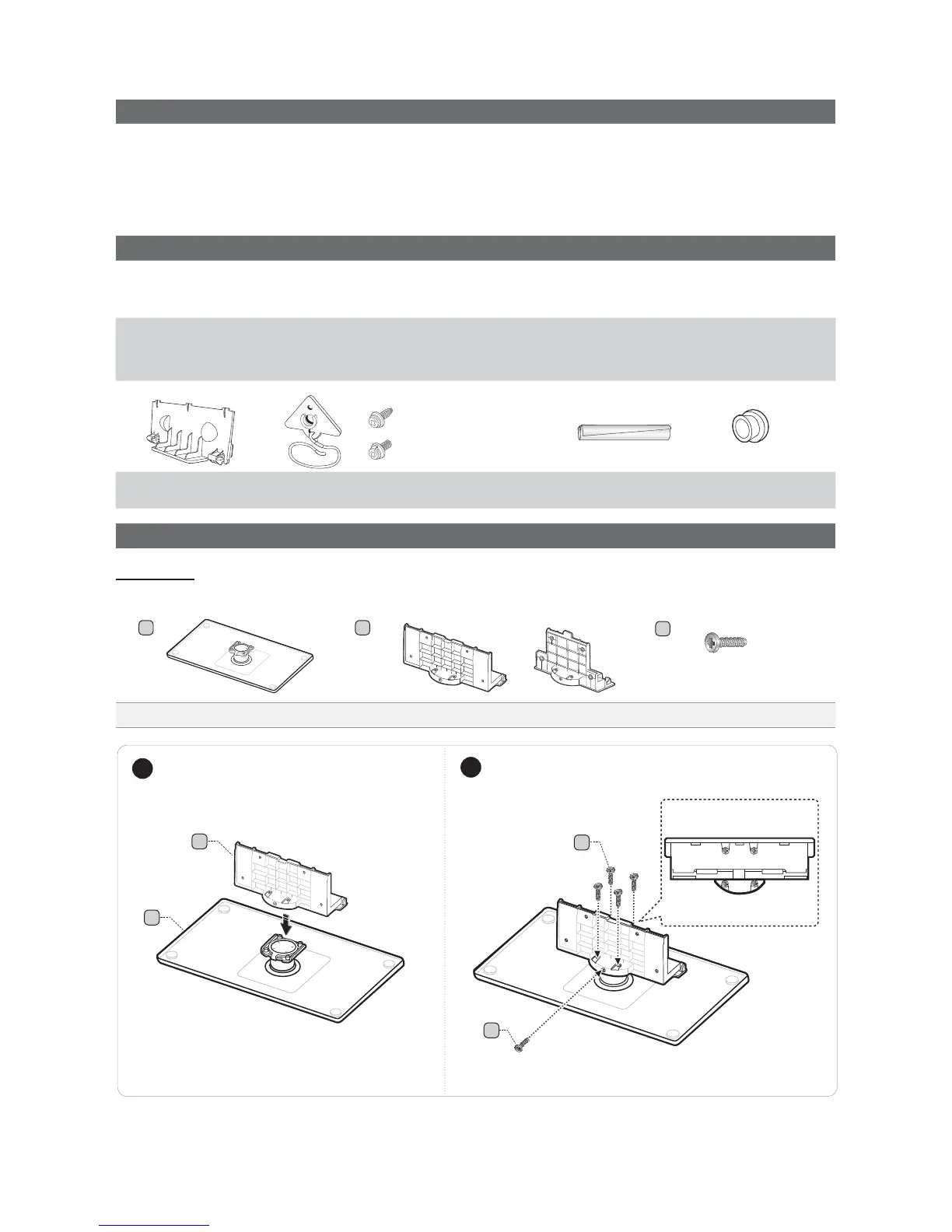
Please make sure the following items are included with your LCD TV. If any items are missing, contact your dealer.
The items' colors and shapes may vary depending on the models.
Remote Control (BN59-01041A) & Batteries (AAA x 2) y
Owner’s Instructions y
W
arranty Card / Safety Guide / Quick Setup Guide y
Cleaning Cloth (BN63-01798B) y
Power Cord y
Blanking Bracket y
(BN63-06339A)
TV-Holder & Screw y
(M8: BN96-10788B / M6: BN96-10788C)
Cable Tie y
(BN61-05596A)
Holder-Ring (4ea) y
(BN61-04529A )
Installing the LCD TV Stand
Components
When installing the stand, use the provided components and parts.
Stand Guide Stand Screws
A B
C
9EA (M4 X L12)
1 EA 1 EA
or
1
2
C
Top View
C
4EA
1EA
B
Front
Rear
A
(M6 X 16 : 40 inch TV)
(M8 X 19 : 46 ~ 55 inch TVs)
(46 ~ 55 inch TVs)






 To Next Page