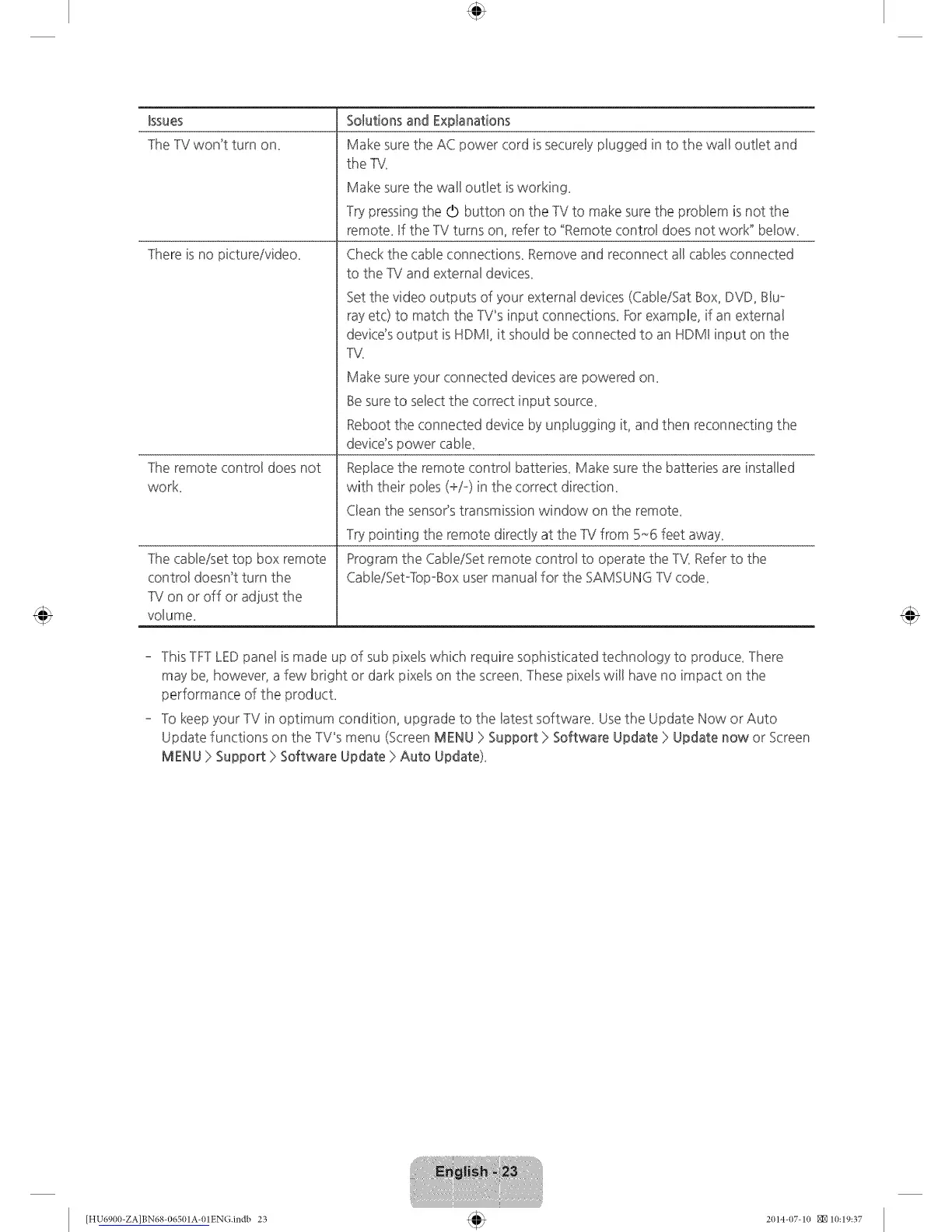
Issues
TheTV won't turn on_
]here is no pictureivideo_
]he remote controBdoes not
work
]he cabBeisettop box remote
control doesn't turn the
TV on or off or adjust the
voBume_
Solutions and Explanations
Make sure the AC power cord is secureBypBuggedin to the wall ouSet and
the ]V.
Make sure the wall oudet isworking_
Try pressing the O button on the TV to make sure the probBem is not the
remote_ If the TV turns on, refer to "Remote control does not work" be!ow_
Check the cabBeconnections_ Remove and reconnect aHcabBesconnected
to the TV and externaBdevices_
Set the video outputs of your external devices (Cable/Sat Box, DVD, Blu°
ray etc) to match the TV_sinput connections_ Forexample, if an external
device's output isHDMI, it should be connected to an HDMI input on the
]V.
Make sure your connected devices are powered on_
Besure to select the correct input source_
Reboot the connected device by unplugging it, and then reconnecting the
device's power cable_
Replacethe remote control batteries_ Make sure the batteries are installed
with their poles (+/-) in the correct direction_
Clean the sensor's transmission window on the remote_
Try pointing the remote directly at the TV from 5,-6 feet away_
Program the Cable/Set remote control to operate the ]'_( Refer to the
CableiSet°]bp°Box user manual for the SAMSUNG TV code_
- ]his TFTLEDpanel is made up of sub pixels which require sophisticated technology to produce_ ]here
may be, however, a few bright or dark pixeg on the screen_These pixels will have no impact on the
performance of the producL
- To keep your TV in optimum condition, upgrade to the latest software_ Usethe Update Now or Auto
Update functions on the TV_smenu (Screen MENU > Support > Software Update > Update now or Screen
MENU > Support > Software Update > Auto Update)_
[HU6900-ZA]BN68-06501A-01ENG.indb 23 2014-07-10 _10:19:37









 To Next Page