Mounting the TVon a Watt Usingthe Wal! Mount Kit
(Optional}
ff you mount this product on a wall. it should be mounted only as recommended by the
manufacturen Unless it is correctly mounted, the product may sBideor fall. causing serious
injury to a child or aduBLand serious damage to the producL
Installing the Wall Mount Kit
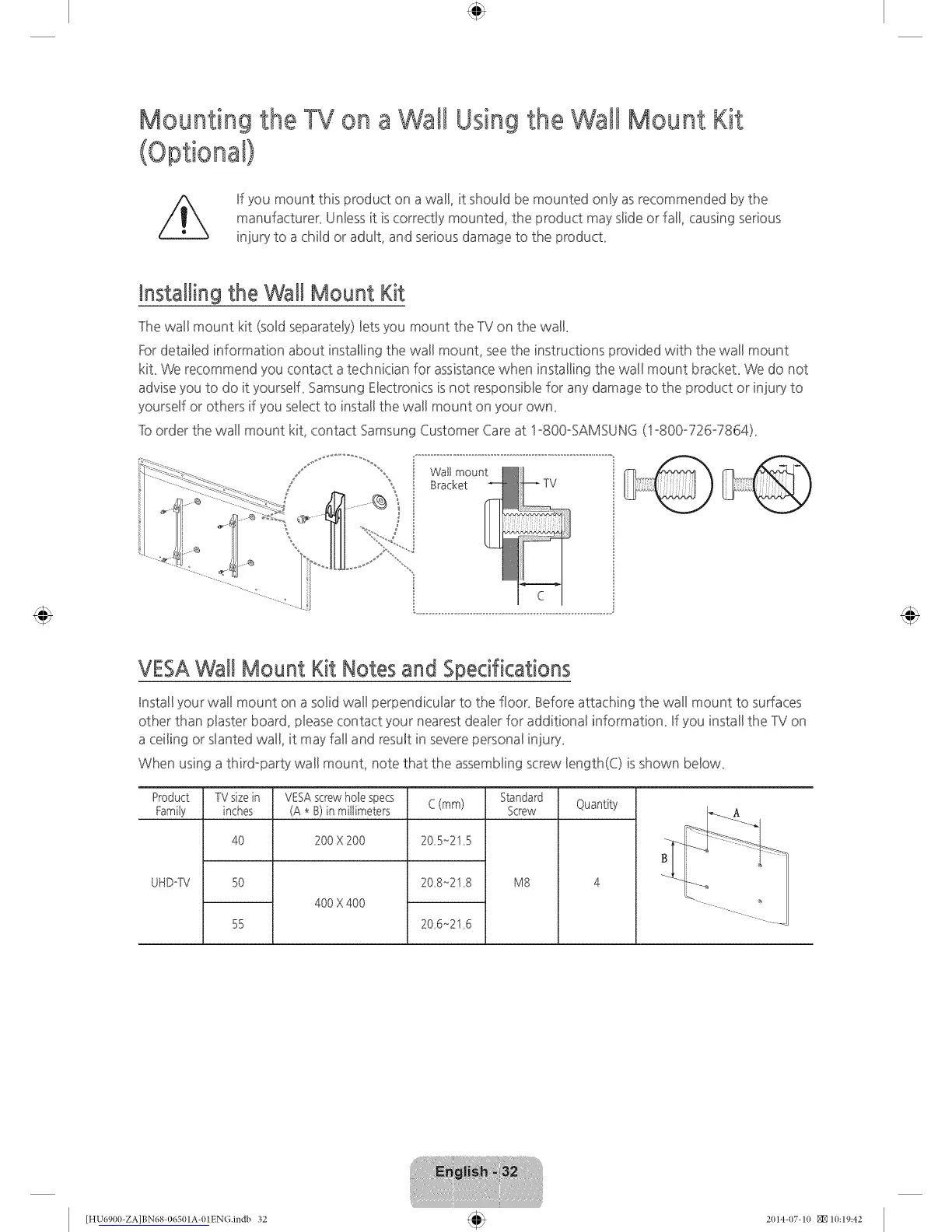
The wall mount kit (soBdseparateBy)Betsyou mount the TV on the wall
Fordetailed information about installing the wal! mounL see the instructions _rovided with the wall mount
kiL We recommend you contact a technician for assistancewhen installing the wall mount brackeL We do not
advise you to do it yourselL Samsung Electronics is not responsible for any damage to the product or injury to
yourself or others if you select to install the wall mount on your owm
]b order the wall mount kit, contact Samsung Customer Care at lo800oSAMSUNG (1o800o726°7864)_
Watt mount
Bracket
VESAWall Mount Kit Notes and Specifications
Install your wal! mount on a solid wall perpendicular to the floon Before attaching the wall mount to surfaces
other than plaster board, pleasecontact your nearest dealer for additional information_ If you install the TV on
a ceiling or slanted wall, it may fall and result in severe personal injury_
When using a third-party wall mount, note that the assembling screw length(C) is shown below_
Product
Family
UHDoW
TVsizein
inches
4O
5O
55
VESAscrewhole specs
(A * B)in millimeters
200 X 200
400 X 400
C (mm)
20 5_215
20 8_218
20 6_216
Standad
Screw
M8
Quantity
[HU6900-ZA]BN68-06501A-01EN(}.indb 32 2(114-(17-1(I _10:19:42









 To Next Page