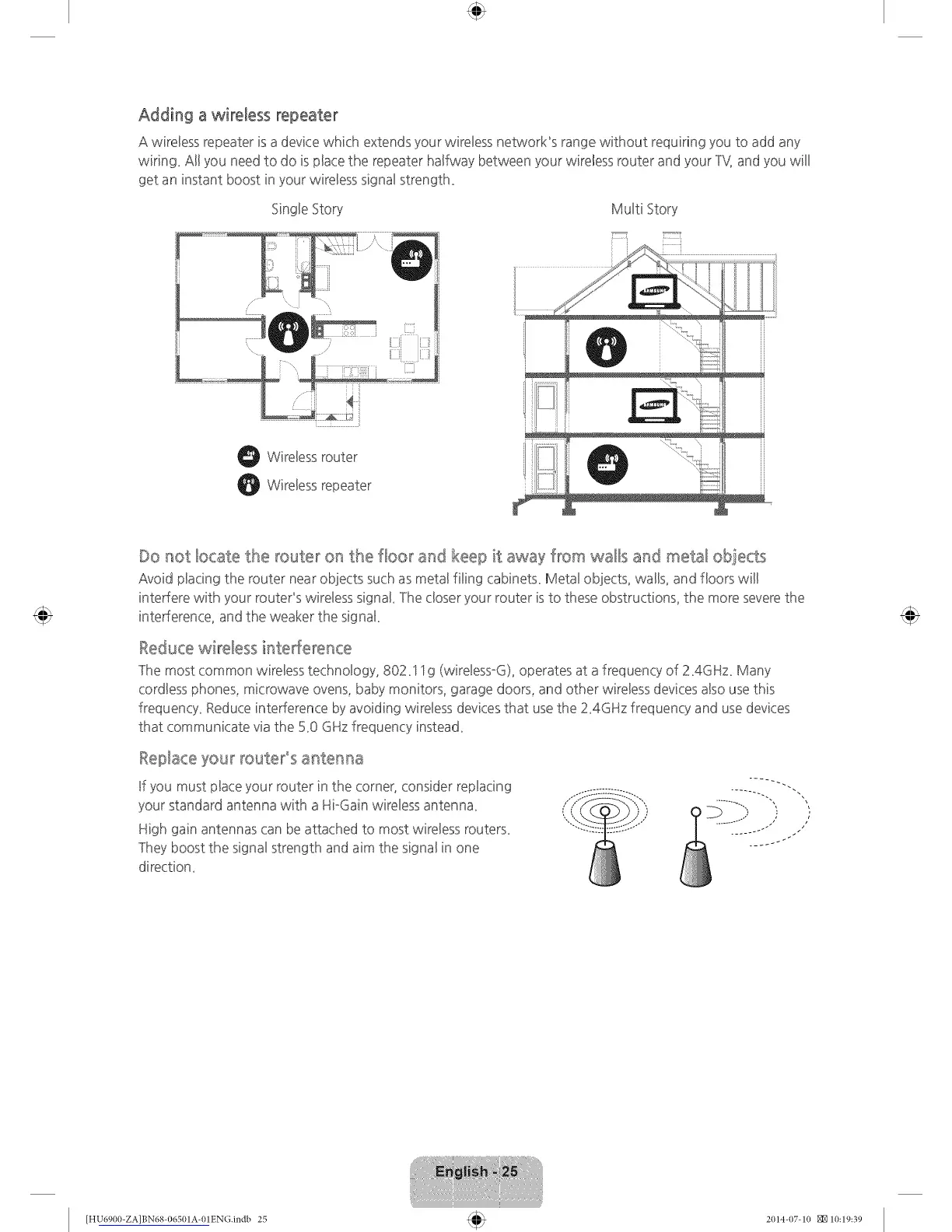
Adding a wireless repeater
A wireless repeater is a device which extends your wireless network_s range without requiring you to add any
wiring. Al! you need to do is pbce the repeater halfway between your wireBessrouter and your ]'_{ and you will
get an instant boost in your wireBesssignal strength.
Single Story MuBti Story
O WireBessrouter
WireBessrepeater
Do not locate the router on the floor and keep it away from walls and metal obiects
Avoid placing the router near ob]ects such as metal filing cabinets. Metal ob]ects, walls, and floors wil!
interfere with your routePs wireless signak ]he closer your router is to these obstructions, the more severethe
interference, and the weaker the signak
Reducewireless interference
]he most common wireless technology, 802.S Sg (wireless°G), operates at a frequency of 2.4GHz. Many
cordless phones, microwave ovens, baby monitors, garage doors, and other wireless devices also use this
frequency. Reduce interference by avoiding wireless devicesthat use the Z4GHz frequency and use devices
that communicate via the 5.0 GHz frequency instead.
Replace your route_'°s a_ttermaa
If you must place your router in the corner, consider replacing
your standard antenna with a HioGainwireless antenna.
High gain antennas can be attached to most wireless routers.
]hey boost the signal strength and aim the signal in one
direction.
[HU6900-ZA]BN68-06501A-01EN(].indb 25 2014-07-10 NN10:19:39









 To Next Page