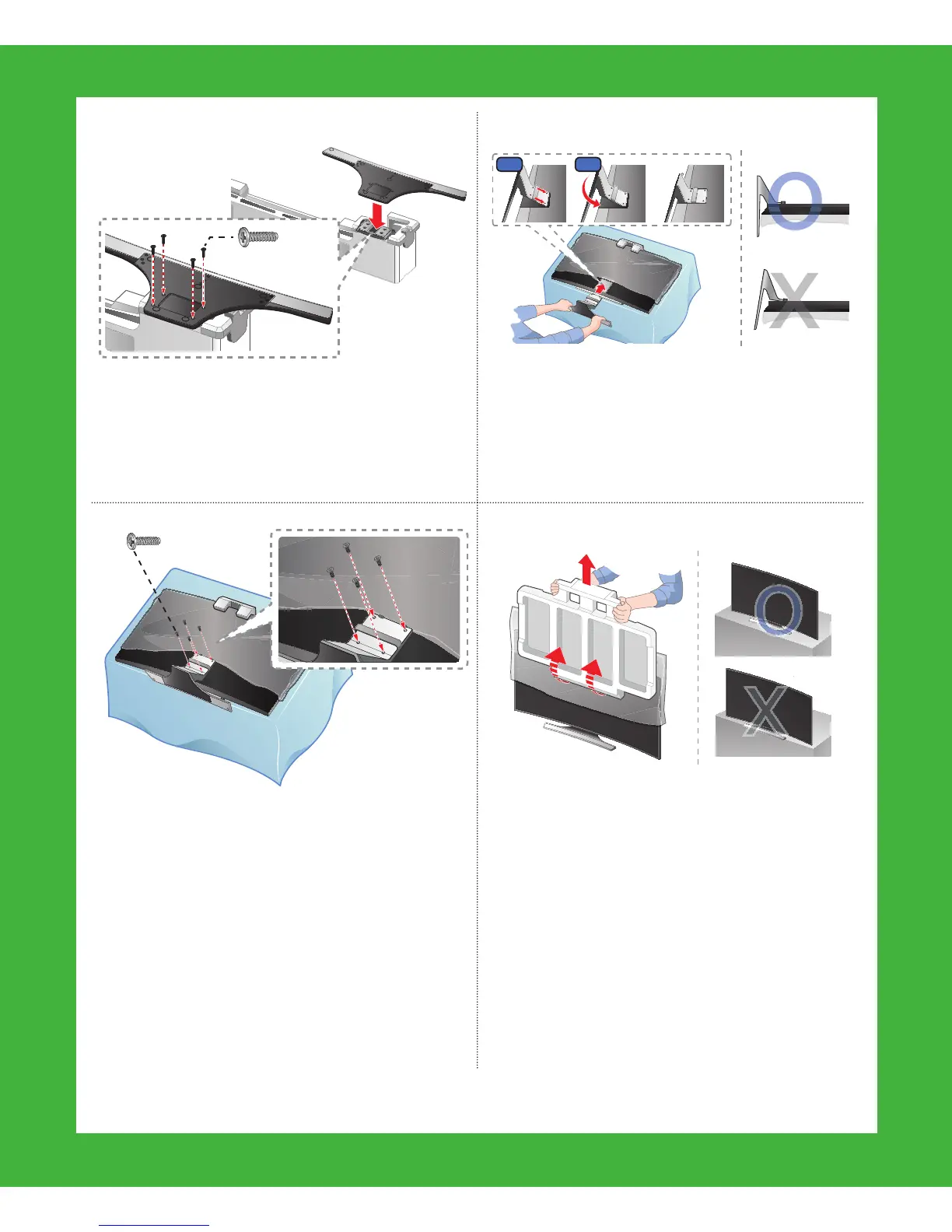
x4 (M4 X L12)
6-26-1
5 Insert 4 screws, and then use a
screwdriver to secure the Base to the
Stand Mount.
6 Holding the stand parallel to the
screen, slide the Mount into the
notches on the back of the TV.
x4 (M4 X L12)
7 Insert 4 screws, and then use a
screwdriver to secure the stand to the
TV.
✎
To assemble the wall mount, use
the styrofoam that came with
the TV’s packaging to protect it.
Lay the TV down and attach the
screws.
8 After attaching the stand, set the
TV upright, and then remove the
Styrofoam from the front of the TV. Do
not place the TV at the edge of any
piece of furniture (table, entertainment
center, etc.). It could fall and break or
cause personal injury.





 To Next Page