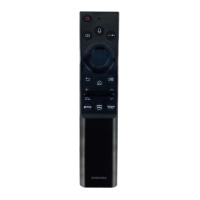
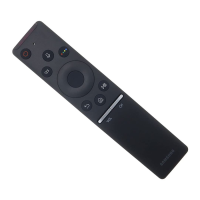
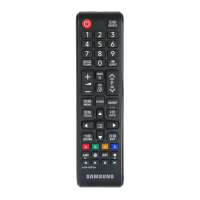
This document describes a replacement remote control for Samsung AA5900818A and TM1240 models, offered by Mandis Shop. The replacement remote aims to replicate the functionality of the original remote, providing a comprehensive set of controls for various television functions.
Function Description
The remote control is designed to operate a Samsung television, offering a wide range of functions categorized into basic navigation, channel and volume control, media playback, and smart TV features.
Basic Navigation and Power Control:
- Power (ن): Turns the television on or off.
- Source (SOURCE): Selects the input source (e.g., TV, DVD, SAT, AUX). The replacement remote features a dedicated "SRC" button for this.
- Number Buttons (0-9): Directly input channel numbers or other numerical data.
- Vol+ / Vol-: Adjusts the volume up or down. The replacement remote uses "VOL+" and "VOL-" buttons.
- PR+ / PR- (CH+ / CH-): Changes channels up or down. The replacement remote uses "CH+" and "CH-" buttons.
- Mute (MUTE): Silences or restores the audio.
- Menu (MENU): Accesses the main menu of the television.
- Home (HOME): Returns to the smart TV home screen or main interface.
- Tools (TOOLS): Provides access to additional settings or quick functions.
- Info (INFO): Displays information about the current program or input.
- Exit (EXIT): Exits the current menu or function.
- Back (BACK): Navigates back to the previous screen or menu.
- OK: Confirms selections or opens menus.
- VOD (Video On Demand): Likely a shortcut to video streaming services or on-demand content.
- Content (CONTENT): Accesses various content options, potentially including media libraries or apps. The replacement remote uses "MEDIA" for this function.
- OPT+ (OPT+): Opens additional options or settings related to the current function.
- TTX/MIX (TEXT): Activates or deactivates Teletext. The replacement remote uses "TEXT" for this.
- Guide (EPG): Displays the Electronic Program Guide. The replacement remote uses "EPG" for this.
- 3D (WIDE): Toggles 3D display mode or screen aspect ratio. The replacement remote uses "WIDE" for this.
- Subt. (SUBT.): Activates or deactivates subtitles.
- Play (►): Starts media playback.
- Pause (II): Pauses media playback.
- Stop (■): Stops media playback.
- Rewind (◄◄): Rewinds media playback.
- Fast Forward (►►): Fast forwards media playback.
- Previous Track (I◄◄): Skips to the previous track or chapter.
- Next Track (►►I): Skips to the next track or chapter.
The remote includes four color-coded buttons (Red, Green, Yellow, Blue) which typically correspond to specific functions within menus or smart TV applications.
- Red (A): Often used for "Red (A)" functions.
- Green (B): Often used for "Green (B)" functions.
- Yellow (C): Often used for "Yellow (C)" functions.
- Blue (D): Often used for "Blue (D)" functions.
Additional Features:
- SHIFT: A modifier key, likely used in conjunction with other buttons to access secondary functions.
- TV, DVD, SAT, AUX: Dedicated buttons for selecting specific input sources.
- P/C (P/C): Likely a picture mode or aspect ratio control.
- FAV (FAV): Accesses favorite channels or content.
- CH.List (CH LIST): Displays the channel list.
- Alarm (ALARM): Sets or manages alarms. The replacement remote uses "Audio" for this, suggesting a potential remapping or a different primary function.
- Clock (CLOCK): Displays or sets the clock.
Usage Features
The Mandis replacement remote is designed for ease of use, aiming for a direct one-to-one replacement experience without requiring complex setup.
- No Programming Required: The replacement remote is pre-programmed to work with the specified Samsung models (AA5900818A and TM1240) right out of the box. This eliminates the need for manual code entry or synchronization processes, making it user-friendly for immediate use.
- Familiar Layout: The layout of the replacement remote closely mirrors that of the original, ensuring that users can intuitively find and operate functions without a steep learning curve. The button shapes and arrangements are largely consistent.
- Durable Construction: While not explicitly stated, replacement remotes are typically built with durable plastic to withstand daily use and accidental drops, similar to original equipment.
- Battery Operated: Like most remote controls, it operates on standard batteries (usually AAA or AA, though not specified in the document), making it portable and easy to power.
Important Technical Specifications
While specific technical specifications like infrared frequency, range, or power consumption are not detailed in the provided document, the core technical aspect is its compatibility.
- Compatibility: The remote is specifically designed as a replacement for Samsung models AA5900818A and TM1240. This implies that its infrared (IR) codes are identical or functionally equivalent to those of the original remotes, ensuring seamless communication with the target televisions.
- Infrared (IR) Technology: Like most television remotes, it operates using infrared signals to transmit commands to the television. This requires a clear line of sight between the remote and the TV's IR receiver.
Maintenance Features
Maintenance for this type of remote control is minimal and straightforward.
- Battery Replacement: The primary maintenance task is replacing the batteries when they run low. The remote is designed for easy access to the battery compartment, typically located on the back.
- Cleaning: The remote can be cleaned with a soft, dry cloth to remove dust and grime. For stubborn dirt, a slightly damp cloth with mild soap can be used, ensuring no liquid enters the internal components.
- Durability: The robust design of the remote means it should withstand typical household use. Avoiding extreme temperatures, direct sunlight, and exposure to liquids will prolong its lifespan.
In summary, the Mandis replacement remote control for Samsung AA5900818A and TM1240 offers a practical and immediate solution for users needing to replace their original remote. Its design prioritizes ease of use, direct compatibility, and comprehensive functionality, mirroring the original experience without requiring complex setup.

 Need help?
 General





 To Next Page