Samsung Electronics 4-19
4-3-1 Setting an indoor unit address and installation option
4-3-1-1 The procedure of setting option
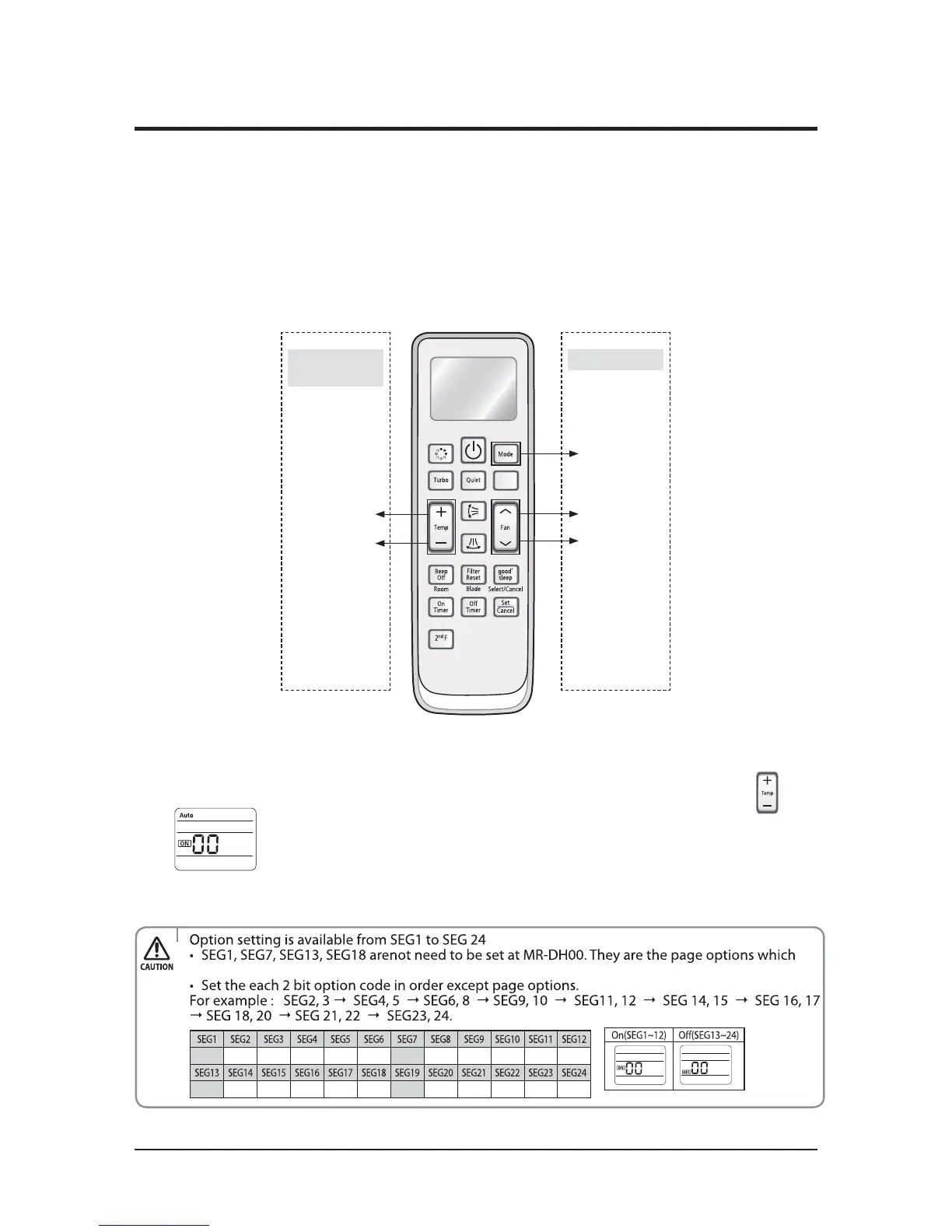
High Temp Button
High Fan Button
Mode change
Low Temp Button
Low Fan Button
Entering mode for
setting option
Option setting mode
ඖ
GG
Set the indoor unit address and installation option with remote controller option.
Set the each option separately since you cannot set the ADDRESS setting and indoor unit installation setting option at the
same time.You need to set twice when setting indoor unit address and installation option.
ඖ
G
Please use the proper wireless remocon which can set 24 digit option code. Following is the instructions of setting option
GGG
code with wireless remocon of MR-DH00. (MR-AH01 can be used for operating but cannot be used for setting the installation
GG
GGG
option because only 12 digit option setting is available.
ඖ
G
Please refer to the wired remocon installation manual for setting with the wired remocon.
Step 1. Entering mode to set option
1. Remove batteries from the remote controller.
2. Insert batteries and enter the option setting mode while pressing High Temp button and Low Temp button.
3. Check if you have entered the option setting status.
Step 2. The procedure of option setting
After entering the option setting status, select the option as listed below.
were used at the previous other remocons.
0XXXXX1XXXXX
2XXXXX3XXXXX



 To Next Page