5
English
At a GlanceAt a Glance
At a Glance
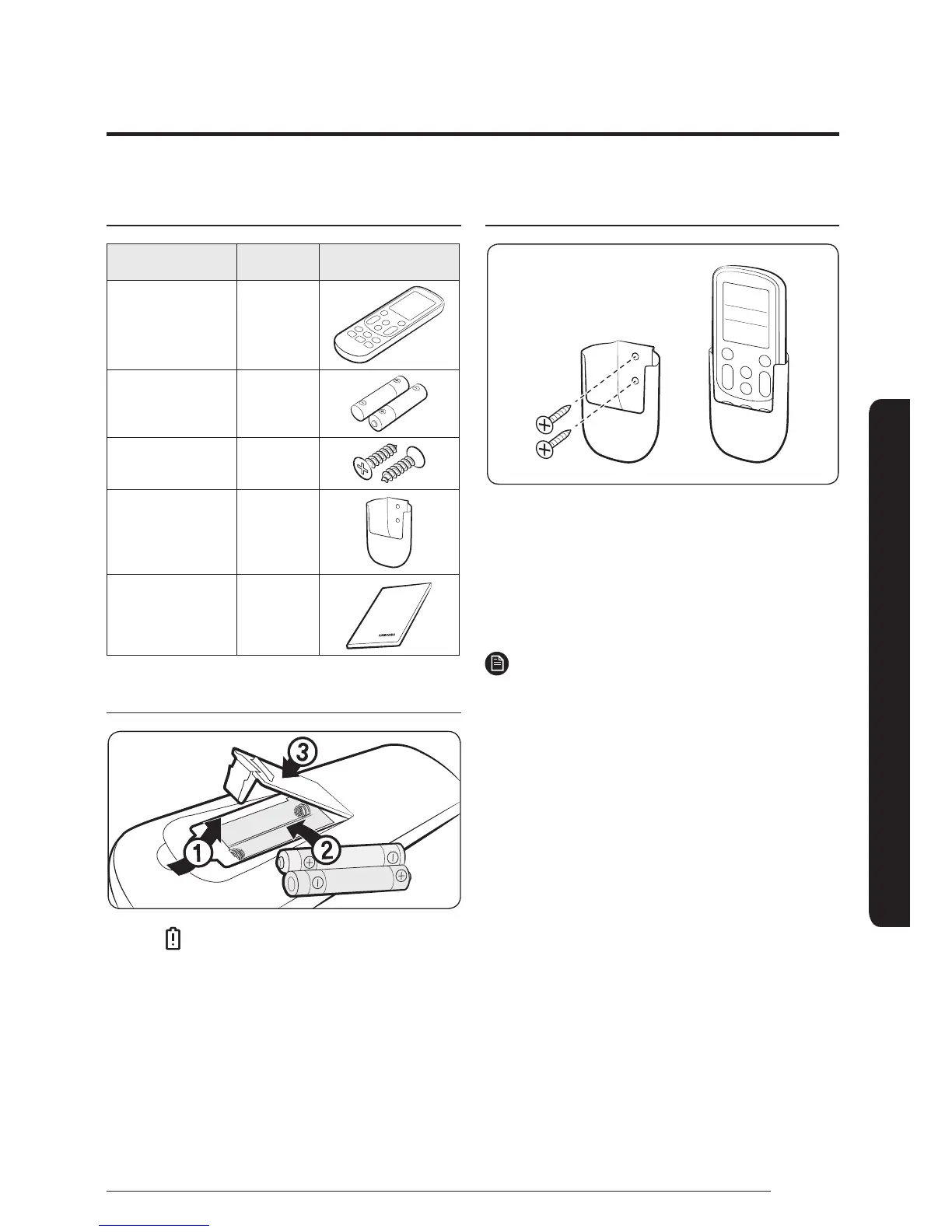
Checking the package contents
Item Quantity Shape
Wireless remote
control
1
Battery
(AAA 1.5 V)
2
M4 x L16
screw
2
Remote control
holder
1
User Manual 1
Inserting batteries
࡙ If the (Low battery) indicator appears on the
remote control display, replace the batteries with
two new AAA 1.5V batteries.
Installing the remote control holder
1 Choose a location on the wall where to install the
remote control holder.
2 Mark the two spots for fastening the two M4 x
L16 screws. Then drill the two holes.
3 Fasten the screws through the holes to fix the
remote control holder in place.
NOTE
࡙ Installation location requirements:
ࣚ Avoid locations exposed to direct sunlight.
ࣚ Avoid locations where the holder is covered by
objects such as curtains.
ࣚ Choose a location that is at least 1 m away from
a TV or stereo system.
࡙ If the remote control will not be used for an
extended period of time remove the batteries and
store them separately.
Preparation







 To Next Page