32 English
Setting the Menu
1. Press the MENU button.
The home menu will be displayed.
2. Press the ◄► buttons to select the desired
home menu, then press the ENTER button.
3. Press the ▲▼ buttons to select the desired
submenu, then press the ENTER button.
4. Press the ▲▼ buttons to select the desired
item, then press the ENTER button.
5. Press the EXIT button to exit the menu.
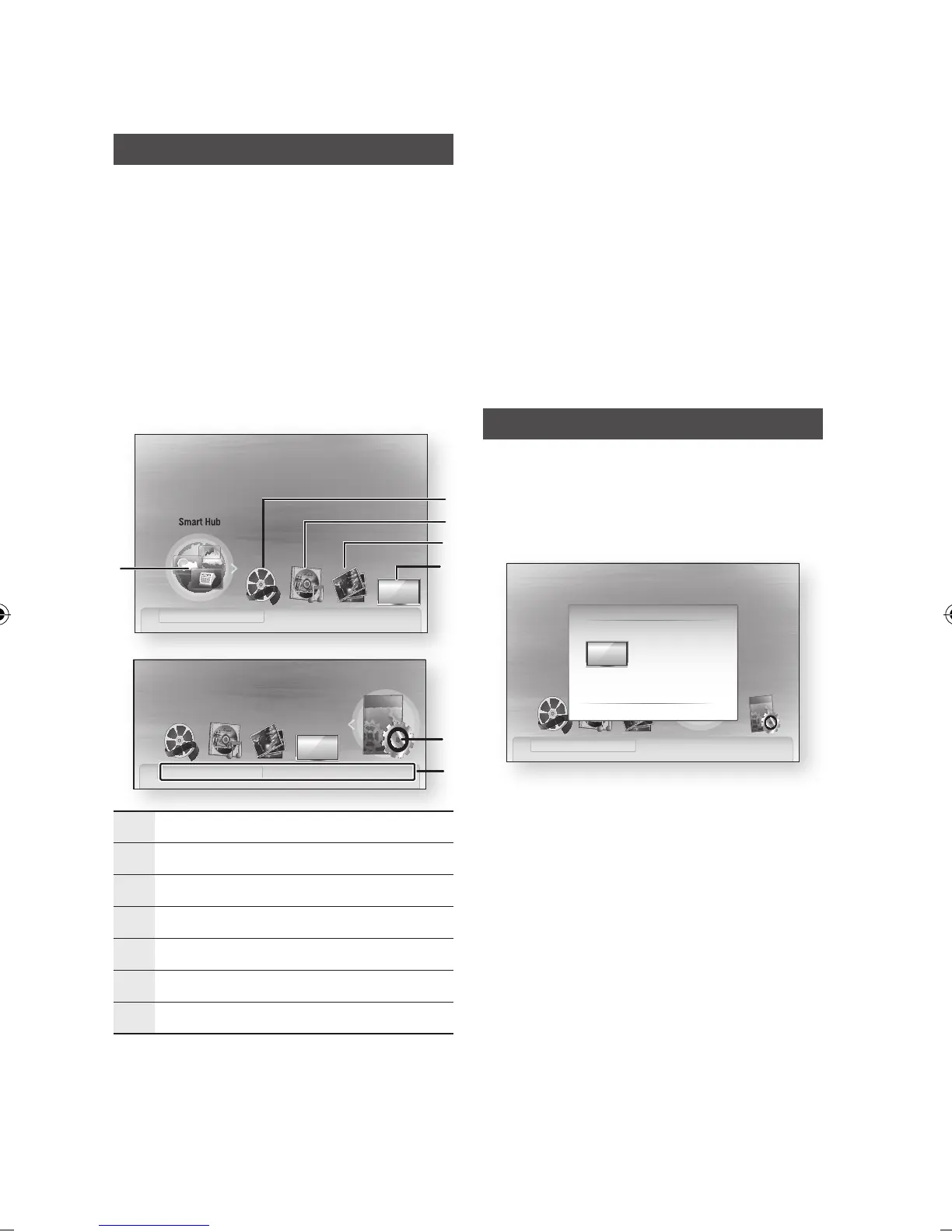
• Home Menu
1
Selects the Smart Hub.
2
Selects the Videos.
3
Selects the Music.
4
Selects the Photos.
5
Selects the Channels.
6
Selects the Settings.
7
Displays the buttons available.
✎
NOTE
`
When you return to home menu, the full screen
mode will be cancelled automatically.
`
The access step may differ depending on the
selected menu.
`
The OSD (On Screen Display) may change in this
product after upgrading the software version.
`
When the product is connected to the network,
select Smart Hub from the home menu.
Download desired content from Samsung Apps.
(See page 64)
Channels
1. Press the MENU button.
The home menu will be displayed.
2.
Press the ◄► buttons to select the Channels,
then press the ENTER button.
3. Press the ▲▼ buttons to select the desired
submenu, then press the ENTER button.
4. Press the ▲▼ buttons to select the desired
item, then press the ENTER button.
5. Press the EXIT button to exit the menu.
Settings
d View Devices " Enter
7
6
No Disc a Change Device
internet radio
You Tube
d View Devices " Enter
Please activate Smart Hub service
to enjoy a variety of Internet Services.
No Disc a Change Device
1
2
4
3
5
Channels
Please activate Smart Hub service
to enjoy a variety of Internet Services.
Channels
Guide
Channel Manager
Channel List
Channel Settings
> Move " Enter ' Return
d View Devices " EnterNo Disc a Change Device
02064Q-BD-D5900-HC-ENG-.indb 32 2012-01-12 오전 11:15:35




 To Next Page