English 45
06 Basic Functions
Listening to Music
ow
Playing an Audio CD (CD-DA)/MP3
1. Insert an Audio CD (CD-DA) or an MP3 Disc
into the disc tray.
• For an Audio CD (CD-DA), the first track
plays automatically.
• For an MP3 disc, press the ▲▼ buttons to
select Music, then press the ENTER button
on the connected device popup.
Press the ENTER button.
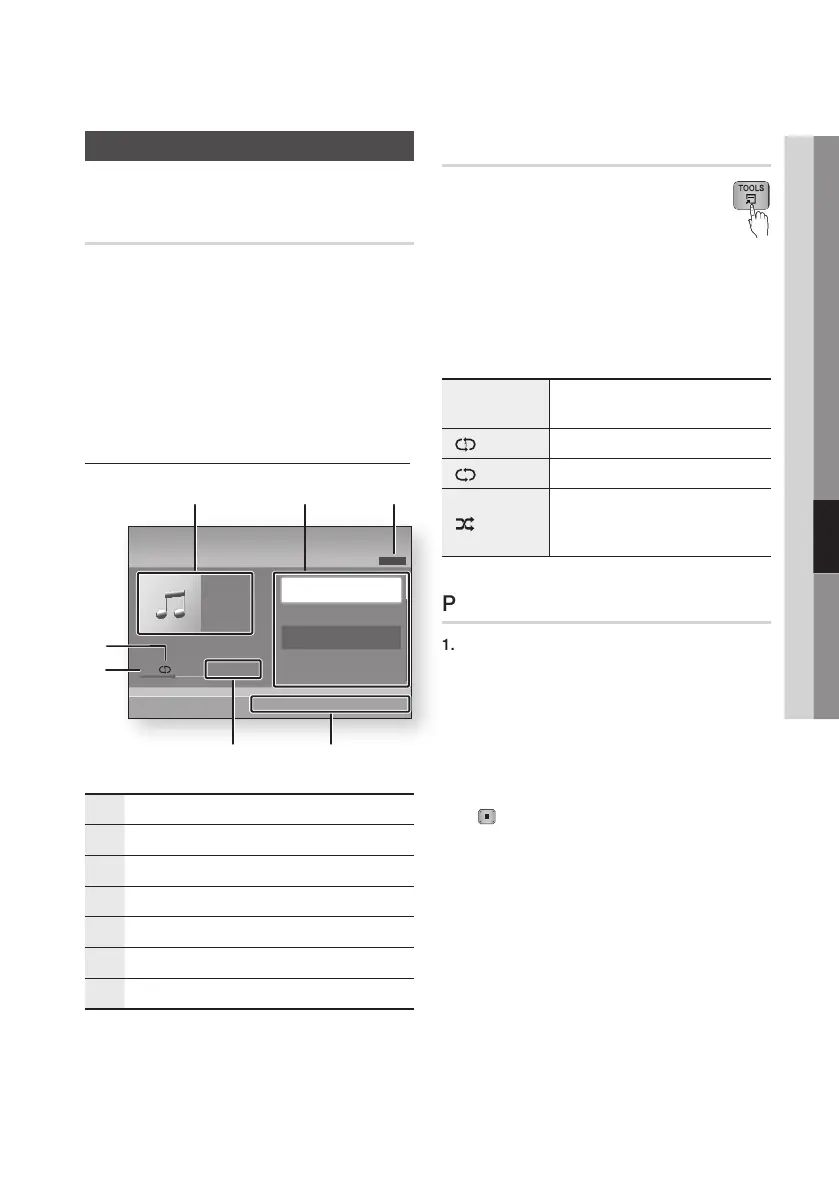
Audio CD (CD-DA)/MP3 Screen Elements
1
Displays the music information.
2
Displays the playlist.
3
Display the current track/total tracks.
4
Displays buttons available.
5
Shows the current play time/total play time.
6
Displays the current playback status.
7
Displays the repeated playback status.
2. Press the ▲▼ buttons to select the track
you want to play, and then press the ENTER
button.
Repeat an Audio CD (CD-DA)/MP3
1. During the Playlist playback, press the
TOOLS button.
2. Press the ▲▼ buttons to select
Repeat Mode, and then press the ◄►
buttons to select the desired repeat mode.
3. Press the ▲▼ buttons to select Shuffle
Mode, and then press the ◄► buttons to
select On or Off.
4. Press the ENTER button.
Off
Songs are played in the order in which
they were recorded.
(
) One Song The current song is repeated.
(
) All All songs are repeated.
(
)
Shuffle Mode
The random option plays songs in
random order. To operate this function,
please set the shuffle mode to On.
Playlist
1. Insert an Audio CD (CD-DA) or an MP3 Disc
into the disc tray.
• For an Audio CD (CD-DA), the first track
plays automatically.
• For an MP3 disc, press the ▲▼ buttons
to select Music, then press the ENTER
button.
2. To move to the Music List, press the STOP
(
) or RETURN button.
The Music List screen appears.
3. Press the YELLOW (C) button.
+
00:13 / 00:43
TRACK 001
1/13
Music
Audio CD
"
Enter
<
Page
/
Tools
'
Return
31
6
5
7
4
2
TRACK 001
00:43
TRACK 002
03:56
TRACK 003
04:41
TRACK 004
04:02










 To Next Page