7
EN
2/ DESCRIPTION OF YOUR APPLIANCE
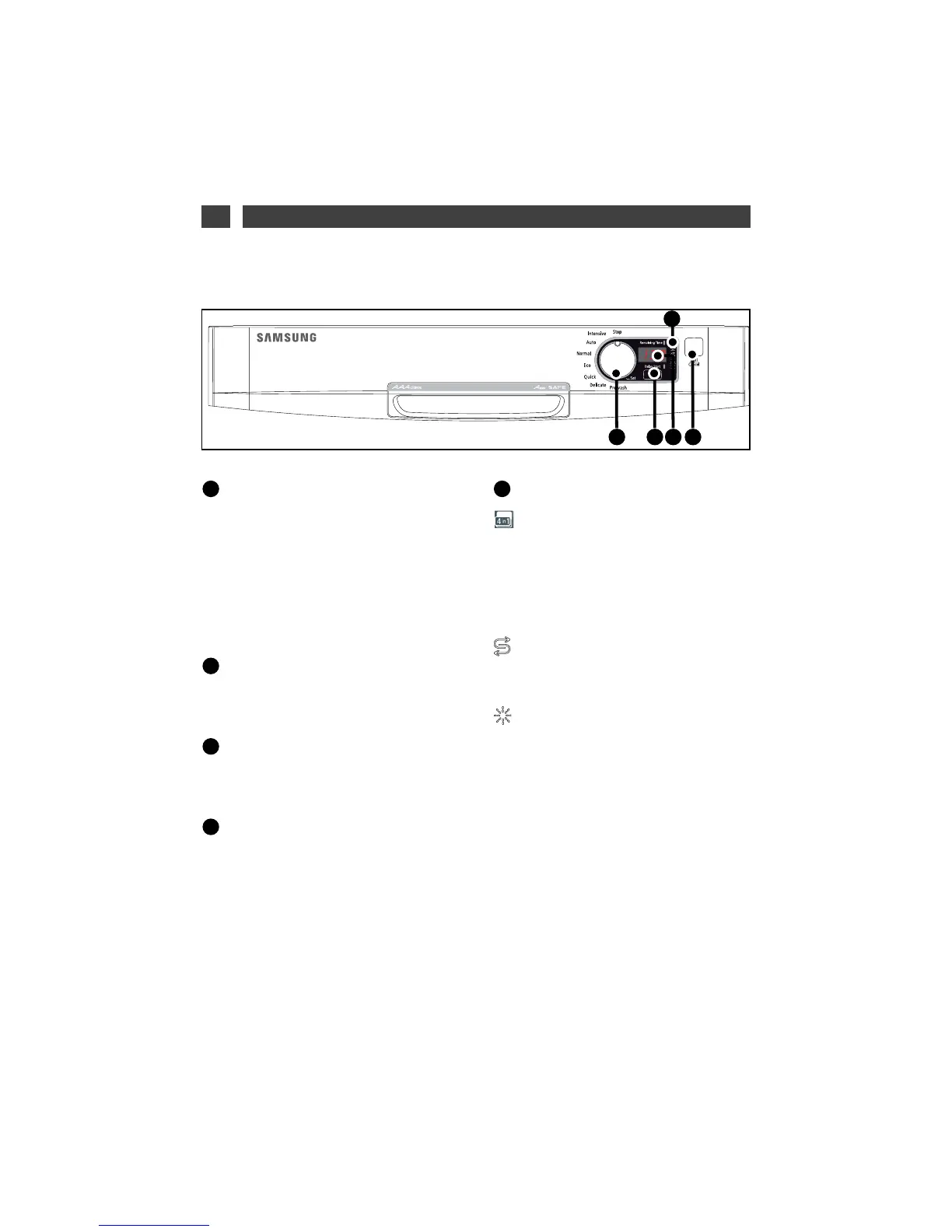
• PRESENTATION OF THE CONTROL PANEL
Selector switch (3 functions):
• Choosing a programme:
Turn the
selector switch to choose a programme.
• selector switch:
Turn the switch to the
Select position to access Select options.
(See Section 5, / Detergent products and
adjusting the water softener).
• Off:
Turn the switch to the
““SSTTOOPP””
position
when the programme has finished.
Selection of washing with a
Delayed Start
-
Softener setting button.
The Screen
gives the duration, the time
remaining for the programme, the delayed start
and the softener setting.
Start/Cancel:
Briefly press this button
to start your programme.
If you make an error, to cancel a selection or
cancel a programme while it is running, hold
down this button for 3 seconds.
The indicator lights:
Multipurpose products:
lit; shows you that the “4/1” feature is turned
on and that the programmes are now automa-
tically adjusted if a multi-function tablet is
used.
SSaalltt::
When lit, it indicates lack of regenerating salt
Rinsing liquid:
When lit, it indicates lack of rinsing product



 To Next Page