English 31
Installation
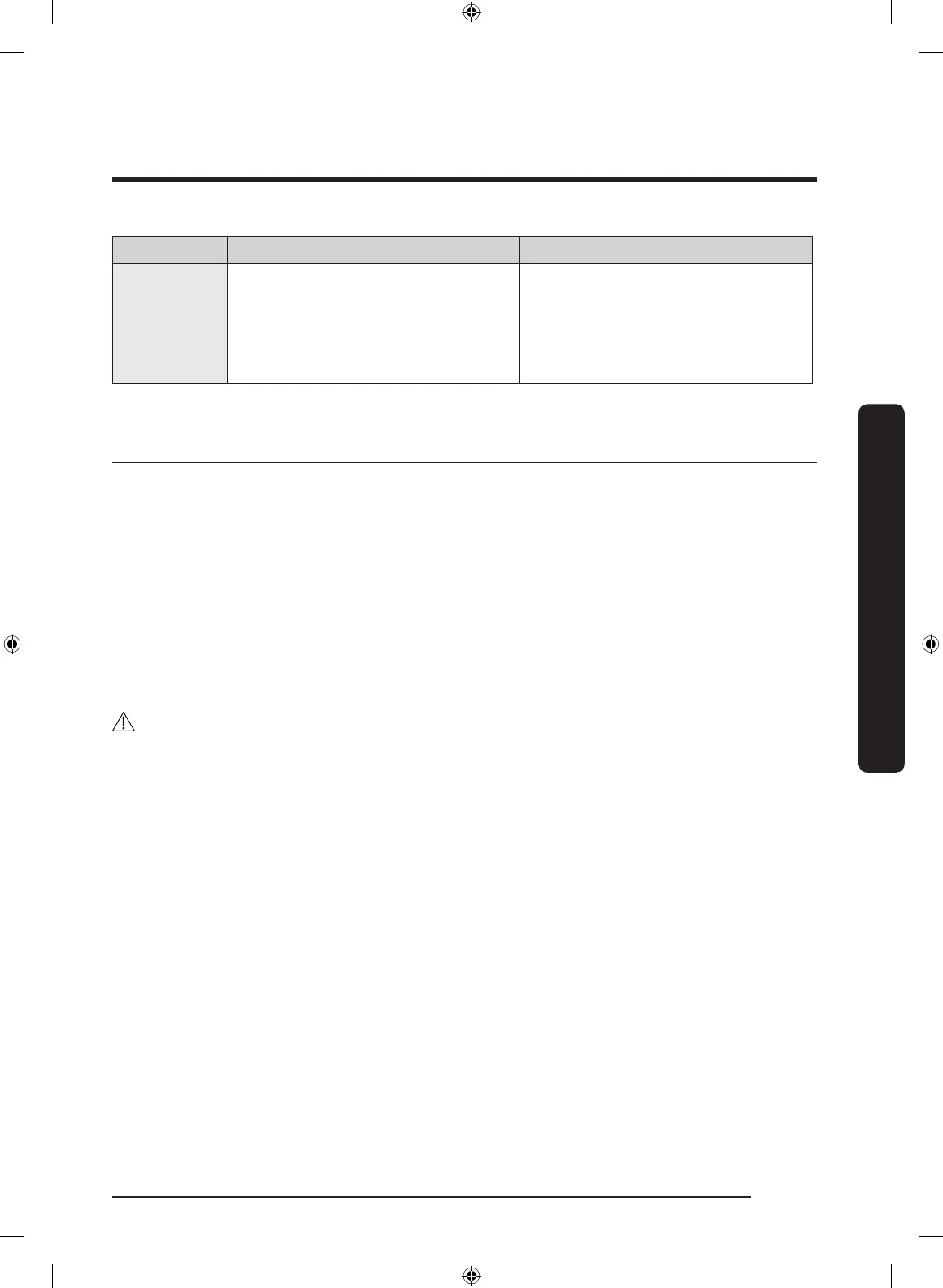
Check code Meaning Solution
9C1 Abnormal voltage detected.
Check the power connection. (Refer
to the “Connect the electrical wiring
(for electric models)” section)
If the problem continues, contact a
service center.
Exhaust ducting guide
Ducting
1. Make sure the dryer is installed properly so the air exhausts freely.
2. Use 4-inch rigid metal ducts. Tape all joints including the dryer connection. Never use
lint-trapping screws.
3. To facilitate the exhaust, keep the ducts as straight as possible.
Cleaning
Clean all old ducts before installing the dryer, and make sure the vent ap opens and
closes freely. We recommend that you clean the exhaust system annually or on a regular
basis.
WARNING
• To prevent re, do not use plastic, thin-foil, or non-metal exible ducts of any kind.
• Do not use a poor exhaust system because it slows down the dryer’s performance.
• Do not use excessively long ducts that have multiple elbows.
• Do not use crushed or clogged venting or ducts.
Untitled-10 31 2020-07-14 3:22:16




 To Next Page