034
A
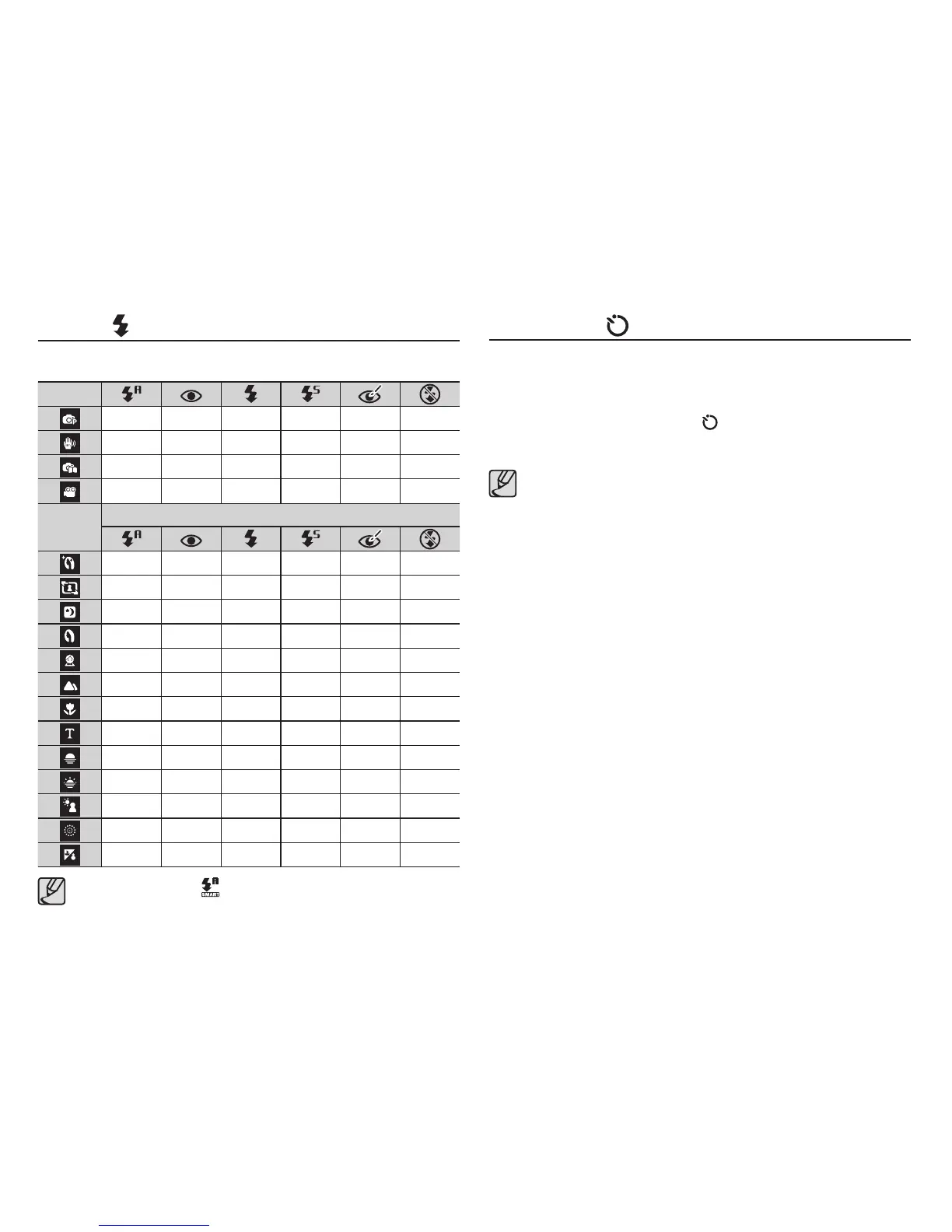
vailable flash mode, by recording mode ( o : Selectable)
Flash ( ) / Left button
When the menu is displayed on the LCD monitor, pressing the Right
button makes the cursor shift to the right tab.
When the menu is not displayed on the LCD monitor, the Right
button operates as the Self-timer ( ) button. This function is used
when the photographer would also like to be in the image.
If you operate the self-timer button during the self-timer
operation, the self-timer function is cancelled.
Use a tripod to prevent the camera from shaking.
In Movie mode, only the 10 Sec self-timer will work.
Depending on the selected face detection option, the timer is
not available or some timer options are not available.
Mode
oooooo
o
oooooo
o
Mode
SCENE
ooo
ooo
ooo
ooo
oo
o
o
o
o
o
o
o
o
Self-timer ( ) / Right button
Smart Auto Flash ( ) icon will appear in [Smart Auto] mode.



 To Next Page