EasyManua.ls Logo

Samsung Evolution Kit - 06 The Samsung Smart Remote; Key Remote Button Functions

Samsung Evolution Kit
80 pages
Print Icon
To Next Page IconTo Next Page
To Previous Page IconTo Previous Page
Loading...
English-12
06 The Samsung Smart Remote
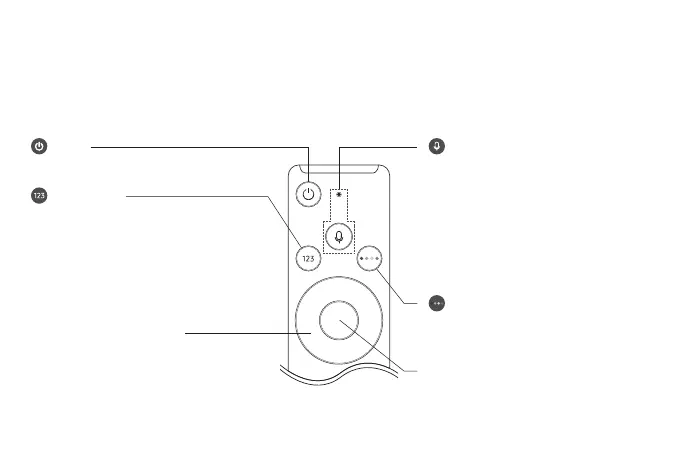
About the Buttons on the Samsung Smart Remote
Samsung Smart Remote may differ depending on the model.

Directional pad (up/down/left/right)
Moves the focus and changes the values seen on the menu.
(Number button)

Done to enter a


When pressed for 1 second or more, the TTX menu
appears.
(Power)
Press to turn the TV and Evolution Kit on or off.
Select
Selects or runs a focused item. When pressed while you are
watching content, detailed programme information appears.
(Voice Interaction)
Runs Voice Interaction
Voice
Interaction.
Enter Voice Command Guide

The supported languages and features for voice
interaction may differ depending on the geographical
area.
(Colour button)


the feature you are using.
Other manuals for Samsung Evolution Kit

Related product manuals