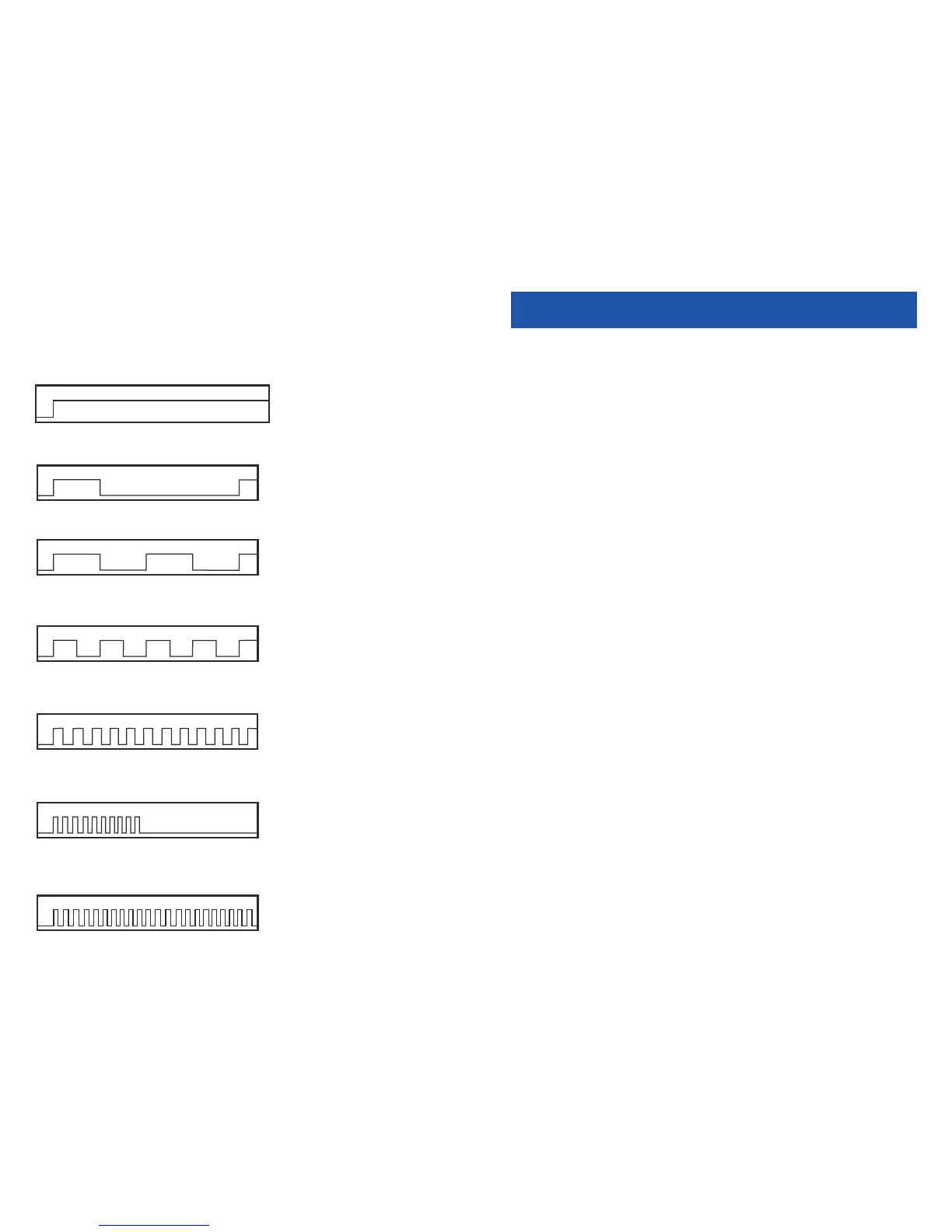
Intercom Dial Tone—A steady tone that indicates you can begin dialing.
DIAL TONE
CONTINUOUS
Ringback Tone—Indicates the station you dialed is ringing.
RINGBACK TONE—1000 ms ON/3000 ms OFF
CONTINUOUS
Busy Tone—Indicates the station you dialed is busy.
BUSY TONE—500 ms ON/500 ms OFF
CONTINUOUS
DND/No More Calls Tone—Fast busy tone indicates the station you dialed
is in the Do Not Disturb mode or cannot receive any more calls.
DND/NO MORE CALLS TONE—250 ms ON/250 ms OFF
FOR TEN SECONDS
Transfer/Conference Tone—Indicates your call is being held and you
can dial another party.
TRANSFER/CONF TONE—100 ms ON/100 ms OFF
CONTINUOUS
Confirmation Tone—Very short beeps followed by dial tone indicate you
have correctly set or canceled a system feature.
CONFIRMATION TONE—50 ms ON/50 ms OFF
FOR ONE SECOND
(programmable)
Error Tone—A distinctive two level beeping tone indicates you have done
something incorrectly.Try again.
ERROR TONE—50 ms of tone 1/50 ms of tone 2
FOR THREE SECONDS
5
OUTSIDE CALLS
MAKING AN OUTSIDE CALL
• Dial a C.O. line or line group access code.
• Receive outside dial tone and then dial the telephone number.
• Finish the call by hanging up.
If your system is programmed to require an authorization code before mak ing a
call:
• Dial ✱ and a valid code. You will hear confirmation tone, followed by dial
tone.
• Select a C.O. line.
If your system is programmed to require an account code before making a call:
• Dial 47 and a valid code.
• Dial ✱8 and receive transfer tone. Select a C.O. line.
For more information see your sys tem ad min is tra tor.
Mobex_User_Guide_SLT_screen.qxd 4/13/2011 10:54 AM Page 12






 To Next Page