English - 18
USING THE AUTO POWER DEFROST FEATURE
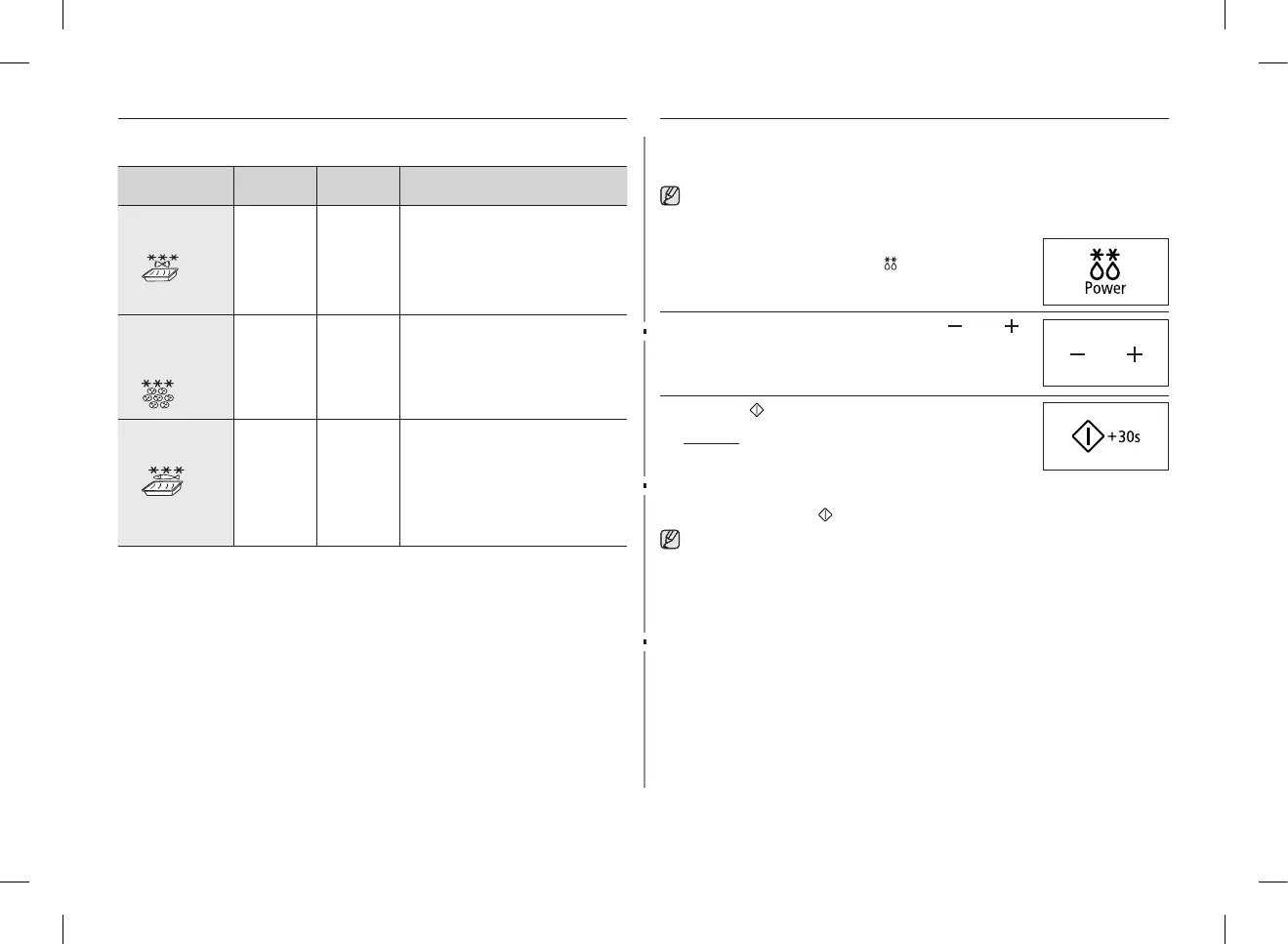
The Auto Power Defrost feature enables you to defrost meat, poultry, fish
andbread/cake.Thedefrosttimeandpowerlevelaresetautomatically.
You simply select the programme and the weight.
Use only dishes that are microwave-safe.
First, place the frozen food in the centre of the turntable and close the door.
1. Select the type of food that you are cooking by
pressing the Power Defrost ( ) button one or more
times.(Refertothetableonthenextpage).
2. Select the food weight by pressing the ( ) and ( )
buttons.
It is possible to set up to a maximum of 1500 g.
3. Press the button.
Result :
• Defrostingbegins.
• Theovenbeepshalfwaythrough
defrosting to remind you to turn the food over.
• Press button again to finish defrosting.
You can also defrost food manually. To do so, select the microwave
cooking/reheatingfunctionwithapowerlevelof180W.Refertothe
sectionentitled“Cooking/Reheating”onpage15forfurtherdetails.
AUTO COOK SETTINGS
ThefollowingtablepresentsthevariousAutoCookProgrammes,quantities,
standing times and appropriate recommendations.
Code/Food Portion
Standing
time
Recommendations
1. Frozen pasta
gratin
200 g
400 g
2-3 min. Put the frozen pasta gratin into a
suitable sized glass pyrex dish.
Put the dish on the rack. This
programme is suitable for frozen
pasta gratin such as lasagne,
cannelloni or macaroni.
2. Frozen mini
quich/Mini
pizza
150 g
(4-6 pcs)
250 g
(7-9 pcs)
- Put the frozen mini-quiches or
minipizzas evenly on the rack.
3. Frozen fish
gratin
200 g
400 g
2-3 min. Put the frozen fish gratin into a
suitable sized glass pyrex dish.
Put the dish on the rack. This
programme is suitable for frozen
ready products consisting o fish
fillets topped with vegetables and
sauce.
GE87M_SUT_DE68-04114G-02_EN.indd 18 2014-03-31 �� 2:32:20


 To Next Page