EasyManua.ls Logo

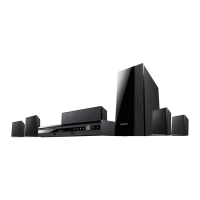
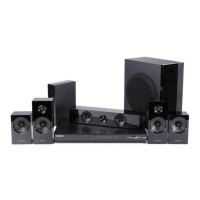
Samsung HT-E5500W - User Manual

Samsung HT-E5500W
82 pages
Print Icon
To Next Page IconTo Next Page
Loading...
imagine the possibilities
Thank you for purchasing this Samsung product.
To receive more complete service,
please register your product at
www.samsung.com/register
5.1CH Blu-ray™
Home Entertainment System
user manual
HT-E5500W
HT-E5500W_ZA_0417-1(D2D).indd 1 2012-04-17 6:57:52

Table of Contents

Questions and Answers

  • A
    andreajohnsonSep 9, 2025
    Why can't I receive radio broadcasts on my Samsung HT-E5500W?
    • K
      Karen ShepardSep 9, 2025
      If you are unable to receive radio broadcasts on your Samsung Home Theater System, ensure the antenna is connected properly. If the antenna's input signal is weak, install an external FM antenna in an area with good reception.
  • S
    Samantha JonesSep 7, 2025
    What to do if I forgot the rating level password on my Samsung HT-E5500W?
    • T
      Tim BerrySep 7, 2025
      If you have forgotten the rating level password on your Samsung Home Theater System, remove any disc from the product, then press and hold the product's 5 button for longer than 5 seconds. INIT will appear on the display, and all settings will return to the default values. Then, press the POWER button. Note that using the RESET function will erase all stored settings, so only use it if necessary.
  • T
    Tracy GreeneAug 22, 2025
    Why is my Samsung HT-E5500W remote control not working?
    • A
      Anthony NelsonAug 22, 2025
      If your Samsung Home Theater System remote control is not working, make sure you are within the operational range and at the proper angle relative to the sensor. Also, check if the batteries are drained and ensure you have selected the correct mode (TV/BD) function on the remote.
  • C
    Christian MillerSep 5, 2025
    Why does playback not start immediately on my Samsung Home Theater System?
    • J
      James DeleonSep 5, 2025
      If playback does not start immediately when you press the Play/Pause button on your Samsung Home Theater System, it may be due to using a deformed disc or a disc with scratches on the surface. Try wiping the disc clean.
  • G
    gabriela83Sep 4, 2025
    What causes an abnormal HDMI output screen on my Samsung HT-E5500W Home Theater System?
    • A
      Ann DiazSep 4, 2025
      If you are experiencing an abnormal HDMI output screen with your Samsung Home Theater System, and random noise appears, it indicates that your TV does not support HDCP (High-bandwidth Digital Content Protection).
  • J
    jamesjohnsonSep 2, 2025
    How to eject a disc from my Samsung HT-E5500W Home Theater System?
    • W
      Wendy Cook DDSSep 3, 2025
      If you cannot eject the disc from your Samsung Home Theater System, check if the power cord is securely plugged into the outlet. If it is, try turning the power off and then back on.
  • M
    Michael HuntSep 1, 2025
    Why is the disc rotating, but no picture is produced on my Samsung HT-E5500W?
    • A
      Aaron WilliamsSep 1, 2025
      If your Samsung Home Theater System is rotating the disc but no picture is produced, or the picture quality is poor and shaking, first ensure that the TV is powered on and the video cables are properly connected. Next, check if the disc is dirty or damaged. A poorly manufactured disc may also cause this issue.
  • K
    Kara AyalaAug 31, 2025
    What to do if I have no picture on my TV because of the HDMI output resolution on my Samsung Home Theater System?
    • C
      christinaadamsAug 31, 2025
      If the HDMI output resolution of your Samsung Home Theater System is set to a resolution that your TV does not support (for example, 1080p), you may not see a picture on your TV. To resolve this, press and hold the 5 button on the front panel of the unit for more than 5 seconds with no disc inserted. This will revert all settings to the factory defaults.
  • J
    Jessica RobinsonAug 30, 2025
    Why is there no sound when listening to TV audio through my Samsung HT-E5500W Home Theater System?
    • N
      Nicholas MarshallAug 30, 2025
      If you are listening to TV audio through your Samsung Home Theater System and no sound is heard, it may be because if the OPEN/CLOSE ^ button is pressed while listening to TV audio using the D. IN or AUX functions, the Blu-ray/DVD disc functions are turned on and the TV audio is muted.
  • M
    Matthew WardAug 28, 2025
    What to do if my iPod fails to connect to my Samsung HT-E5500W?
    • R
      Rebecca Wilson MDAug 29, 2025
      If your iPod fails to connect to your Samsung Home Theater System, check the condition of the iPod connector and Dock. Also, ensure that your iPod software version is up to date.

Summary

Safety Information

Warning and Caution Notes

General warnings about electric shock, water exposure, and not removing covers.

Connections

Connecting to TV, External Devices, and Network

Methods for connecting to TVs, external devices, and network routers.

Settings

Initial Setup Procedure

Step-by-step guide for the initial setup process.

Software Update Procedures

Methods for updating the product's software (Online, USB, Disc).

Appendix

Troubleshooting Common Issues

Common issues and their solutions for product operation.

Product Specifications

Technical specifications for the main unit and accessories.

LIMITED WARRANTY TO ORIGINAL PURCHASER

Warranty Details

Details of the limited warranty for parts and labor.

Audio In Connections

Network Connections

Final Steps

Initial Settings

Networks

Safety Warnings

Important Safety Instructions

Essential safety guidelines for operating the product.

IMPORTANT: Player Update Information

Samsung HT-E5500W Specifications

General IconGeneral
BrandSamsung
ModelHT-E5500W
CategoryHome Theater System
LanguageEnglish

Related product manuals