EasyManua.ls Logo

Samsung HT-E330K - User Manual

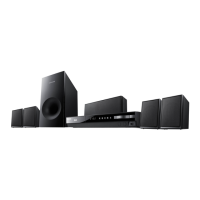
Samsung HT-E330K
36 pages
Print Icon
To Next Page IconTo Next Page
Loading...
Digital Home
Entertainment System
user manual
Imagine the possibilities
Thank you for purchasing this Samsung product.
To receive more complete service,
please register your product at
www.samsung.com/register
HT-E330K

Questions and Answers

  • G
    Glenn EspinozaAug 17, 2025
    Why is my Samsung HT-E330K Home Theater System remote control not working?
    • T
      Teresa ShepherdAug 18, 2025
      The remote control may not work if it is being operated outside of its effective range (angle and distance), the batteries are drained, or the incorrect mode (RECEIVER DVD/TV) is selected. Ensure the remote is within range, replace the batteries, and select the correct mode.
  • A
    Austin HowardAug 20, 2025
    How to fix sound not working on Samsung HT-E330K Home Theater System?
    • S
      Sean GeorgeAug 20, 2025
      If no sound is produced, ensure the speakers are connected properly and the speaker setup is correctly customized. Note that no sound is heard during fast playback, slow playback, and step motion playback. Also, check if the disc is severely damaged.
  • J
    Joseph StephensAug 22, 2025
    What to do if playback does not start on Samsung HT-E330K Home Theater System?
    • D
      Daniel FarrellAug 22, 2025
      If playback does not start, check the region number of the DVD, as DVDs purchased from abroad may not be playable. Also, CD-ROMs and DVD-ROMs cannot be played on this product. Make sure that the rating level is correct.
  • T
    Tonya CombsAug 25, 2025
    Why is Dolby Digital 5.1 CH Surround Sound not working on my Samsung Home Theater System?
    • A
      Ann JenkinsAug 26, 2025
      If Dolby Digital 5.1 CH Surround Sound is not produced, check if there is a 'Dolby Digital 5.1 CH' mark on the disc. Also, verify that the audio language is correctly set to Dolby Digital 5.1-CH in the information display.
  • A
    Andrew MorrisAug 27, 2025
    Why doesn't Samsung HT-E330K playback start immediately?
    • S
      susanbrewerAug 27, 2025
      If playback does not start immediately when the Play/Pause button is pressed, check if you are using a deformed disc or a disc with scratches on the surface. If so, wipe the disc clean.
  • M
    mejiabrianAug 30, 2025
    How to reset the rating level password on a Samsung Home Theater System?
    • R
      richardsonkathleenAug 30, 2025
      If the rating level password has been forgotten, while 'NO DISC' message appears on the display of the product, press and hold the remote control's STOP button for longer than 5 seconds. 'INIT' appears on the display and all settings will return to the default values. And then press the POWER button. Note that using the RESET function will erase all stored settings, so use this only when necessary.
  • C
    carolynbuchananSep 1, 2025
    How to get sound from all 6 speakers on my Samsung HT-E330K?
    • S
      Samantha GilmoreSep 1, 2025
      If sound is only coming from a few speakers, first check if the speakers are connected properly and adjust the volume. Note that on certain DVD discs, sound is output from the front speakers only, and when listening to a CD, radio, or TV, sound is also output to the front speakers only. To use all six speakers when listening to a CD, radio or TV, select 'PROLOG' by pressing PL II (Dolby Pro Logic II) on the remote control.
  • L
    Linda JohnsonSep 4, 2025
    What to do if my Samsung Home Theater System is not working?
    • P
      patricia88Sep 4, 2025
      If the product is not working, press and hold the STOP button on the remote control for longer than 5 seconds with no disc inserted to activate the reset function. Note that using the RESET function will erase all stored settings, so use this only when necessary.
  • P
    Parker LarsonSep 6, 2025
    What to do if my Samsung HT-E330K can't receive radio broadcast?
    • M
      melissa99Sep 6, 2025
      If you cannot receive a radio broadcast, make sure the antenna is connected properly. If the antenna's input signal is weak, try installing an external FM antenna in an area with good reception.
  • W
    wisesheriSep 9, 2025
    Why is there no picture on my Samsung HT-E330K Home Theater System, or the picture quality is poor?
    • D
      Daniel HinesSep 9, 2025
      If the disc is rotating but no picture is produced, or the picture quality is poor, make sure the TV power is on and the video cables are connected properly. The disc may also be dirty or damaged, or it could be a poorly manufactured disc that is not playable.

Summary

SAFETY INFORMATION

Safety Warnings

Provides crucial warnings about electrical shock, fire, and hazardous radiation.

Precautions and Disc Handling

Details important guidelines for product installation, ventilation, disc care, and environmental considerations.

Copyright and Licence

Contains legal information regarding copyright, copy protection, and software licenses.

GETTING STARTED

Icons, Disc Types, and Region Codes

Explains manual icons, lists playable disc types, and details DVD region coding for playback compatibility.

Panel and Remote Control Overview

Describes the front and rear panels, and outlines the functions of buttons on the remote control.

CONNECTIONS

Speaker Connections

Guides on positioning and connecting front, center, surround speakers, and subwoofer for optimal audio.

Video, Antenna, and Audio Inputs

Explains connecting to TV, FM antenna, and external analog audio sources, including microphone setup.

SETUP

Initial Setup and Menu Navigation

Guides users through initial language selection and navigating the setup menu for system configuration.

Display and Audio Settings

Covers adjusting TV aspect ratio, video output, speaker configuration, and sound modes for optimal viewing and listening.

Advanced Setup and System Configuration

Details advanced settings like delay time, DRC, EQ, karaoke, system options, and DivX registration.

Language, Security, and Support

Explains language preferences, parental controls, password management, and accessing product support.

BASIC FUNCTIONS

Disc and Media File Playback

Details playing CDs, DVDs, MP3, WMA, and JPEG files, including basic playback controls.

Playback Navigation and Control

Covers advanced playback functions like search, skipping, slow motion, and using disc menus for navigation.

Audio, Subtitle, and Sound Settings

Guides on selecting audio tracks, subtitle languages, and configuring sound modes for a personalized audio experience.

Radio and Advanced Sound Features

Explains how to listen to FM radio and utilize advanced sound enhancements like GIGA Sound, EQ, and Dolby Pro Logic II.

ADVANCED FUNCTIONS

USB Functionality and Recording

Details connecting USB devices for media playback and recording audio content onto USB storage.

OTHER INFORMATION

Troubleshooting Guide

Provides solutions for common product malfunctions and error messages encountered during operation.

Specifications and Licenses

Lists the technical specifications of the product and includes information on software licenses and compliance.

Samsung HT-E330K Specifications

General IconGeneral
EqualizerYes
Audio decoders-
RMS rated power- W
Audio output channels5.1 channels
Audio formats supportedMP3, WAV, WMA
Disc types supportedCD, CD-R, CD-RW, DVD, DVD+R, DVD+RW, DVD-R, DVD-RW
Playback disc formatsCD audio, VCD
Number of optical discs1 discs
Optical disc player typeDVD player
Built-in HDDNo
Volume controlDigital
Image formats supportedJPG
Apple docking compatibilityNot supported
Video formats supportedDIVX
Supported radio bandsFM
HDMI in0
USB version2.0
USB ports quantity1
Product colorBlack
Power consumption (standby)0.47 W
Power consumption (typical)36 W
Subwoofer typePassive subwoofer
Front speaker type1-way
Package weight8400 g
Weight and Dimensions IconWeight and Dimensions
Main unit weight2000 g
Subwoofer weight2800 g
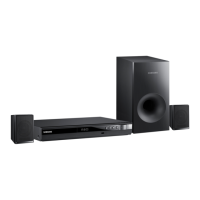
Main unit dimensions (WxDxH)430 x 250 x 56 mm
Subwoofer dimensions (WxDxH)155 x 285 x 300 mm
Front speaker dimensions (WxDxH)77 x 68 x 107 mm

Related product manuals