EasyManua.ls Logo

Samsung HT-WP38 - Playback Control Features; Checking Remaining Time of Titles;Tracks; Fast, Slow, and Skipping Playback

Samsung HT-WP38
38 pages
Print Icon
To Next Page IconTo Next Page
To Previous Page IconTo Previous Page
Loading...
ENG
3433
OPERATION
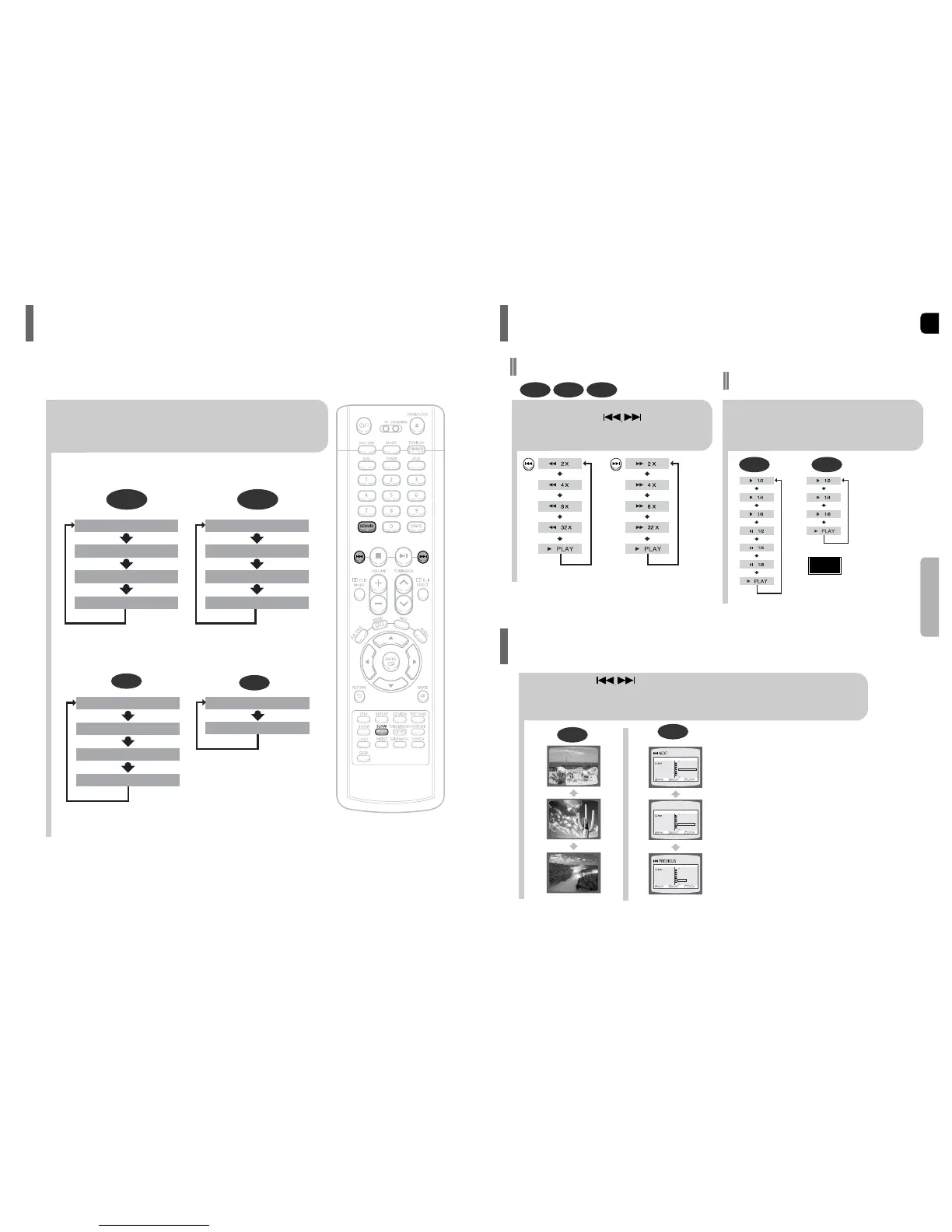
Checking the Remaining Time
Fast Playback
DVD CD MP3
Press and hold .
Each time the button is held down during playback,
the playback speed changes as follows:
Press SLOW button.
Each time the button is pressed during playback,
the playback speed changes as follows:
Slow Playback
DVD DivX
Reverse slow playback
does not work with DivX.
Note
Fast/Slow Playback
Skipping Scenes/Songs
DVD
Briefly press .
Each time the button is pressed briefly during playback, the previous or next chapter, track,
or directory (file) will be played.
You cannot skip chapters consecutively.
TITLE 01/05 CHAPTER 002/040
TITLE 01/05 CHAPTER 004/040
MP3
Something like you
Back for good
Love of my life
More than words
I need you
My love
Uptown girl
DVD RECEIVER SMART NAVI
Something like you
Back for good
Love of my life
More than words
I need you
My love
Uptown girl
DVD RECEIVER SMART NAVI
Something like you
Back for good
Love of my life
More than words
I need you
My love
Uptown girl
DVD RECEIVER SMART NAVI
Press the REMAIN button.
For checking the total and remaining time of a title or chapter
being played.
Each time the REMAIN button is pressed

CHAPTER REMAIN
TITLE REMAIN
CHAPTER ELAPSED
TITLE ELAPSED
DVD-
VIDEO
TRACK REMAIN
GROUP REMAIN
TRACK ELAPSED
GROUP ELAPSED
DVD-
AUDIO
CD
TRACK REMAIN
TOTAL ELAPSED
TOTAL REMAIN
TRACK ELAPSED
MP3
TRACK ELAPSED
TRACK REMAIN

Table of Contents

Related product manuals