ENG
44
SETUP
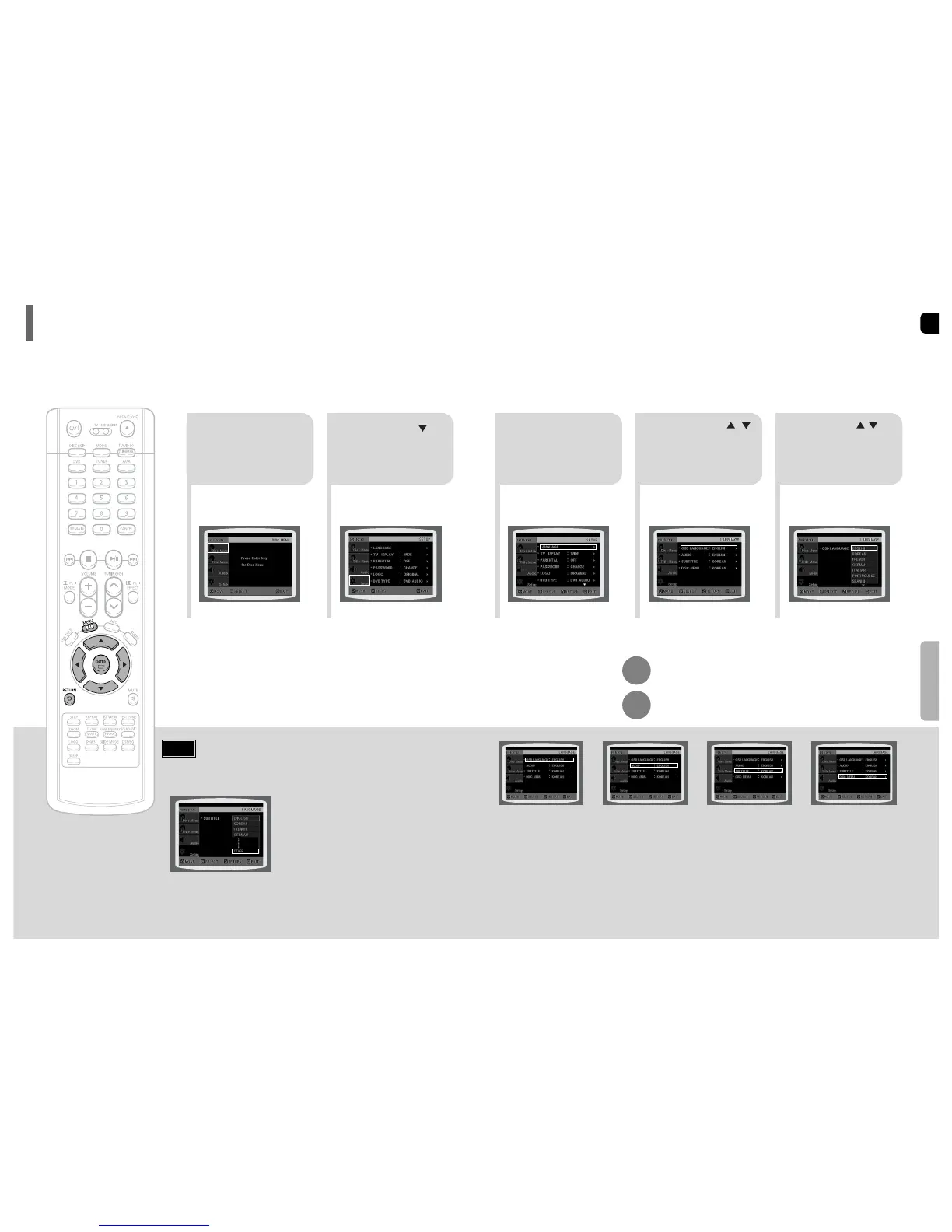
OSD (On-Screen Display) language is set to English by default.
Setting the Language
43
*
If the language you selected is
not recorded on the disc, menu
language will not change even
if you set it to your desired
language.
Selecting the
OSD Language
Selecting the
Audio Language
(recorded on the disc)
21
In Stop mode,
press MENU
button.
Press Cursor
button to move to
‘Setup’ and then
press ENTER button.
4
•
Once the setup is complete, if the language was
set to English, OSD will be displayed in English.
3
Selecting the
Subtitle Language
(recorded on the disc)
Selecting the Disc Menu
Language (recorded on the disc)
Select ‘Language’
and then press
ENTER button
5
Press Cursor ,
button to select ‘OSD
Language’ and then
press ENTER button.
Press Cursor ,
button to select the
desired language and then
press ENTER button.
Press RETURN button to return to the previous level.
Press MENU button to exit the setup screen.
• To select another language, select OTHER and enter the language code of your country.
(See page 72 for language codes)
AUDIO, SUB TITLE and DISC MENU language can be selected.
Note


 To Next Page